The short answer
If you run security awareness for your organization, phishing simulation best practices come down to learning over punishment: calibrate cadence to avoid fatigue, use realistic but ethical lures, deliver instant, educational feedback, and track reporting rate and time-to-report ahead of click rate. Integrate simulations with micro-training and culture programs so your employees feel like partners in the program.
What is a phishing simulation?
A phishing simulation is a controlled, attacker-style exercise across email (and increasingly SMS, voice, or QR) that tests and teaches secure behavior. The attack it rehearses is the one MITRE ATT&CK catalogs as Phishing, technique T1566. Strong programs pair every lure with a learning loop: immediate feedback, a concise explainer, and a 1-minute micro-lesson.
Looking to compare vendors? You can read our phishing simulation tool comparison guide here.
Core elements (and why they matter)
Channels and realism
Attackers do not stop at email. They text (smishing), call (vishing), and use QR codes (“quishing”). Simulate only email, and employees will never practice spotting the rest. Add new channels gradually so people do not feel bombarded.
Ethical boundaries
Ethical boundaries mean keeping every scenario professional and work-relevant, letting your employees know that simulations are going to happen instead of tricking them, and not using sensitive material (like layoffs, medical results, or personal finances). If you cross these lines, the program will lose its most valuable asset: employees’ trust.
Payload and “fail method”
The fail method is the exact action that counts as failing: clicking a link, opening an attachment, filling out a form. For example, with a fake-invoice payload, failure means approving a payment, and a click on its own does not count. If you get the fail action wrong, you will only confuse your employees and completely miss the point.
OSINT-driven relevance
A simulation that actually feels real only uses safe, public OSINT (open-source intelligence), like someone’s role, location, or industry. If you keep it generic, people will stop learning the moment they spot the pattern. Skip private internal information too; it turns a fair exercise into a setup.
Metrics that prove learning
Tracking the wrong metrics is one of the most common mistakes in phishing simulation programs. Reporting rate, time-to-report, whether repeat clickers improve, and credential-submission rate prove real progress. If you only track click rate, you will not learn much about the program’s performance. Also bear in mind that the trend over time beats any static number.
Cadence and culture
Cadence and culture mean finding a rhythm that keeps people alert without wearing them out. Run simulations too often, and employees start treating every email as just another test, which kills the point. Framing the program as a culture initiative, with recognition and light gamification instead of a string of “gotcha” tests, builds buy-in instead of resentment.
Design best practices (cadence, fatigue, comms)
What’s the right cadence? Who should receive what, and when? What happens when it becomes too much or too boring? Planning is the key here.
Phishing Simulation Cadence Planner
| Audience and trigger | Starting cadence | Why it works | When to adjust |
|---|---|---|---|
| Company-wide baseline | Monthly or quarterly | Reinforces recognition without alert fatigue; keeps habits alive between real incidents. | If engagement dips, refresh themes and personalize before adding volume. |
| High-risk roles (finance, IT, executive support) | Every 1-4 weeks (short micro-drills) | Higher exposure justifies a tighter repetition cycle; the micro-format minimizes disruption. | Tune by reporting rate and time-to-report; reduce if you see a spike in false positives or workload. |
| New hires or returners | Warm “welcome” benchmark (after initial training), then 30/60/90-day touchpoints | Builds trust early and avoids cold “gotchas”; adaptive difficulty prevents overwhelm. | Delay or soften during intense onboarding windows or feedback-flagged stress. |
| Repeat clickers | Weekly micro-sims and individual coaching | Practice helps, but change sticks with supportive, one-on-one guidance rather than punishment. | As the cohort shrinks, taper to monthly; escalate to manager check-ins only if patterns persist. |
| After incidents or new attack patterns | Focused follow-up drills in the next cycle | Converts lessons learned into muscle memory, and mirrors real threats like QR code scams, MFA-fatigue attacks, and vishing calls. | Don’t stack too many vectors at once; prioritize relevance over volume. |
| Sensitive periods (layoffs, restructures, crises) | Pause or soften campaign | Protects psychological safety and trust; avoids backlash from “cruel realism.” | Resume with transparent comms and gentle difficulty ramp. |
Tuning rules that prevent fatigue
- Start with a monthly baseline. Run company-wide simulations monthly or quarterly to start.
- Layer in risk-based drills. Add tighter, shorter micro-drills for high-exposure roles like finance, IT, and new hires, on top of that baseline.
- Measure to manage. Optimize cadence with reporting rate and time-to-report; click rate alone plateaus and can harm psychological safety.
- Refresh before you repeat. If engagement stalls, change themes and personalize; what looks like “too many emails” is usually repetition fatigue.
- Protect trust windows. During layoffs, restructures, or tense periods, pause or soften campaigns to avoid backlash and keep safety intact.
- Expect (and interpret) spikes. A short-term surge in reporting can be a good sign; calibrate rather than overcorrect.
- Avoid automated misfires. Security tools can “auto-click” links and enroll everyone in remedials; verify logs and workflows before big sends.
- Start easy, scale smart. Open with a “welcome” benchmark and let difficulty adapt per user so no one feels tricked or bored.

How do you create psychological safety?
Psychological safety means mistakes are treated as part of the learning process and never punished. When someone reports a suspicious email, or admits to clicking one, how you respond in that moment decides whether they’ll get it right next time. Here’s how:
Design moves that increase safety
Psychological Safety: Dos & Don’ts
North star
Build a culture where people report fast. That protects the org more than chasing zero clicks.
| Do | Don’t |
|---|---|
 Define the win as “reporting” Define the win as “reporting”Tell people that reporting a suspicious message is the goal. | Don’t over-index on click rate It never hits zero, so optimize for reporting and time-to-report instead. |
| Use positive reinforcement Stars, streaks, and shout-outs keep engagement high. | Don’t punish or shame Fear reduces reporting and slows real incident response. |
| Give instant, kind feedback Close the loop the moment someone reports, and tell them what’s phishy and why. | Don’t assign hour-long remedials Use short, contextual micro-lessons instead. |
| Start easy, then adapt Open with a welcoming first simulation, then ramp difficulty per person. | Don’t run cold “gotchas” Skip surprise tests for new hires or during sensitive periods. |
| Treat adults like peers Match your tone to their role, and skip the lecture. | Don’t lecture people as if they were students Speaking down to adults breeds resentment instead of trust. |
| Make reporting effortless One obvious “Report phish” button is all you need. | Don’t make people hunt through menus If reporting takes more than one click, people will give up and just delete the email instead. |
| Coach repeat clickers one-on-one Understand their role and workload, then set small, specific goals for them, based on their own mistakes. | Don’t treat every clicker the same A one-size drill misses why someone keeps failing. |
| Make amnesty explicit If someone slips on a real phish, reporting fast is still the right move. | Don’t leave amnesty unspoken If people aren’t sure they’ll be safe reporting a slip, they won’t. |
| Protect trust windows Pause or soften campaigns during layoffs, crises, or peak deadlines. | Don’t use creepy lures Skip highly personal or panic topics like medical results, layoffs, or finances. |
Heads up
Some email security tools click links automatically before a person ever opens the message. That can register as a false “fail,” so check for it before you count anyone as having clicked.
What makes a simulation realistic and ethical?
A realistic simulation mirrors what attackers are actually doing right now, and that bar keeps moving: AI-generated phishing surged roughly 14× at the end of 2025, climbing from under 5% to 56% of detected attacks in a single month (Hoxhunt Phishing Trends Report 2026), so a simulation built on last year’s templates is already behind. Ethical is the other half: realism only earns its place when it never tips into fear, harm, or entrapment.
Reality that teaches without tricking
- Role-aligned pretexts. Choose scenarios people actually face, like an IT reset, finance urgency, or executive impersonation. These are the most common, and most effective, real-world hooks.
- Multi-channel where relevant. Modern attacks chain email and phone. Simulate vishing and deepfake voice carefully to build recognition without going too far.
- Match the end goal. If the pretext is a payment request, the fail is acting on the request, and a click alone does not count. Design the path to match how attacks actually happen.
Ethical guardrails (program-level)
- Real but responsible. Don’t recreate the worst incidents or let simulations drag on. Respect people’s time, and stop before it starts to feel like a setup.
- Avoid “cruel realism.” If a scenario would genuinely upset someone in real life, it doesn’t belong in a simulation. Keep topics professional and relevant instead.
- Be transparent and legal. Announce that periodic tests occur, and check regional limits, since SMS or phone spoofing can cross telecom lines. Coordinate with Legal and HR on consent and data-handling expectations.
Design details that keep trust
- Use familiar context safely. Reference tools, logos, and workflows employees already use, but avoid exploiting sensitive inside information.
- Keep it short. If the pretext is something like a fake sales lead, cut the interaction short before someone wastes real time chasing it.
- Teach caller-ID skepticism. Attackers can spoof a number to look like an internal extension, which makes people trust the call more than they should. Teach them to hang up and call back on a number they already trust instead.
Rule of thumb: you don’t train soldiers in real firefights. Make it realistic enough to teach, and safe enough that no one gets hurt.
Which scenarios should you prioritize in 2026?
Prioritize the simulations that mirror the phishing attacks your people actually receive: business email compromise (BEC), credential harvesters with realistic landing pages, QR “quishing,” MFA-fatigue, SMS phishing, and voice phishing (vishing), often chained in multi-channel pretexts. Match the fail action to the story (click, open attachment, act on a request).
Top scenarios to cover (with design notes)
- Business Email Compromise (invoice fraud, payroll diversion): Move it from email to voice calls or a chat follow-up. The fail is acting, for example paying a bogus invoice, and a click alone does not count. Teach verify-and-call-back procedures.
- Credential-harvesters (cloud or app logins): Use a landing page tied to the pretext, and a short microlearning module after failure. Measure credential-submission rate and time-to-report.
- QR “quishing”: Allowlist scanners to avoid false “auto-clicks” from integrated cloud email security. Track reporting as well as clicks.
- MFA-fatigue: Simulate rapid MFA prompts (bombarding someone with login approval requests until they tap “yes” out of frustration) and teach “deny and report” behavior. Keep the exercise short to protect morale.
- SMS phishing (smishing): Use delivery, bank, or account-update pretexts that lead to a mobile phishing site. Verify regional rules before running SMS tests.
- Voice phishing (vishing) and deepfake calls: Model the email-to-spoofed-call chain attackers actually use. Use this responsibly: keep it brief, and debrief fast.
- Attachment-based lures (malicious emails): Match it to the story (e.g., an “Updated HR policy” email), so opening the attachment is the fail. Follow up with an “Oops!” landing page.
Build each scenario so it feels real (but responsible)
- Match channel and fail method to the story. Every scenario above follows the same rule: the fail should match how the attack actually plays out, however easy a click would be to measure.
- Use multi-channel pretexts sparingly. Chaining channels builds recognition, but overdoing it overwhelms people.
- Keep lures professional. The goal is to teach, and a “gotcha” moment teaches nothing.
- Use current templates and tools. Rotate phishing templates (including QR and AI-crafted lures). Many programs supplement with phishing simulation software like Microsoft Defender Attack Simulator or Hoxhunt. Allowlist your link scanners first so the results stay clean.
Below, an interactive tour of what a user sees in Hoxhunt: reporting a suspicious email, getting instant feedback, and completing the micro-lesson.
How do you choose the “fail method” and design the landing page?
The fail method is whichever action counts as getting caught: a click, an attachment, or something bigger, matched to what the real attack would need.
North star
Match the fail method to the attacker’s real objective, even when a simpler fail would be easier to build. Close the loop instantly: a short explanation of what gave it away, plus a quick lesson.
Decision rule (works across channels)
Objective→Pretext→Fail method→Teaching moment
Real attacks have “something after the click.” Make your victim flow coherent and educational, then close with a concise “Oops, that was a phish” page and a micro-lesson.
Fail Method & Landing Page Matrix
| Objective (social engineering) | Natural fail method | What your landing page teaches | Notes and security tools |
|---|---|---|---|
| Credential compromise attacks (account warning, SSO reset) | Enter credentials on a spoofed phish landing page | 3 cues (URL, sender, urgency), safe next steps, and where the “Report phish” button lives | Rotate phishing templates, and keep them up to date |
| Business email compromise (invoice fraud, payroll diversion) | Act on the request (approve payment or change IBAN) | Verified callback and dual-approval habit; how to escalate quickly | The fail is acting on the request (e.g., approving the payment), not just clicking the email |
| Attachment lures (policy update, delivery note) | Open a phishing attachment (PDF or Doc) | How to spot risky attachments (hidden macros, disguised extensions like .pdf.exe), preview safely, and know when to report | Use when the story fits; don’t overuse attachments |
| QR-triggered mobile drive-by (“quishing”) | Scan the code and land on a mobile phishing website | How to check a URL is real, even on a small screen, how to spot a fake app posing as a real one in the app store, and how to report from a phone | Allowlist link-scanners to prevent false “auto-click” fails |
| MFA-fatigue (push bombing) | Approve repeated prompts | Deny-and-report behavior; device hygiene basics | Cap how many prompts you send. Too many can trip real account-lockout policies |
| Vishing or hybrid (email and spoofed voice call) | Comply on the phone (share information or approve action) | Caller-ID skepticism; verified callback script; short debrief | Run these rarely, since a spoofed call feels more invasive than an email; debrief right away so it’s clear it was a test |
Landing-page and micro-lesson checklist
- Immediate feedback without scolding. A short explainer plus a one-minute microlearning module, then back to work.
- Actionable next steps. “Report it, then delete,” and show where the Report Phishing button lives in the Outlook toolbar.
- Positive reinforcement notifications. A quick thank-you or progress update keeps people motivated.
- Measure whether it’s working. If someone repeats the same mistake, the landing page or micro-lesson isn’t working; revise it.
How do you tailor phishing simulations to your business?
Tailoring means mapping the attack surface to your actual roles and regions. The same scenario for everyone teaches nobody. Personalize the difficulty and the language, then wire the results into the security tools you already have.
Map your attack surface to role-based scenarios
- Finance: BEC, vendor IBAN changes, invoice updates. Design attack simulations where the “fail” is acting on the request, and measure time-to-report.
- IT/admins: SSO resets, urgent password-check requests, and endpoint compromise attacks; prefer credential-harvest flows and phish landing pages that teach URL checks.
- Executive support or HR: business email compromise attacks, meeting changes, sensitive file shares; train people to verify by calling back on a known number and never by replying to the email.
Personalize content without getting creepy
- Adaptive difficulty by person and role. Tune the challenge to each person’s skill and risk level to keep them engaged.
- Personalize the reward as well as the difficulty. A finance team and a new hire don’t need the same “thanks for reporting” message.
- Localize the language. A pretext that reads naturally in one language can feel stiff or obviously translated in another, and that alone can tip someone off.
Wire simulations into your security stack
- Integrate with security tools. Trigger just-in-time nudges, and connect dashboards to your security operations center.
- Prevent false fails. Some integrated cloud email security tools rewrite URLs (e.g., QR tests showing “1000% opens”). Allowlist or bypass those scanners to avoid noise.
- Use real-threat intel. Build scenarios from reported cyber threats (smishing, QR, credential harvesters) so simulated phishing attacks mirror what hackers are actually building.
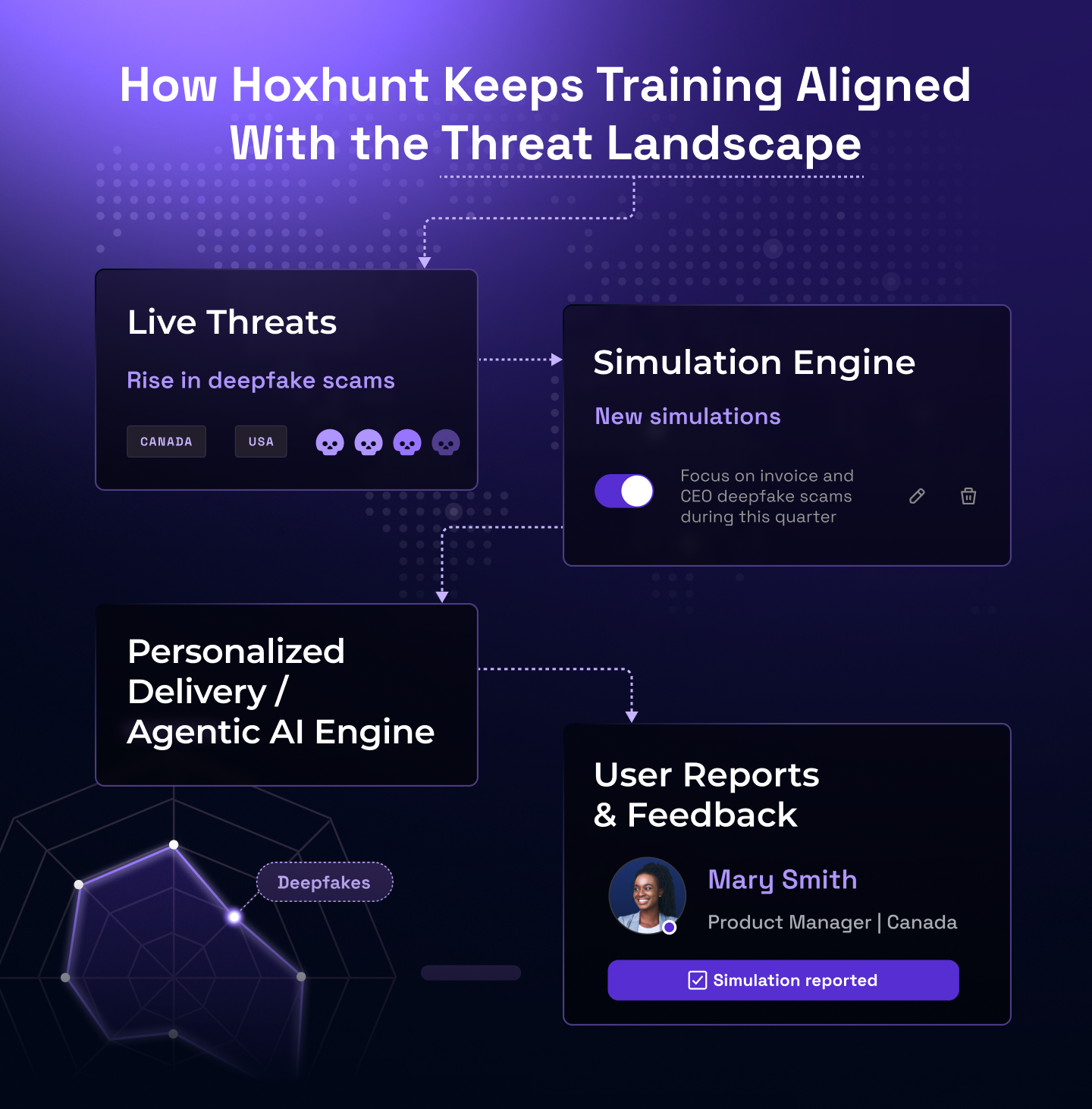
Below you can see how we turn real reported threats into phishing simulations here at Hoxhunt.
What metrics actually prove behavior change?
The metrics that actually prove behavior change are reporting rate and time-to-report, on real threats as well as simulated ones, with click rate as a secondary signal. Click rate plateaus and says nothing about learning. Reporting rate keeps climbing when a program uses positive feedback and timely micro-lessons, and that climb is the real signal of change.
The proof shows up in the data: the fastest 5% of employees report threats in 39 seconds, and reporting keeps climbing even as simulation difficulty rises over time (Hoxhunt Phishing Trends Report 2026, p.34 and p.39).
Your KPI short-list: definition, why it matters, how to measure
Reporting rate (simulated & real)
What
% of users who report suspicious messages.
Why
A climbing rate is real behavior change, more people choosing to report instead of staying silent, and it gives the security team an earlier warning on a real threat.
How to measure
Per campaign and as a monthly trend. Aim for continuous lift, because there is no fixed “good” number.
Time-to-report
What
Minutes from receiving the email to reporting it.
Why
The sooner someone reports a real threat, the sooner the security team can contain it, before it spreads or someone acts on it.
How to measure
Median by role or team, and by channel (email, SMS phishing, voice phishing).
Repeat-clicker reduction
What
% decrease in users who fail two or more times across training campaigns.
Why
A shrinking number over time shows that coaching people instead of punishing them actually works.
How to measure
Cohort size over rolling 90 days.
Phishing simulation metrics: what each field means and how to read it
| Metric | What it measures | How to read it | Break it down by |
|---|---|---|---|
| Click rate | Share of recipients who clicked the simulated link | Always against lure difficulty (the NIST Phish Scale rates it) and by group; one company-wide number hides the spread. It plateaus and never reaches zero. | Department, role, tenure, lure difficulty |
| Credential submission rate | Share who entered credentials or completed the fail action (approved the invoice, opened the attachment) | The costlier fail. It should fall faster than click rate as people learn to stop before they act. | Department, role, scenario type |
| Reporting rate | Share who reported the simulation, and separately the share who report real threats | Your north-star metric. A climbing rate is behavior change you can show the board. | Department, role, channel (email, SMS, voice) |
| Time-to-report | Minutes from delivery to the first report | Median per group. The first report is what lets your security team pull a real campaign out of every other inbox. | Role, team, channel |
| Repeat-clicker rate | Share of people who failed two or more simulations in a rolling window | Should shrink as coaching works. A flat rate points at the program before it points at the people. | Department, cohort, rolling 90 days |
| Training completion | Share who finished the micro-lesson after a fail or a report | Low completion means the lesson is too long or lands at the wrong moment. | Department, role |
Break every one of these down by department and role before you report it upward. A company-wide click rate hides the finance team that approves invoices and the executive assistants who field the callback requests, the same cohorts your cadence planner already treats differently.
Why shouldn’t “click rate” be your north star?
It never hits zero, and focusing too much on failure makes people afraid to speak up. Reporting, on the other hand, keeps improving with positive reinforcement.
How should you handle repeat clickers constructively?
The constructive way to handle your repeat clickers is to treat them as a signal to coach and never as a reason to punish. Check the training itself first: a program that discourages reporting or buries feedback will keep producing repeat clickers no matter who’s in it. Whoever’s still struggling after that should get one-on-one coaching built around their specific motivations, since punishment only pushes people to hide mistakes instead of admitting them.
We unpacked one of cybersecurity’s most polarizing dilemmas: what should be done with repeat offenders in phishing simulations in a recent episode of the All Things Human Risk Management Podcast.
Playbook for dealing with repeat clickers
- Fix the program before the people. Low engagement and fear of “gotchas” are symptoms of the program before they are failings of the person. Redesign the training so success means reporting and feedback is instant, before assuming anyone needs individual coaching.
- Use positive reinforcement instead of penalties. Reward correct actions (reports), pair misses with short microlearning, and keep tone respectful. This sustains behavior change better than reprimands.
- Shrink the cohort, then individualize. Group-level fixes shrink the number of repeat clickers over time. For whoever’s still left, find out why they keep clicking: overload, curiosity, or an unclear reporting process, and set a small, personal goal from there.
- Coach with empathy and relevance. Use examples from their own role to show that reporting fast limits damage, even after a mistake, until “report fast” becomes their default reflex.
- Check whether the lesson is being read at all. In a randomized study at UC San Diego Health, more than half of the embedded training sessions ended within 10 seconds (Ho et al., IEEE Symposium on Security and Privacy 2025), so a repeat click often means the lesson never landed. Shorten the micro-lesson, deliver it at the moment of the report, and give the people who clear it harder simulations to keep them engaged.
- Keep HR as a culture partner rather than an enforcer. Use HR to build psychological safety and craft humane communications, not to open a disciplinary file every time someone clicks a test email.
Why this works: Positive, individualized coaching drives real behavior change. Punitive “consequences” often create fear, underreporting, and productivity drag.
What legal, privacy, and ethics guardrails should you follow?
The core rule is simple: tell people testing happens, stay within legal limits for SMS and phone, and treat every mistake as something to learn from. Get any of those wrong, and your program loses the trust it needs to build. The UK NCSC’s phishing guidance puts it bluntly: “Don’t reprimand users who are struggling to recognise phishing emails,” because punishing people for clicking on emails you sent “starts to resemble entrapment.” CISA’s advice to employers lands in the same place: make sure people know to whom and how to report, and accept that once-a-year training is not enough.
At-a-glance guardrails
- Announce the program (without spoilers). Tell employees that simulated phishing and other attack simulations may occur to support cybersecurity awareness training (the aim is learning, so nobody feels entrapped).
- Keep lures professional and non-harmful. Complaints about a lure that goes too far can end up as an HR or legal matter on top of a bad review.
- Check regional telecom rules for SMS or phone. In some countries, simulating calls or texts can breach telecom regulations. Consult Legal and HR first, and exclude sensitive groups if needed.
- Design for dignity. Treat mistakes as teachable moments. Punitive programs backfire: people get resentful and just stop reporting.
Program communications you can copy
Plain-English program notice (pre-launch):
“We run periodic security exercises to help everyone spot phishing attempts and protect data. These are part of our cyber security program. If you’re ever unsure, report it. We’ll always provide quick feedback so we can learn together.”
Scope note for multi-channel tests:
“From time to time, exercises may include email, QR, text, or phone-based social engineering. We design them to be realistic but respectful, and to follow local rules.”
Red lines (don’t cross)
- No “cruel realism.” If it would be devastating in real life, it doesn’t belong in a test. No exceptions. The Wall Street Journal’s February 2025 report on phishing tests “getting meaner” is the reputation you are avoiding, and our response to that report spells out what separates a program from a gotcha test.
- No cold “gotchas” for new hires. Educate first. Surprise testing can create a hostile first impression of security.
- No spoofing of real external identities or numbers. Use safe stand-ins. Legal peers flag telecom and privacy risk in several regions.
“Click rate never goes down to zero… and focusing on click rates means we focus on failure. That can be really damaging to psychological safety; people become afraid to report mistakes.”
Phishing simulation best practices (Top 10)
These are the ten practices that matter most, the ones that make simulations feel real, stay ethical, and actually change behavior.
- Make reporting the win condition: Clicks won’t hit zero. Over-focusing on them damages psychological safety. Track reporting rate and time-to-report as your north-star metrics.
- Set a cadence without fatigue: Use a monthly baseline. Increase frequency only for high-risk cohorts and new hires, and refresh content before you add volume.
- Keep scenarios realistic and ethical: Prioritize BEC, credential harvesters and SMS phishing. Avoid panic-bait (layoffs, medical results, or personal finance). Keep exercises short and respectful.
- Match the fail method to the pretext: If the pretext is payroll change (BEC), the fail is acting; if it’s an account warning, it’s submitting credentials. Follow every failure with a one-minute micro-lesson.
- Fix the plumbing before the program: Unify to one report phishing button (e.g., Outlook add-in), and allowlist URL rewriters. QR tests often break from Microsoft link rewriting, skewing results.
- Give instant feedback, not hour-long remedials: Route simulated failures and real reports to concise, positive landing pages that explain the social engineering cues and next steps. Morale and learning both improve.
- Adapt difficulty, and keep templates fresh: Rotate phishing templates from current intel; tune challenge per user or role. That’s how you avoid plateaus and “template fatigue.”
- Train multi-channel safely (email, phone, and SMS): Simulate voice calls and SMS thoughtfully, especially deepfake-style vishing for executive support, then debrief fast to protect trust.
- Integrate with your SOC & Microsoft stack: Feed reports into the security operations center, and trigger just-in-time nudges.
- Be transparent, and track whether it’s working: Announce that periodic tests support cybersecurity awareness training. A short-term reporting spike afterward is a good sign, so treat it as progress. Track it against real outcomes such as fewer incidents and faster response, with click rate as the secondary signal.
Learn how to design phishing simulations that build trust, boost engagement, and strengthen your organization’s security culture. In this video, we walk through the essentials, from creating realistic, fair scenarios to reinforcing psychological safety and delivering instant feedback.
Year-one rollout: cadence, difficulty ramp, and sample calendar
Use this calendar as your starting ramp, and move faster or slower on the evidence your reporting rate gives you.
Q1 - Foundations (build trust)
- Program comms: simulations support cybersecurity awareness training, success equals reporting.
- Deploy a single report phishing button (e.g., Outlook) and instant feedback.
- Baseline send (easy simulated phishing) and a 1-min micro-lesson.
- Check integrated cloud email security (QR or URL rewrites) and allowlist to prevent “auto-click” noise.
Q2 - Calibrate by risk (adaptive difficulty)
- Move high-risk roles (finance, IT, executive support) to tighter micro-drills; everyone else stays at same cadence.
- Rotate phishing templates (BEC, invoice change, delivery updates).
Q3 - Multi-channel realism (responsibly)
- Add QR (quishing) and SMS phishing for appropriate teams; verify regional rules and keep lures professional.
- Pilot voice phishing for executive support (brief, debrief fast).
- Coach repeat clickers one-on-one with positive reinforcement and no penalties.
Q4 - Prove impact and harden operations
- Tie signals to incident response dashboards.
- Highlight reporting rate and time-to-report gains.
- Tune training campaigns for what’s working.
- Plan next year’s scenarios and ramp.
Templates and topics: what should you try and what should you avoid?
The best templates stay grounded in the real, current attacks your organization sees. Panic-bait, a badly timed lure during a reorg, or anything that has gone stale works against you. The table below breaks down what to use, what to skip, and why each one lands or backfires.
Templates and topics: try or avoid
| Use these (safe and effective) | Why they work | Avoid or caution | Why to avoid |
|---|---|---|---|
| Business email compromise (vendor IBAN change, invoice update) | Mirrors real losses; teaches verify-and-callback and out-of-band checks | Layoffs, medical results, or personal-finance bait | Makes people afraid to speak up, and drives complaints and under-reporting |
| Credential notices (SSO or session reset that leads to a phish landing page, e.g., “Password Check Required Immediately”) | Natural fail is credential submission; perfect for concise landing-page coaching | Salary or bonus rumor lures | Feels manipulative and personal; harms trust |
| Delivery, meeting, or policy update nudges, e.g., “Travel Perks,” “Google Play” receipt, “Canvas Teacher” invite | Everyday pretexts build the report-button habit without drama | Perks or benefits lures during tense periods | A cheerful “bonus” or “perks” email feels tone-deaf if it lands during a layoff round or reorg |
| QR (“quishing”) that leads to a mobile phishing website | Matches current attacker tactics; trains mobile URL scrutiny | Spoofing real external identities or numbers (SMS or phone) | Telecom and privacy risk; requires strict controls and approvals |
| SMS phishing (delivery or bank) where regionally permitted | Expands channel coverage; short micro-lessons land well | All-channels-at-once blitzes | Testing every channel at once overwhelms people and makes false positives more likely |
| Vishing (executive support; verify-and-callback drills) | Prepares for deepfake- or voice-led BEC chains, and it sticks with people when it’s short and debriefed right away | Punitive comms or public shaming of “clickers” | Suppresses reporting; damages morale and culture |
Tip
Keep lures professional, and match pretext to fail method to a teachable landing page. Rotate templates, and skip panic-bait.
Training techniques (micro-lessons, gamification, adaptive difficulty)
- Instant feedback beats hour-long remedials: Route them to a quick landing page with a micro-lesson, right away.
- Positive reinforcement: Celebrate small wins instead of scolding mistakes.
- Adaptive difficulty: Ramp the challenge gradually, so it always matches each person’s skill level.
- Coach repeat clickers one-on-one: As the group shrinks, shift from general training to individual coaching.
What the research says about simulations and training
Two large field studies back the reporting-first approach on this page, and both cut against the remedial-training reflex. At UC San Diego Health, a randomized experiment sent ten simulated campaigns to more than 19,500 employees over eight months: completing the annual awareness training had no significant relationship with falling for a lure, embedded training after a click reduced the failure rate by only 2 percent, and fewer than 24 percent of users formally completed the training materials they were shown (Ho et al., IEEE Symposium on Security and Privacy 2025). At ETH Zurich, a 15-month study with 14,773 employees found that embedded training “does not make employees more resilient to phishing” and can make them more susceptible, while warnings on suspicious emails worked and crowd-sourced reporting through a report button proved “effective, fast, and sustainable over long periods of time” (Lain, Kostiainen and Capkun, IEEE Symposium on Security and Privacy 2022).
The lesson for your program: a lecture after a click changes little on its own. What moves the numbers is the habit both studies confirm, an easy report button, instant feedback and one-on-one coaching for the people who keep clicking, which is why the metrics above put reporting ahead of click rate.
What’s the right platform and tooling stack?
The right platform depends on how far you want to go, from a lightweight setup that covers the basics to a dedicated system built for scale. Either way, the same five criteria decide whether it actually works.
Minimum viable
- One channel
- A follow-up training moment
- A single report button
- Basic metrics
Advanced
- Multi-channel lures (SMS, voice)
- Adaptive AI-driven playbooks
- SOC integrations
- Automated reporting exercises tied to real-life cyber threats
Selection criteria (what actually matters)
- Channel coverage and realism: The platform must cover the channels attackers actually use, email, SMS, voice, and QR, otherwise simulations miss half of what people need to recognize.
- Learning loop and effectiveness: Every failure must end in an instant, teachable landing page and micro-lesson that turns it into actionable learning, otherwise the lesson doesn’t stick.
- Measurement and analytics that prove change: The platform must track reporting rate and time-to-report, not just click rate, otherwise you can’t tell if anyone is actually learning. It should also feed that data into the security tools you already use.
- Deliverability and safety: Simulations must work smoothly with your existing email security tools without triggering false fails, otherwise your data will be wrong.
- Scalability and localization: The platform must support multiple languages and target users by role or region, otherwise a global rollout won’t feel relevant to everyone.
Why choose Hoxhunt for phishing simulations?
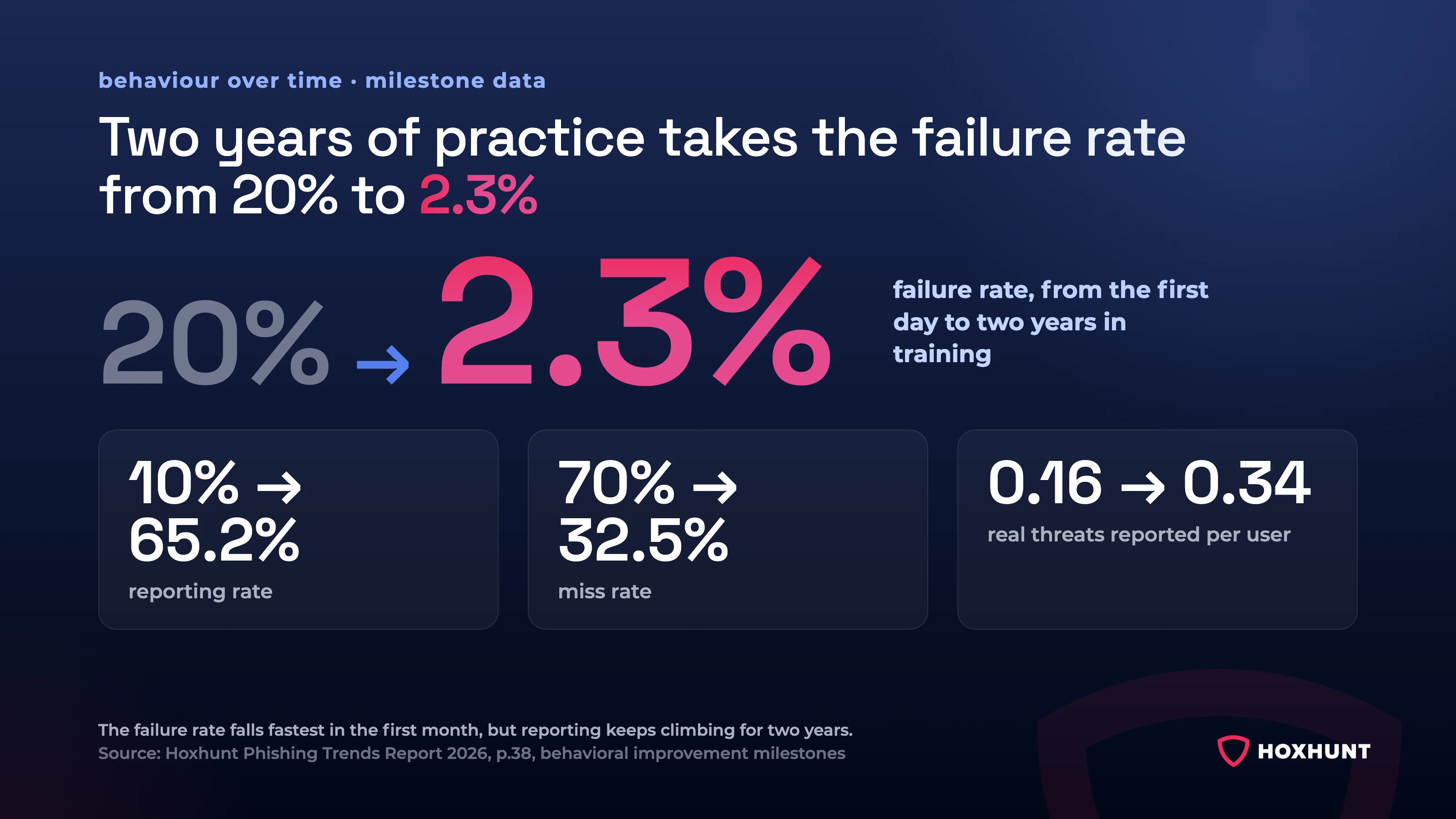
Hoxhunt customers see fail rate and miss rate drop while reporting rate climbs, month over month.
Hoxhunt excels at adaptive, gamified phishing simulation that lifts reporting and eases SOC workload. It unifies the report phishing button, gives instant feedback on real phish, rotates content from current threats, integrates with Microsoft and EDR signals, and prioritizes psychological safety with an easy “welcome” benchmark and per-user difficulty.
What we hear from security teams (and how Hoxhunt answers)
If any of these sound like your current setup, you are not alone: they are the frustrations we hear most often about a previous phishing simulation platform, before a move to Hoxhunt.
“Training feels generic; engagement is low.”
Hoxhunt personalizes simulated phishing difficulty to each user’s skill and role and uses stars, streaks, leaderboards to keep people motivated. The result is higher participation in security awareness training that doesn’t feel like a “gotcha” test.
“We only see click and fail rates.”
Admins get real-time dashboards and user-level insights that go beyond clicks. The platform also provides threat heatmaps you can act on in training campaigns.
“Too many places to report a phish.”
Hoxhunt consolidates to one integrated button (for Outlook, Gmail), so users are no longer confused about which tool they should use, which leads to more consistency in reporting.
“Employees never get feedback on real phishing incidents.”
The platform provides instant, automated feedback on real reports, teaching in the moment so employees and the SOC don’t have to go back and forth as much.
“Microsoft integration is a nightmare, and simulations don’t reliably land in inboxes.”
Hoxhunt is designed to seamlessly integrate with Microsoft Defender and EDR signals for behavior-based training.
Differentiators that matter in 2026
- Psychological safety by design. A “welcome” benchmark and adaptive difficulty keep users challenged, but not overwhelmed, while making “report fast” the default reflex.
- Threat-led content rotation. Templates are updated from real-life phishing attacks (QR, credential harvesters, smishing), so attack simulations mirror today’s cyber threats.
- Vishing and deepfake training capability. Hoxhunt offers deepfake simulations to prepare for business email compromise chains that pivot to a phone call or a Teams meeting.
- Culture over punishment. Experts agree that punitive programs backfire and suppress reporting, so the platform emphasizes positive reinforcement and short micro-lessons instead.
Case Study: Bird & Bird transforms human cyber risk with Hoxhunt
Overview: Bird & Bird is a global law firm founded in 1846, headquartered in London, and active in 20 countries with around 3,300 attorneys and staff. Serving clients in sensitive sectors, especially finance, makes it a high-value target for cyber threats.
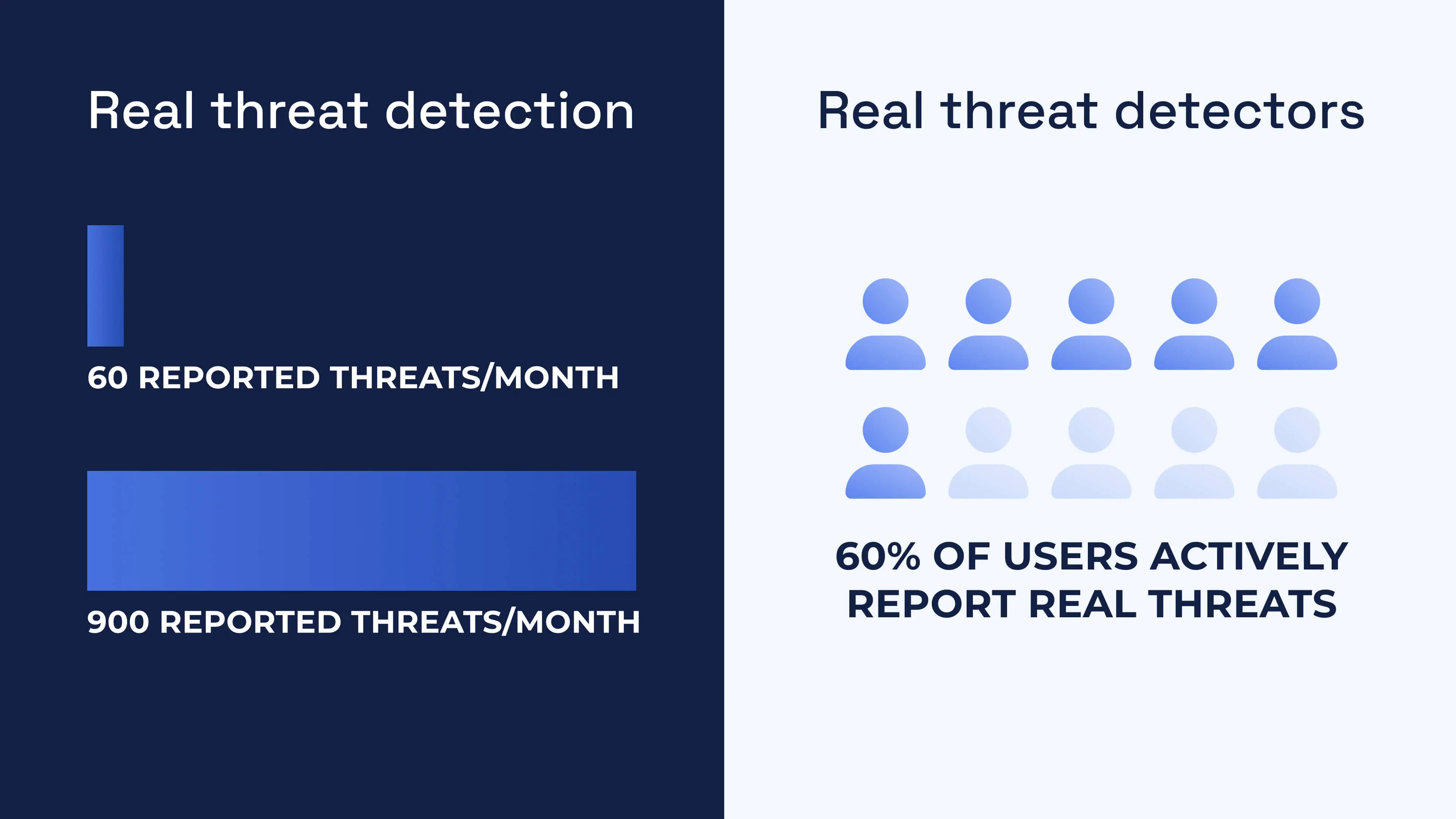
Reported threats jumped from 60 to 900 a month after the rollout, and 60% of users now report real threats on their own.
The challenge: building trust without fear
- The firm needed to shift away from punishment-driven security awareness training that put people off and discouraged them from reporting.
- They wanted real behavior change, measurable risk reduction, and a people-first experience that users would embrace rather than resent.
The Hoxhunt Solution
- Hoxhunt’s human risk management platform was a natural fit. Individualized micro-trainings, gamified engagement (stars, leaderboards), adaptive difficulty, and instant feedback loops turned passive awareness into active learning.
- Leadership embraced it too, a rare positive reaction to a security program.
Bird & Bird case study: outcomes with Hoxhunt
| Metric | Before | After | Change |
|---|---|---|---|
| Real threat detection | 60 reports/month | 900 reports/month | +1,400% |
| Resilience ratio (success-to-failure) | 5.3 | 37.8 | +613% |
| Failure rate | 9% | 1.8% | −80% |
| Miss rate | 43% | 28.8% | −33% |
| Real threat detectors | N/A | 60% of users reported at least one real threat | N/A |
| Reporting time | N/A | 6 h 35 min average | N/A |
US benchmark: The same approach scales in the United States too. Copart, the Dallas-based global vehicle remarketer, ran 202,992 completed phishing simulations across 963 unique variants. It doubled its reporting rate from 24% to over 50%, after moving on from a legacy cadence of just one to three campaigns per quarter. A high-variety simulation library is what lets a US enterprise and an EU firm like Bird & Bird both sustain that climb, and it is the first thing to check when you compare platforms.
Phishing simulation best practices FAQ
How do I run my first simulation?
Start with a low-friction template, target a pilot cohort, and schedule one campaign per week for the first month. Measure reporting rate and time-to-report.
Can I use Microsoft 365 Attack Simulation Training for best practices?
Yes, follow the same cohort and frequency logic. If you need automated coaching or gamification, consider switching to Hoxhunt.
What’s a “good” click rate?
There is no single good click rate, because it depends on how hard the lure was: a generic delivery notice and a targeted invoice change are different tests. Rate lure difficulty with the NIST Phish Scale and compare like with like. Click rate never hits zero, and over-focusing on it makes people afraid to speak up, so optimize for reporting rate and time-to-report, which correlate with faster detection and fewer incidents.
Should we tell employees about simulations?
Yes, announce that periodic simulated phishing attacks support learning. Keep lures professional and avoid panic-bait. Transparency builds trust and reduces backlash.
Do we punish repeat clickers?
No. Punishment suppresses reporting and damages culture. Use positive reinforcement, micro-lessons, and one-on-one coaching to address root causes.
How realistic should scenarios be?
Mirror real phishing attempts but avoid highly personal or panic topics. Keep exercises short and respectful.
Is it OK to run “gotcha” tests without telling employees?
Program-level transparency works better. Announce that periodic simulated phishing attacks support learning, and avoid cold “gotchas,” especially for new hires. You’ll protect trust and get better reporting behavior.
What’s the right way to onboard new hires?
Ease them in instead of throwing them straight into a test: give a quick primer on what to expect, start with an easy first simulation, follow it with instant feedback, and make clear that success means reporting, which matters more than avoiding a click. Skip surprise tests. Ramp difficulty per person after they’ve seen the basics.
Sources
- Phishing Trends Report 2026, Hoxhunt, 2026.
- Phishing, Technique T1566, MITRE ATT&CK.
- Phishing Tests, the Bane of Work Life, Are Getting Meaner, The Wall Street Journal, February 2025.
- Phishing attacks: defending your organisation, UK National Cyber Security Centre, version 2.0, reviewed February 2024.
- Teach Employees to Avoid Phishing, CISA.
- Understanding the Efficacy of Phishing Training in Practice, Ho et al., IEEE Symposium on Security and Privacy, 2025.
- Phishing in Organizations: Findings from a Large-Scale and Long-Term Study, Lain, Kostiainen and Capkun, IEEE Symposium on Security and Privacy, 2022.
- NIST Phish Scale User Guide (TN 2276), Dawkins and Jacobs, NIST, November 2023.
Get more cybersecurity insights like this
- Subscribe to All Things Human Risk to get a monthly round up of our latest content
- Request a demo for a customized walkthrough of Hoxhunt
.avif)