





Executive summary
While AI-generated voice and video deepfakes dominated headlines and discussions in the cyber community in 2025, these attacks accounted for a fraction of the threats that bypassed filters and actually reached employees. The vast majority of attacks leveraged more traditional impersonation and deception techniques that have been updated to trick filters and slide into new communication environments, including social media.
Sometimes developments in the threat landscape were enhanced by AI and sometimes not. Their effectiveness was fuelled by familiarity, not visibly slick deception and sophistication. The new generation of attacks imitated normal business processes, credible brands, trusted tools and everyday communication patterns. This report reveals the quantity and quality of threats that matter most: the ones that bypass filters and affect real people. This intelligence will help you develop your training and manage your human risk more effectively. This report’s data set is based on millions of user-reported emails that bypassed filters in 2025.
3 key developments
- First, attackers are using AI to improve classic phishing techniques with cleaner language, more convincing formatting and more believable workflow mimicry.
- Second, adversary-in-the-middle (AitM) phishing kits have become easier to deploy and are becoming more widely adopted. These toolkits intercept logins in real time, forward the authentication to the legitimate service, and capture session tokens in addition to passwords. AitM attacks can circumvent MFA.
- Third, social engineering is increasingly expanding beyond email environments and moving into social platforms,recruitment channels and other communication layers that shape professional identity.
Prefer to listen? We broke down the key findings of this report on The All Things Human Risk Management Podcast - how AI is scaling social engineering, why traditional signals fail, and how humans detect what technology misses.
Fluent phish: Flawless grammar, live chats andAitM toolkits
Generative AI raised the quality baseline for phishing content. Many phishing emails are now polished and grammatically perfect, undermining the classic “look for typos” advice. Today’s threats might even read more fluently than legitimate correspondence.
Recruitment and account suspension themed social media account takeovers emerged with novel tactics to hijack Meta business accounts through browser-in-the-browser and live-chat techniques. These campaigns underscore how professional identities - not just credentials -are being monetized.
Phishing-resistant MFA remains vital, yet the rise of adversary-in-the-middle toolkits capable of session-token theft shows that identity protection must evolve beyond traditional MFA prompts. Organizations can no longer rely solely on passwords or SMS codes to maintain account integrity.
Trusted routines, trusted brands
By blending into legitimate workflows, third parties, and infrastructure, attackers achieve a false sense of trust. In 2025, they changed their tactics and adopted some new technologies to do exactly that, but more effectively.
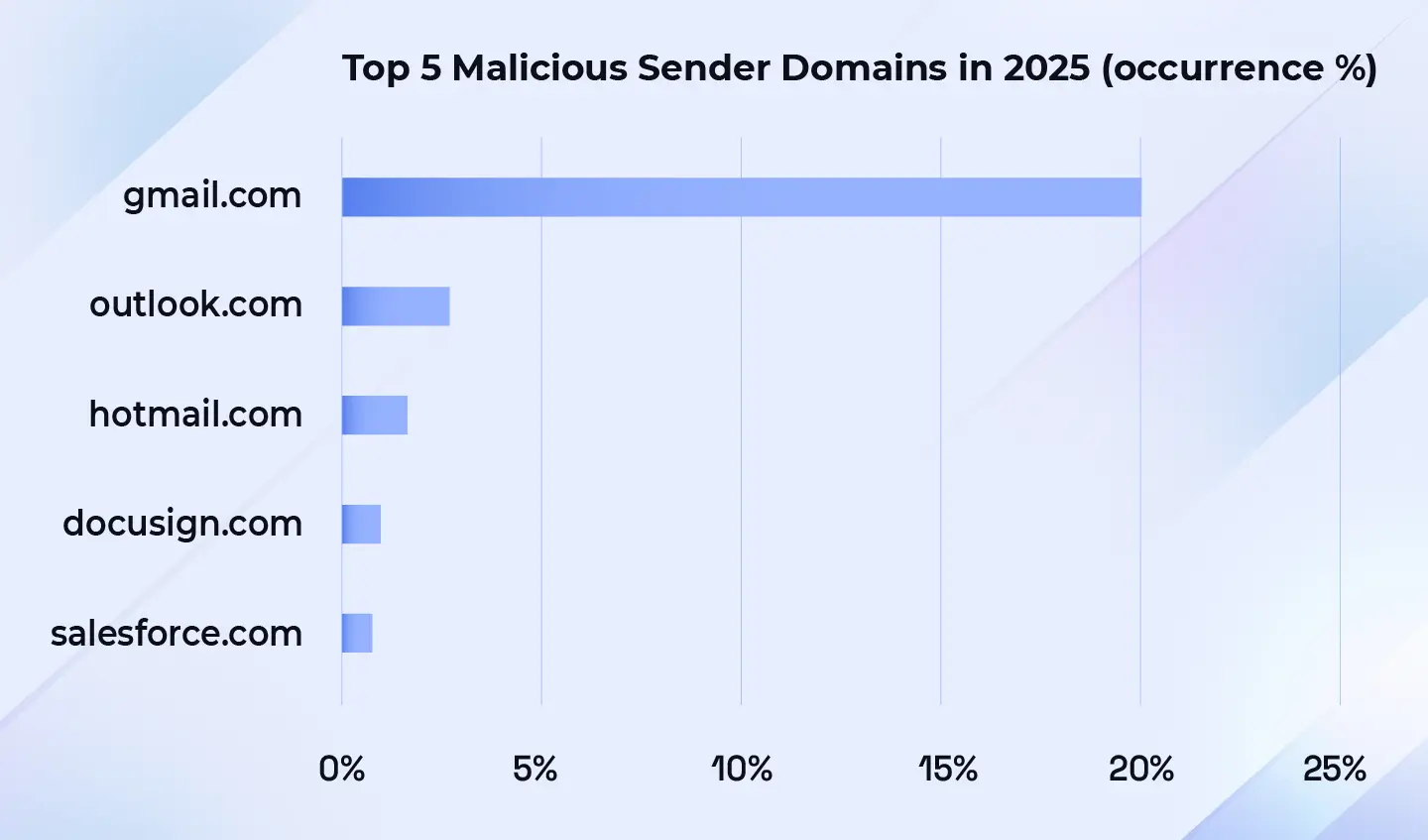
- Consumer webmail continues to dominate, with gmail.com accounting for roughly one-fifth of all malicious senders.
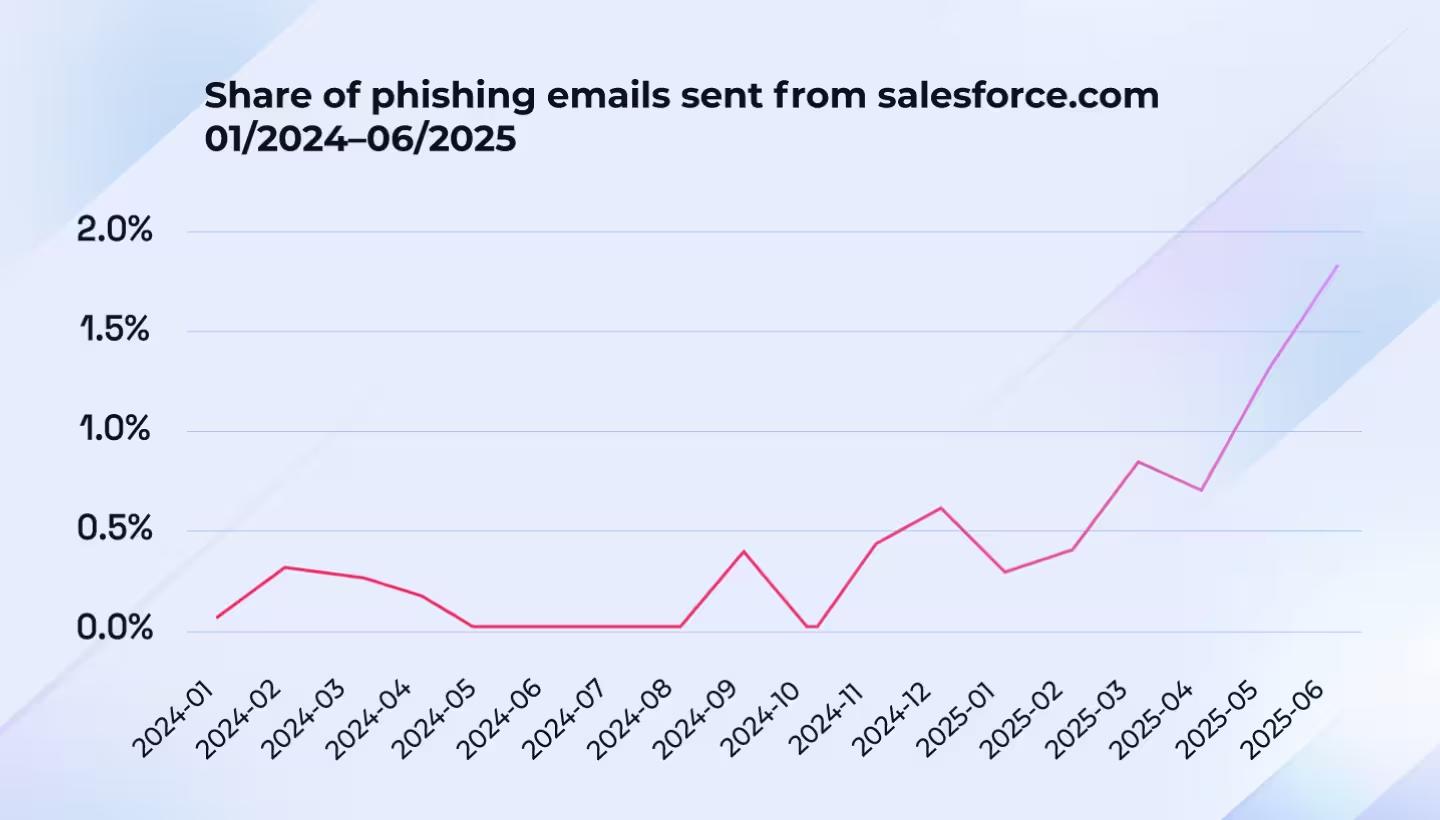
- The misuse of legitimate services was also prevalent throughout the first half of the year, with, for example, the misuse of Salesforce tripling - from 0.6% in January to 1.8%, signaling increasing attacker preference for recognized, trusted delivery paths that exploit both technological and human blind spots.
- Attachment-based techniques diversified as malicious SVG attachments surged, growing 50-fold compared to 2024, while malicious QR codes - once a breakout trend - now appear in less than two percent of malicious emails.
Updating your security awareness and defense playbook
Overall, the findings imply a steady shift toward stealth, automation, and token-based compromise. Defenders should assume that attackers can bypass common filters and instead focus on detecting anomalies after login, binding tokens to devices, and shortening session lifetimes.
The development of error-free phishing messages reinforces the need for behavioral training that teaches employees to question routine, not just urgency and errors. Awareness programs should emphasize routine-looking lures over sensational ones, while technical teams implement token-centric incident response and phishing-resistant MFA.
Finally, every organization should reinforce a “Pause → Verify→ Act” culture that treats ordinary requests with the same caution reserved for high-urgency scams. Together, these behavioral and technical safeguards transform humans into an early warning system rather than an entry point.
Threat landscape overview
Top social engineering tactics
Attackers mimic familiar workflows and exploit urgency and authority - gaining access to organizational accounts remains a main goal for threat actors.
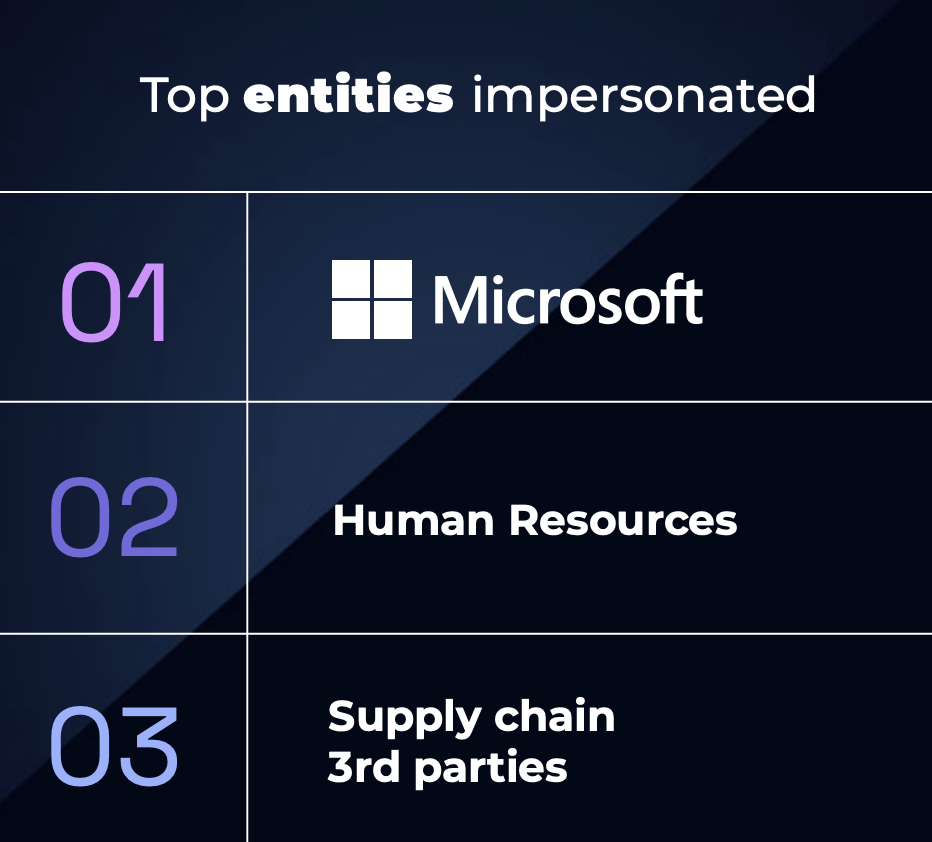
Top entities impersonated
- Microsoft
- Human resources
- Supply chain third parties
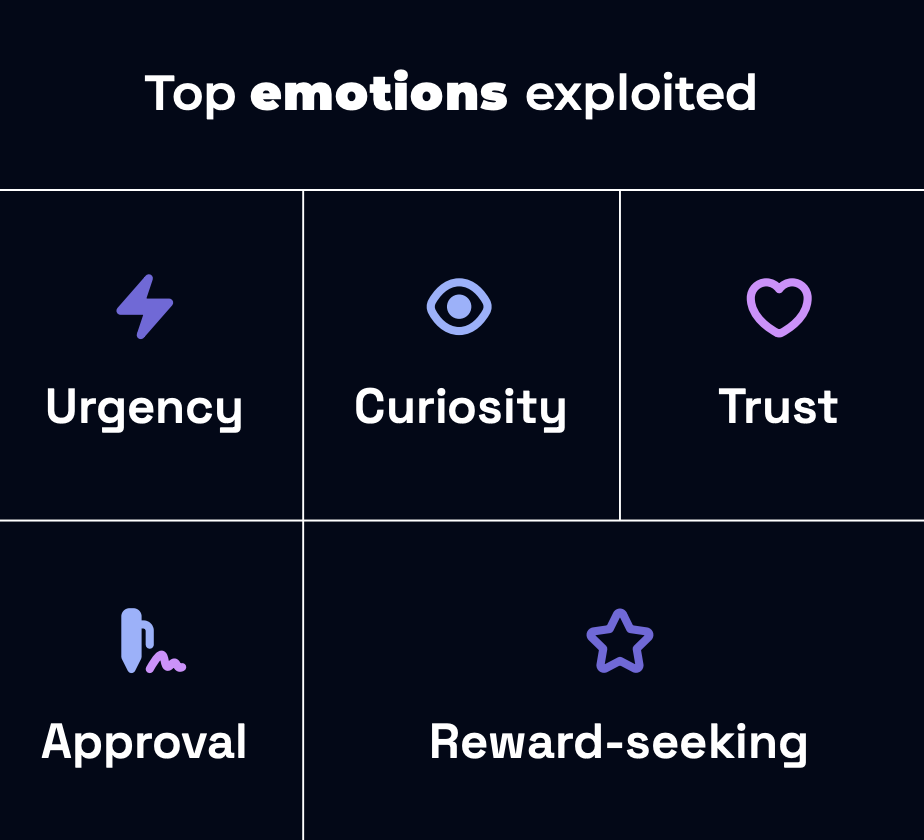
Top emotions exploited
- Urgency
- Curiosity
- Trust
- Approval
- Reward-seeking
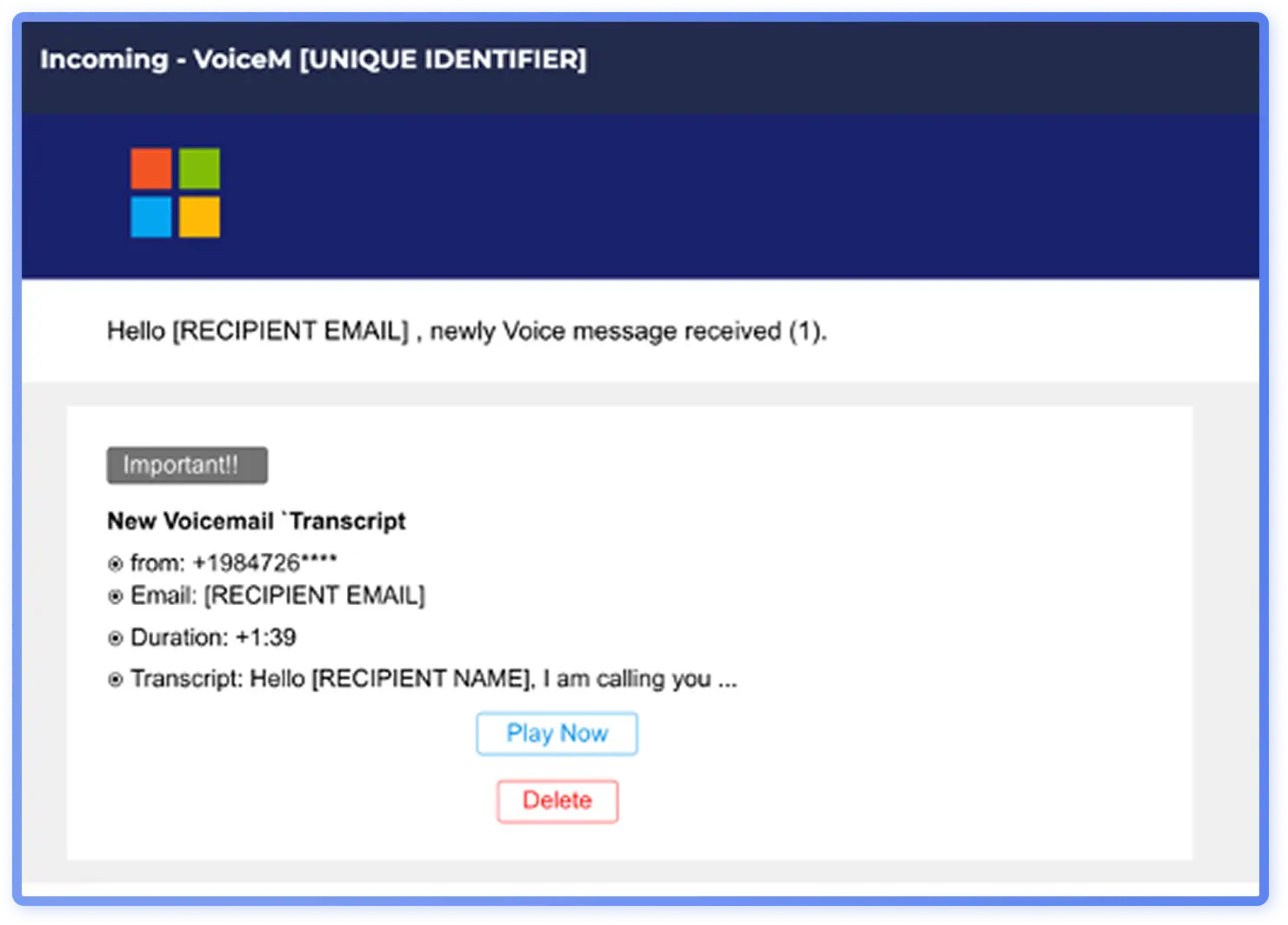
Age-old tactics remain effective and have continued to evolve over the past year, with themes such as Microsoft impersonations still among the largest campaigns observed by Hoxhunt’s analysts. Attackers commonly utilize a security alert theme, exploiting urgency, or claim a new voicemail transcript is available (Figure 1), to exploit curiosity.
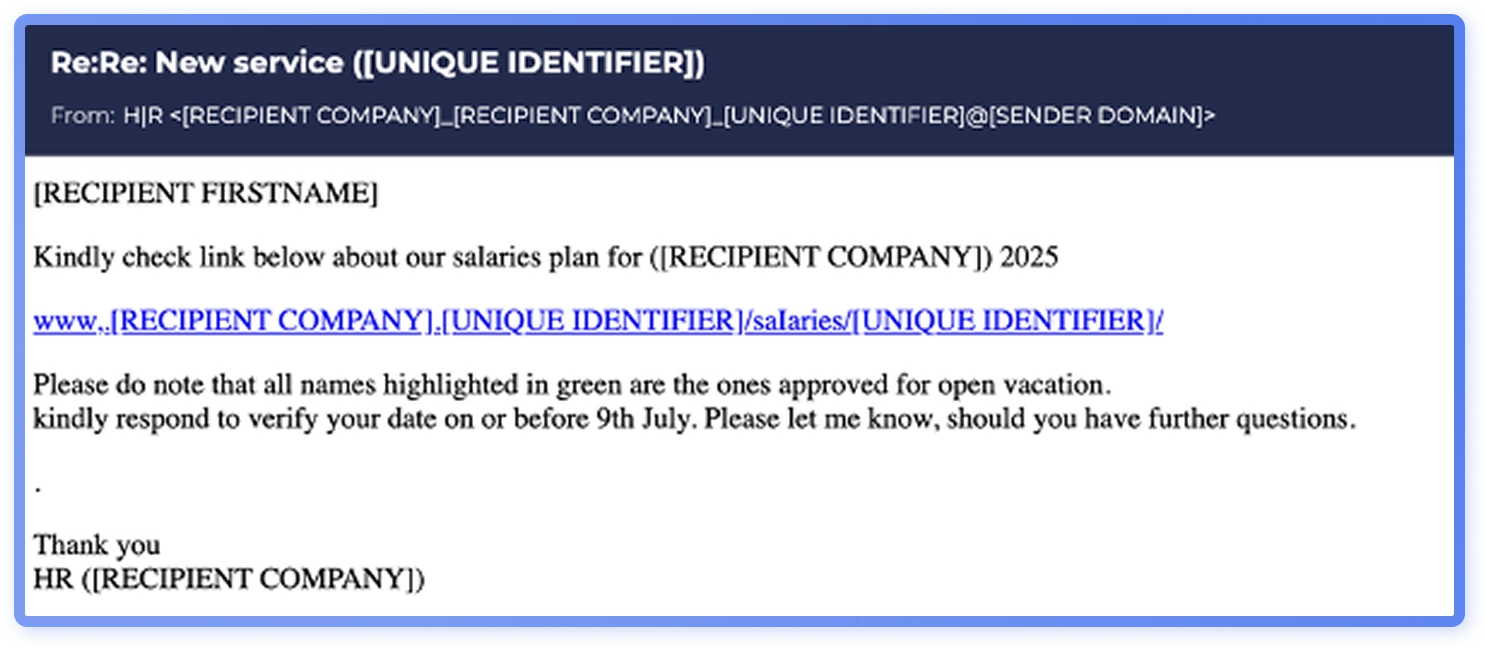
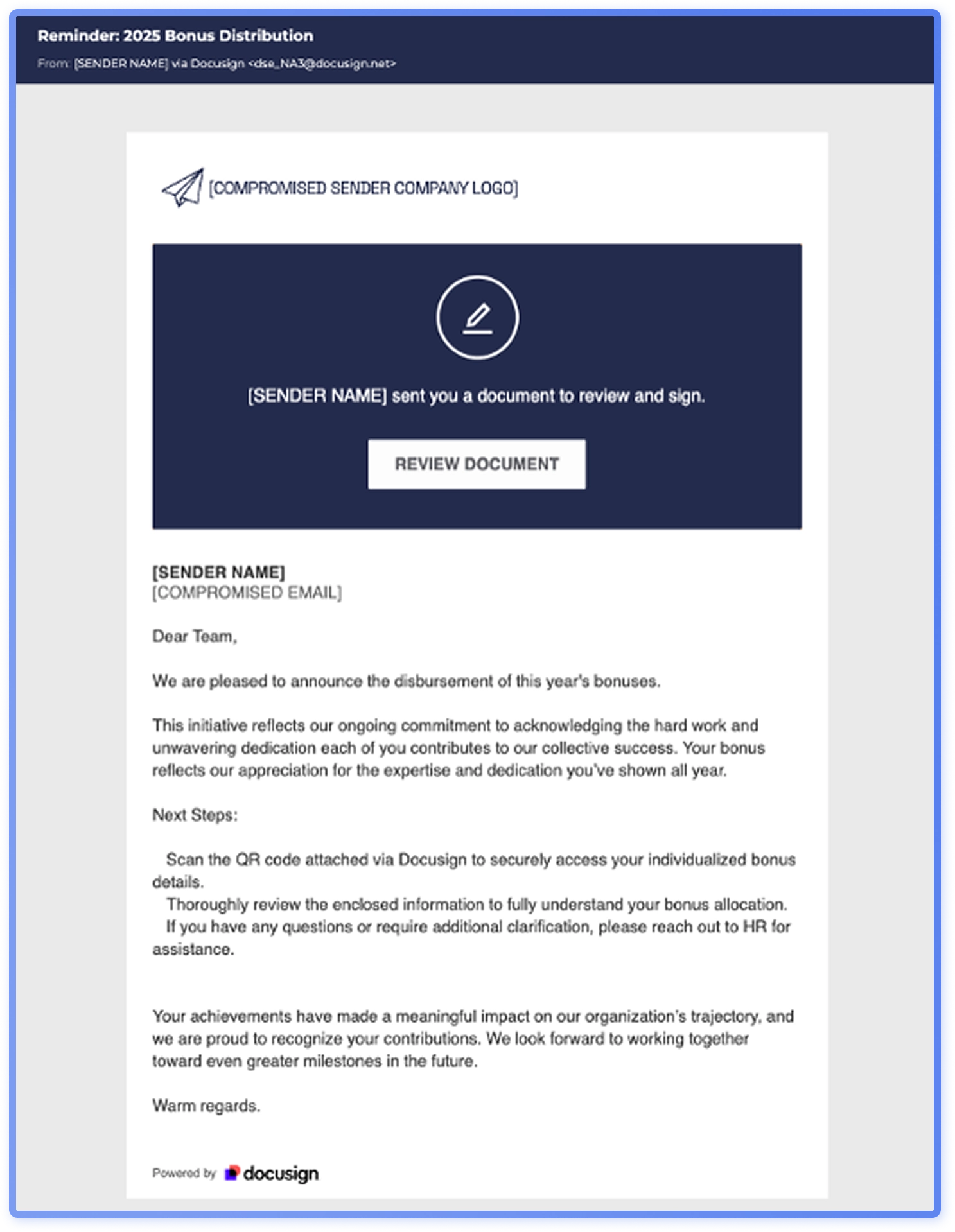
Threat actors impersonate a range of parties, like HR, suppliers and service providers in file share attacks. In some of the most popular campaigns of 2025, attackers impersonated human resources, claiming to share a link to a list of salary increases (Figure2), or asking the recipient to review a document regarding bonus distribution plans (Figure 2). The social engineers are exploiting the recipient’s desire to be recognized and rewarded, stirring curiosity, and leveraging trust in an organizational authority figure.
File share themed phishing has also remained widespread this year with Docusign as the most impersonated and misused service (Figure 3). Specific social engineering techniques vary, but the end goal is the same: stealing the recipient’s organizational credentials, exploiting both curiosity and the familiarity of everyday workflows.
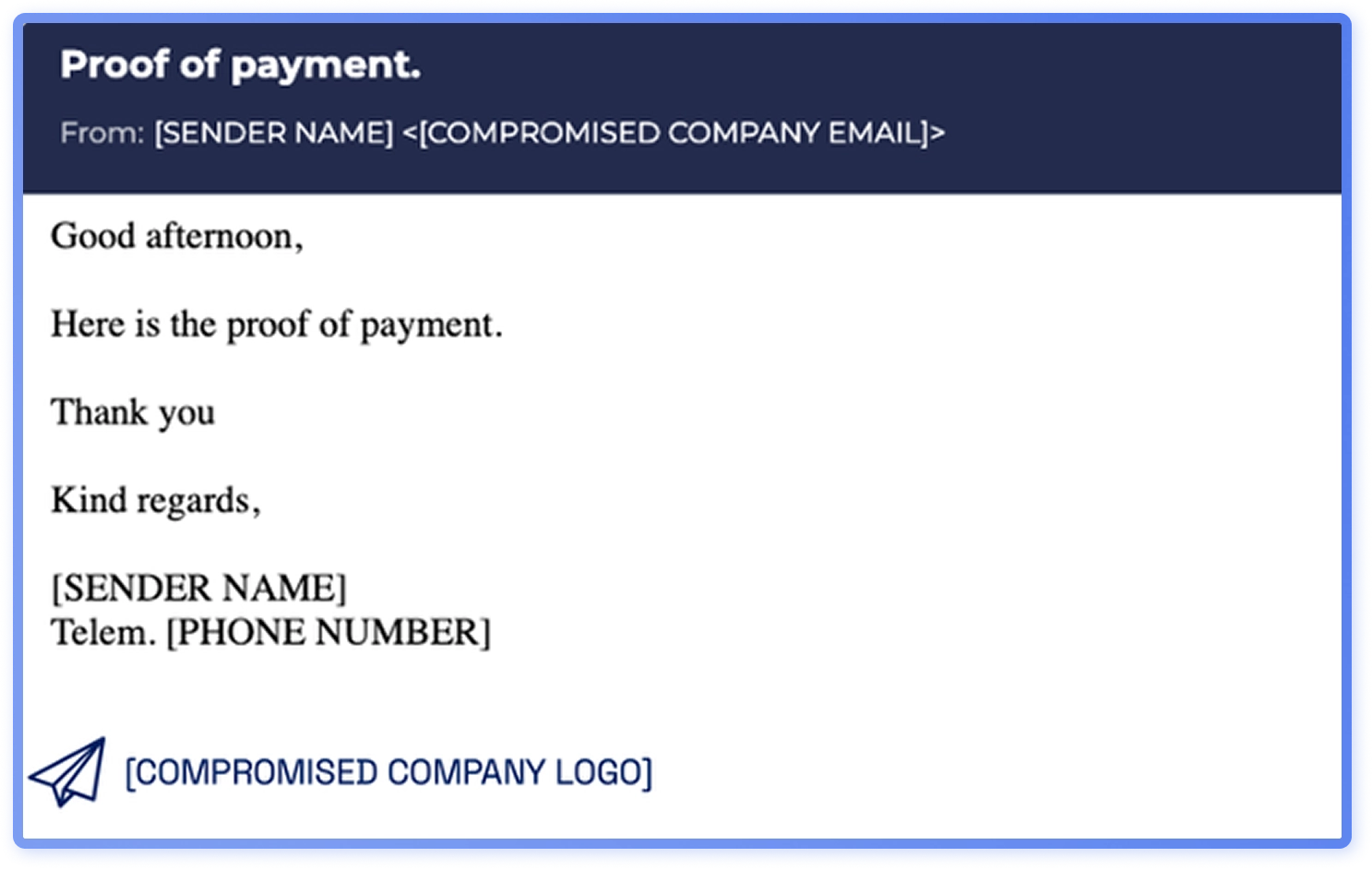
Threat actors also impersonate suppliers, partners, and service providers to share malicious files and manipulate invoicing, delivery details, or contract terms. Supply chain fraud phishing is often sent from free email addresses or look-a-like domains, and emails also originate from compromised organizational email addresses (Figure 4). These types of phishing emails often include malicious attachments with embedded links leading to credential harvesters.
When sharing files or sending other fraudulent emails from legitimate email addresses of SMBs, or even from look-a-like domains, attackers are exploiting trust and the familiarity of everyday workflows.
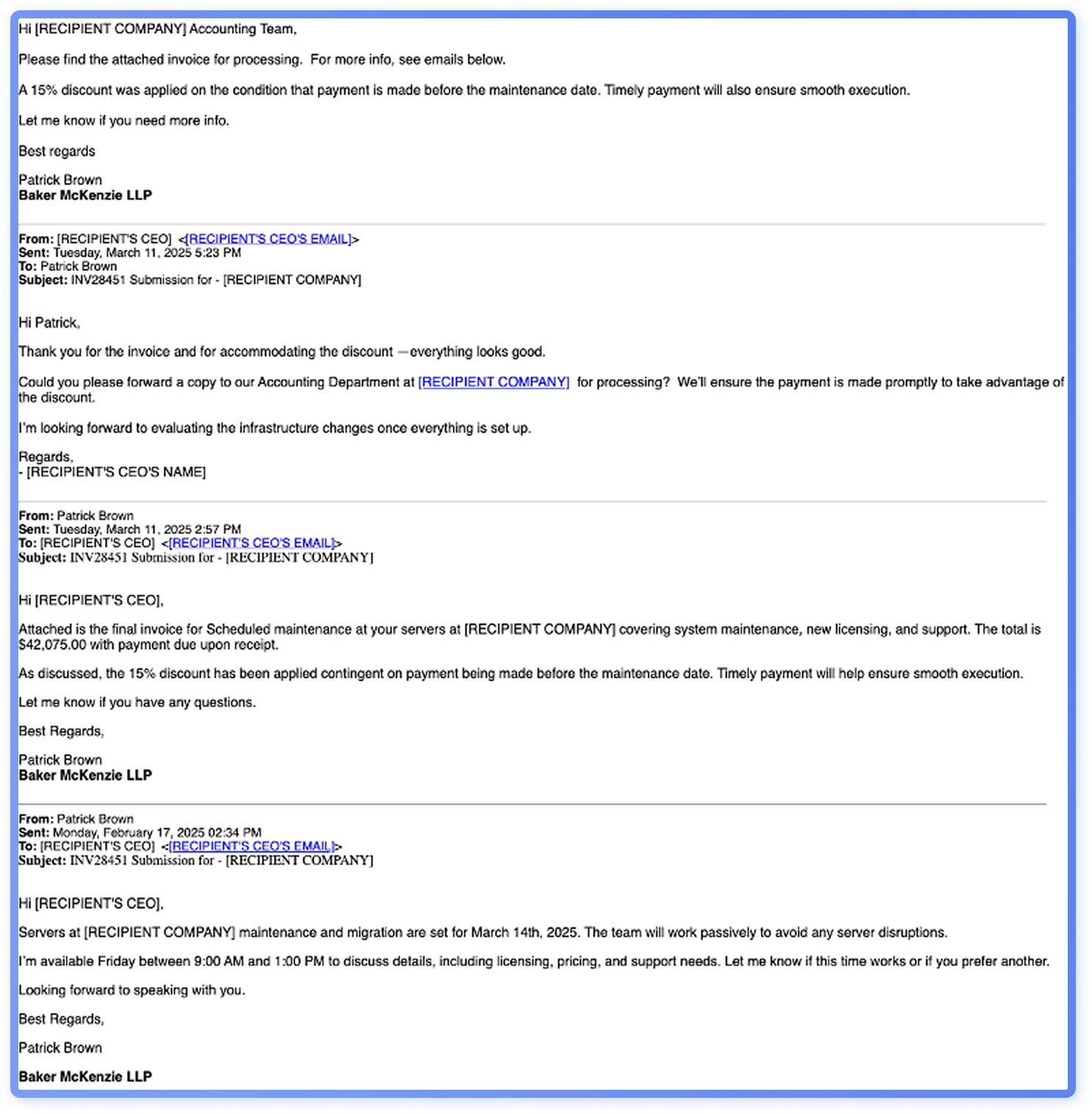
Supply chain attacks are not a 2025 novelty, but they remain a popular theme used in major campaigns. Perhaps even more noteworthy in 2025 is the observed increase of the fake email chain technique. Threat actors craft email threads that appear to be a part an ongoing conversations, making their call-to-action, often requesting the payment of a large invoice, seem more credible.In one campaign that uses this technique, attackers attempted to convince the recipient to execute a large financial transaction by claiming there was an unpaid invoice and impersonating the recipient’s CEO (Figure 5).
Generative AI and phishing visuals
Lately, the visual outlook of common bulk phishing has shifted from minimal, unformatted emails to more refined templates with branding elements and structured layouts, with timing that aligns with the increasing quality and availability of generative AI tools. A representative shift in visual presentation is the Microsoft impersonation framed as a “full mailbox” alert, a conventional lure.
The newer email template (Figure6) looks slicker with branding elements and footers and is probable to be AI-generated, while an older phishing email (Figure 7) is plain with minimal graphics.
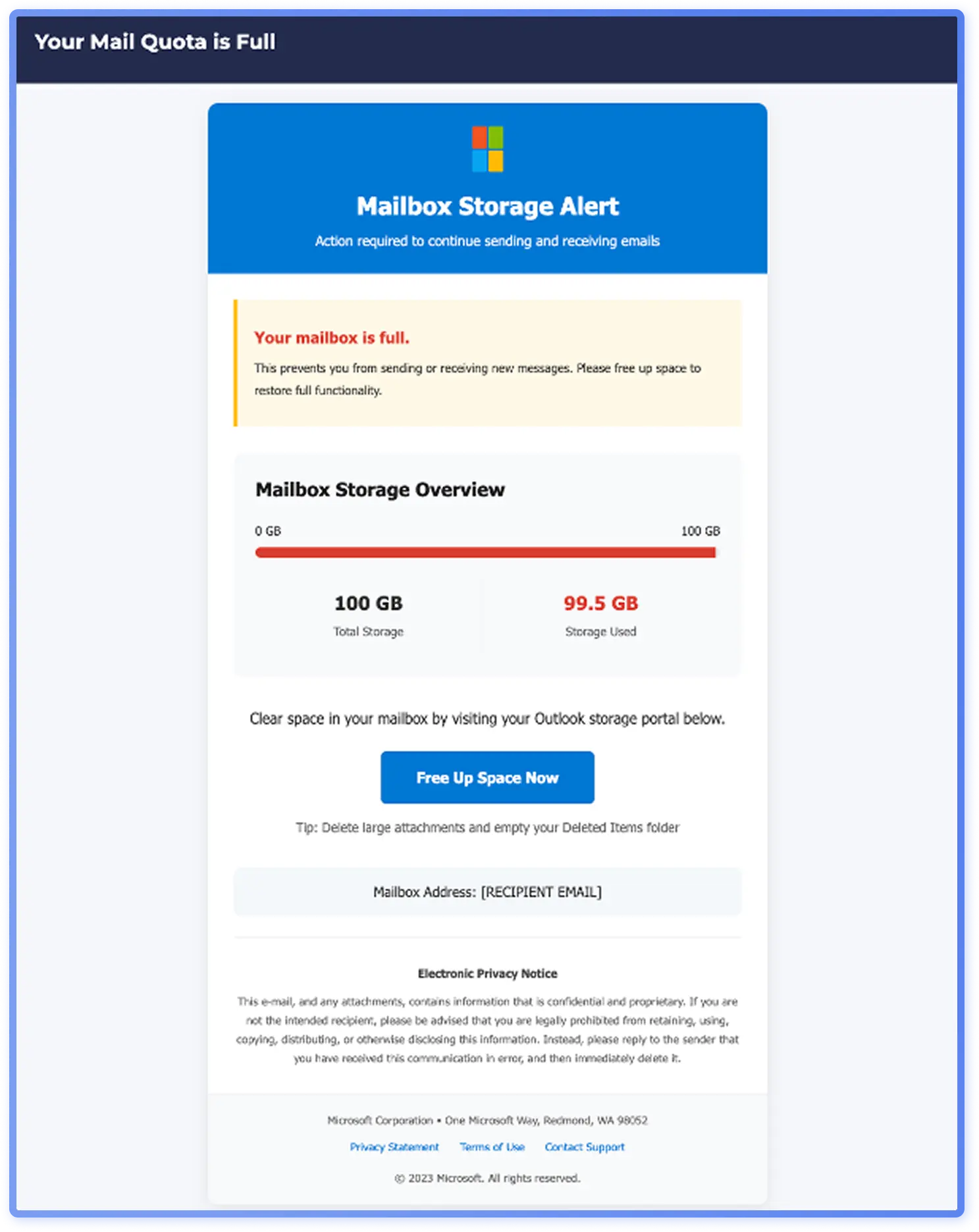
Although newer emails look more polished, improved visuals do not necessarily make a campaign appear more legitimate. In fact, the simpler “full mailbox” alert from 2023 (Figure 7) more closely mirrored genuine Microsoft notifications (Figure 8), appearing more authentic than the newer, more elaborate version (Figure 6).
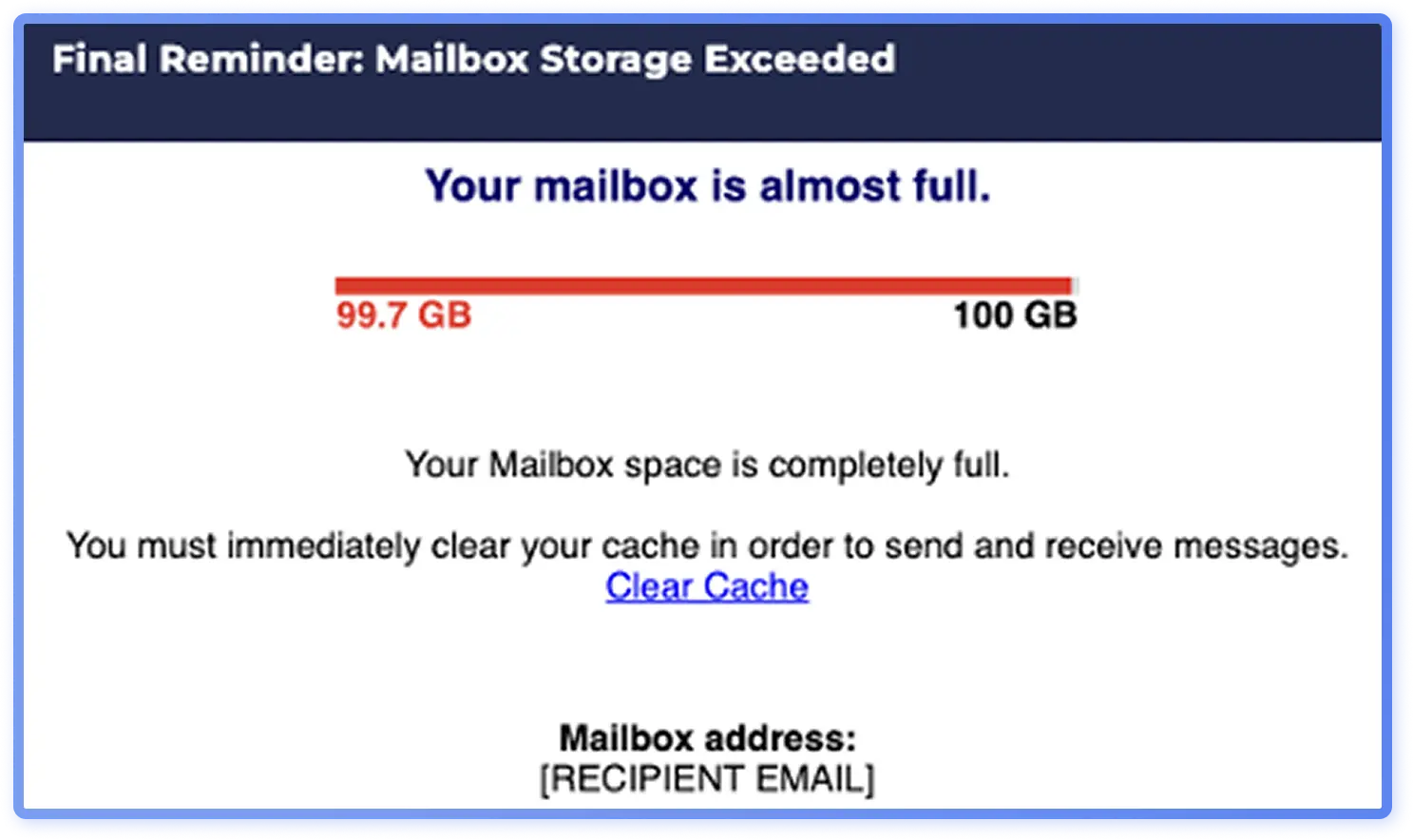
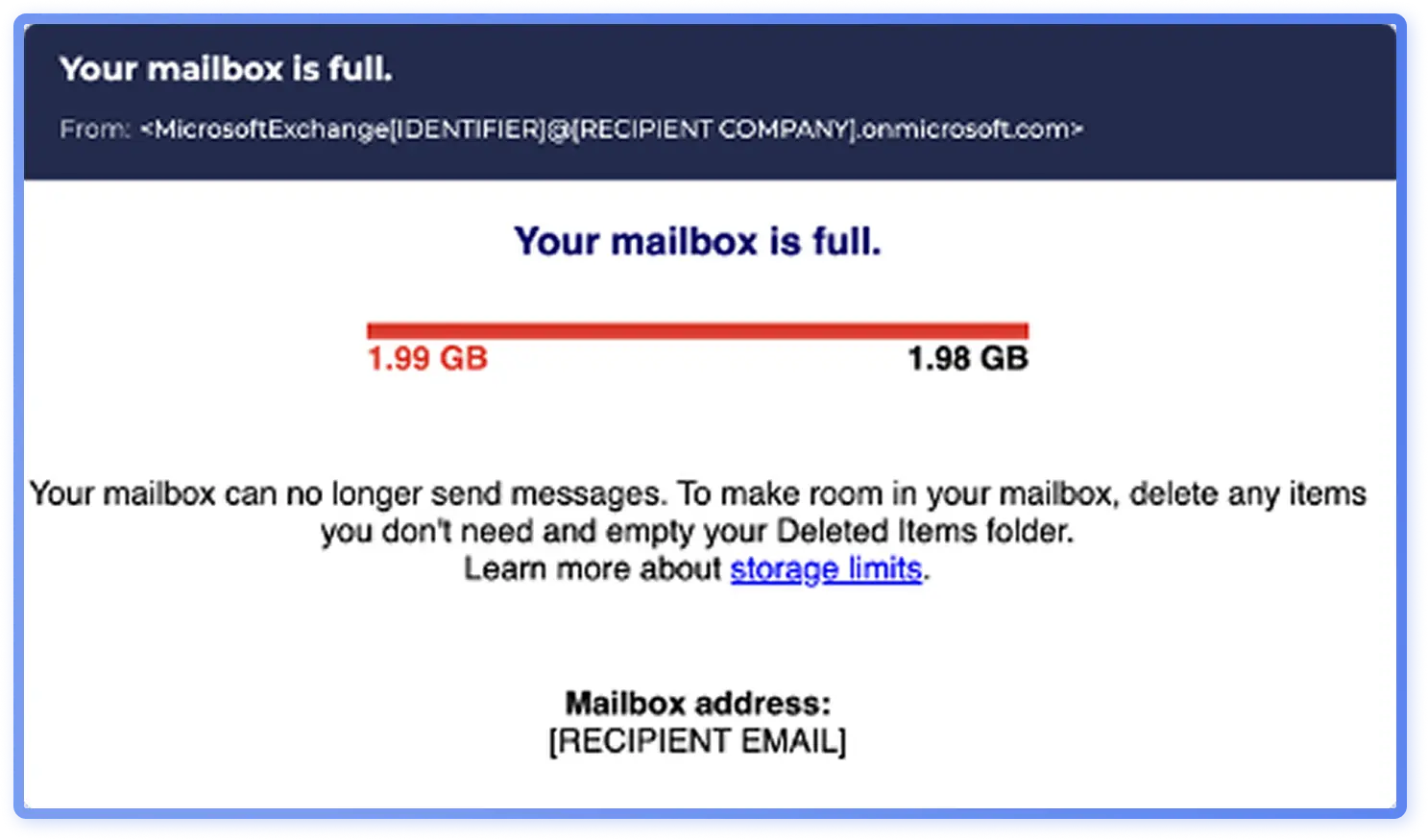
It is probable generative AI is driving glossier, more professional-looking phishing emails, while legitimate emails are often more stripped down and utilitarian. The more polished designs have not completely replaced the basic ones: analysts still see both used in phishing emails. Even as generative AI gains popularity in attackers’ toolkits, the threat landscape of 2025 remains a blend of older phishing templates and AI-enhanced phishing.
Industry observations
While bulk phishing remains broad and opportunistic, some techniques show signs of selective use. Industry-specific targeting is limited but does occur. For example, QR-code based lures stand out in retail where their usage is more common, especially in consumer-facing workflows. It is probable that tactics are occasionally tailored to sector-specific behaviors, technologies, or trust dynamics.
Even if the broader data doesn’t highlight strong industry targeting, there are some clear examples of campaigns targeted at specific industries. For example, in 2025 several campaigns targeting the hospitality industry were identified, impersonating services such as Booking.com. Figure 9 shows an example of such a campaign, requesting a hotel to confirm its details to reactivate an account. While Booking.com impersonations are not a novel threat, they have persisted in 2025 as one of the most prominent examples of industry targeting.
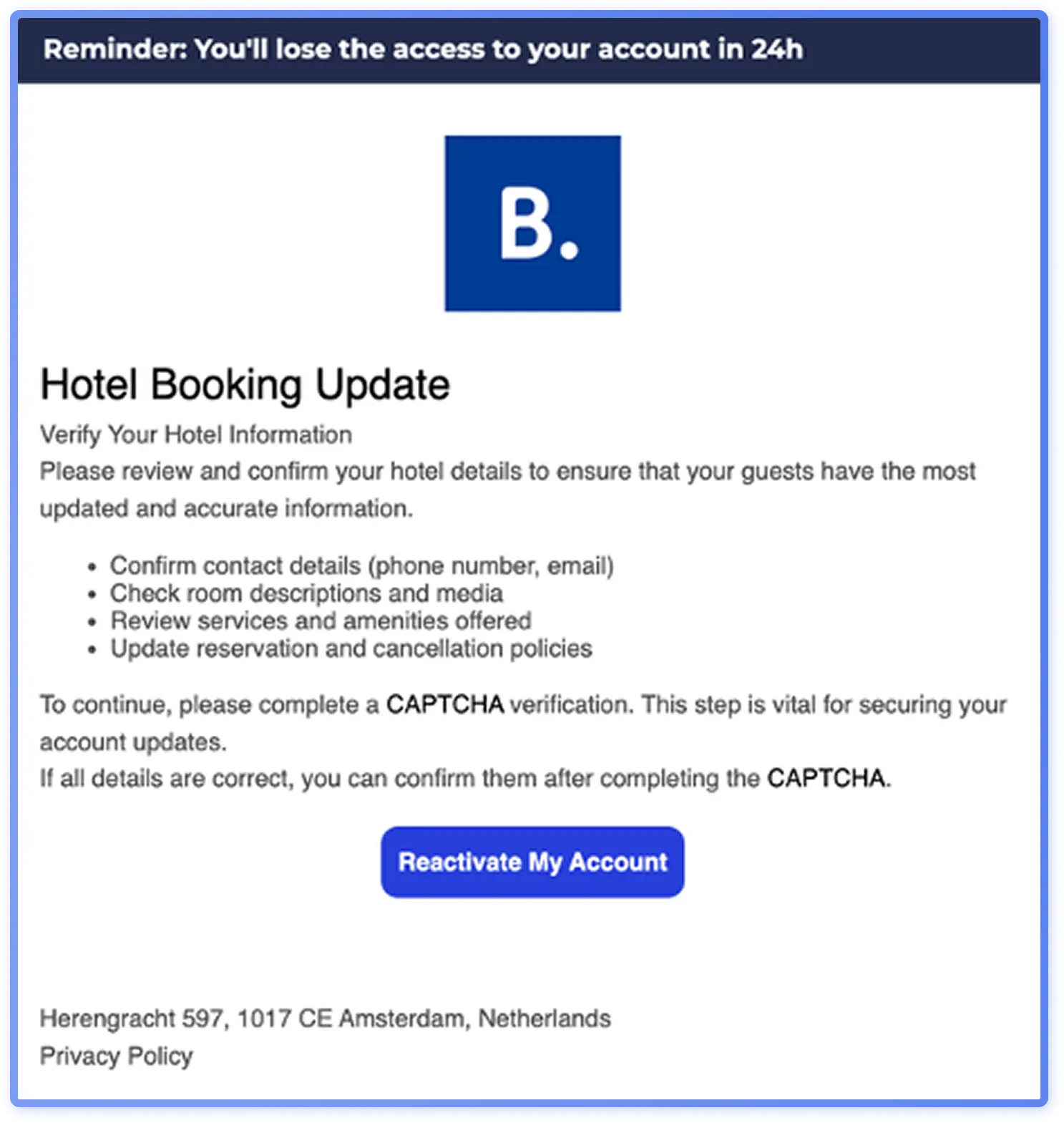
Across industries, campaigns consistently rely on core social engineering tactics, such as urgency, authority impersonation, and money transfer requests. These techniques exploit universal emotional and hierarchical triggers, making them effective regardless of the target sector.
Threat data reflects high volume campaigns designed to be universally effective with some examples of industry-specific targeting. However, it is probable that many seemingly industry-focused attacks are even more precise, aiming to breach a specific company rather than just a sector.
Regional threat landscape analysis
Globally popular techniques include urgency, money-transfer lures, authority impersonation, document-signing lures, and security alerts. However, threat data suggests that regional variation in phishing tactics is more pronounced than industry-specific differences.
A review of western cybersecurity news in H1 2025 reported more high profile attacks targeting primarily North America and Eastern Europe, with East Asia and Western Europe following.
Region: North America
Based on regional data, it is probable that voicemail-themed phishing is more common in North America than in Europe or Asia-Pacific. With wider adoption of VoIP systems, like voicemail-to-email solutions in today’s hybrid working environments, fake voicemail transcripts are an appealing tactic for threat actors. Some threat actors using voicemail transcript themes focus specifically on North America.
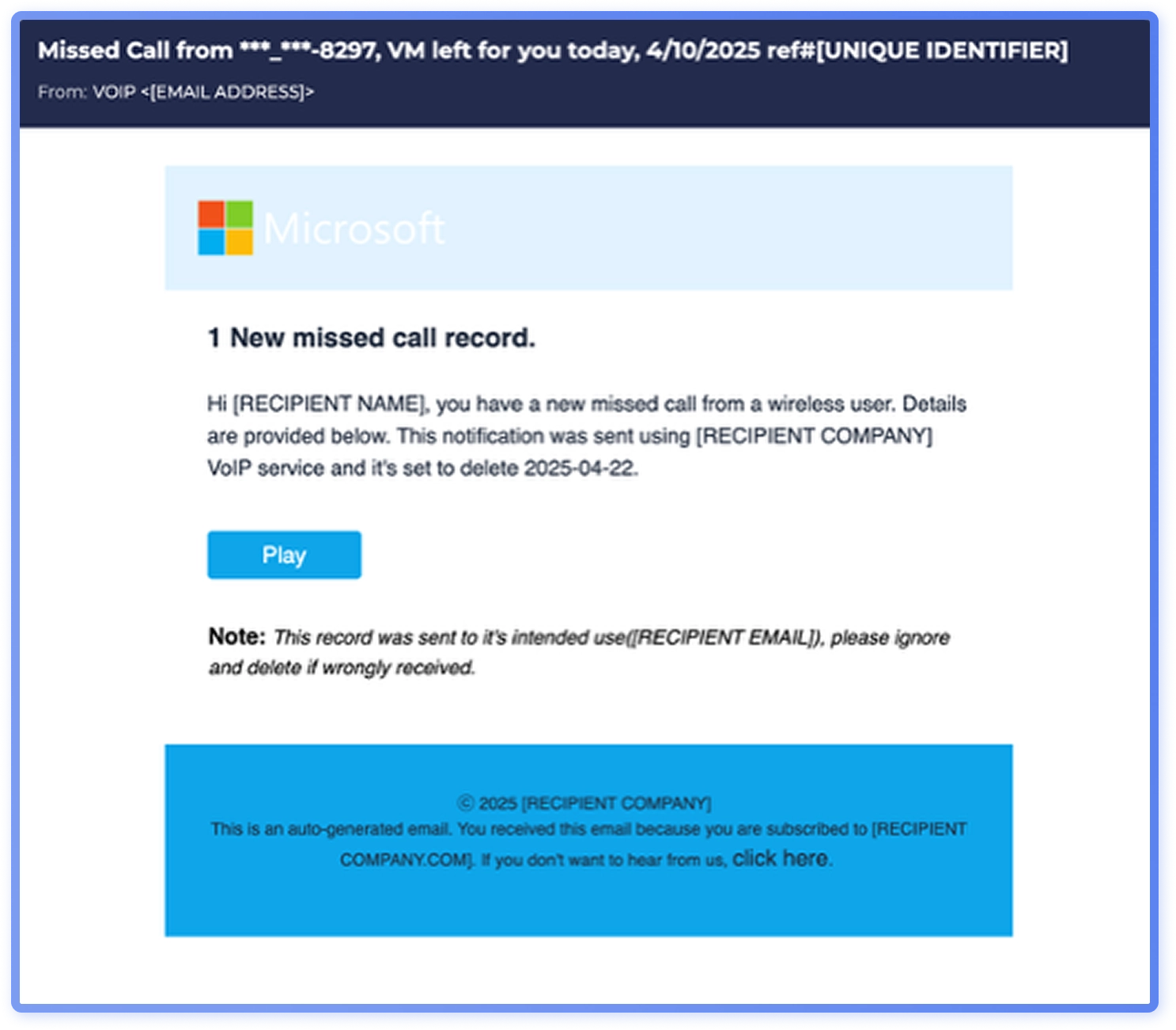
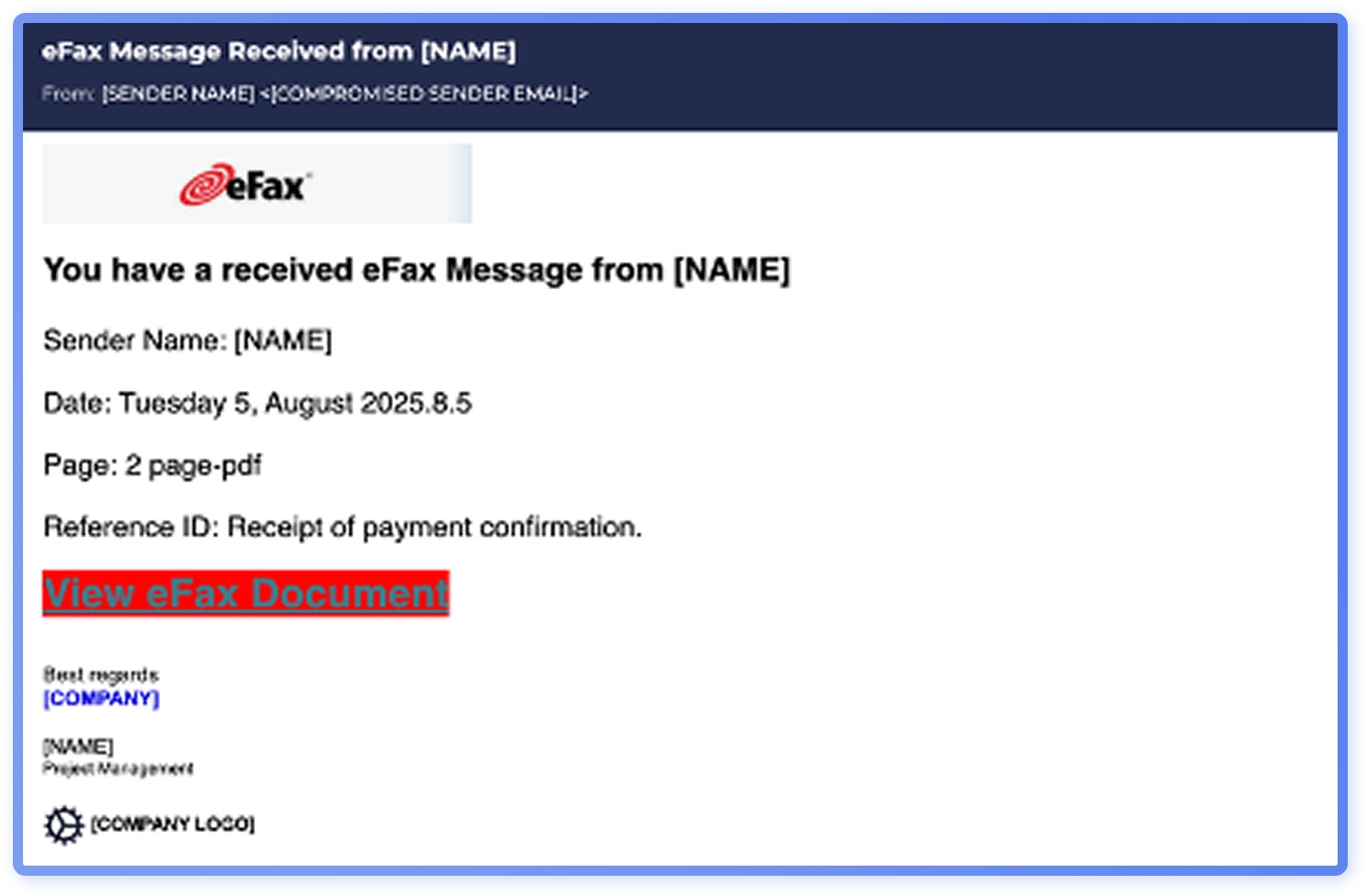
In the dataset, fax phishing also appears more commonly in North America than in other regions.
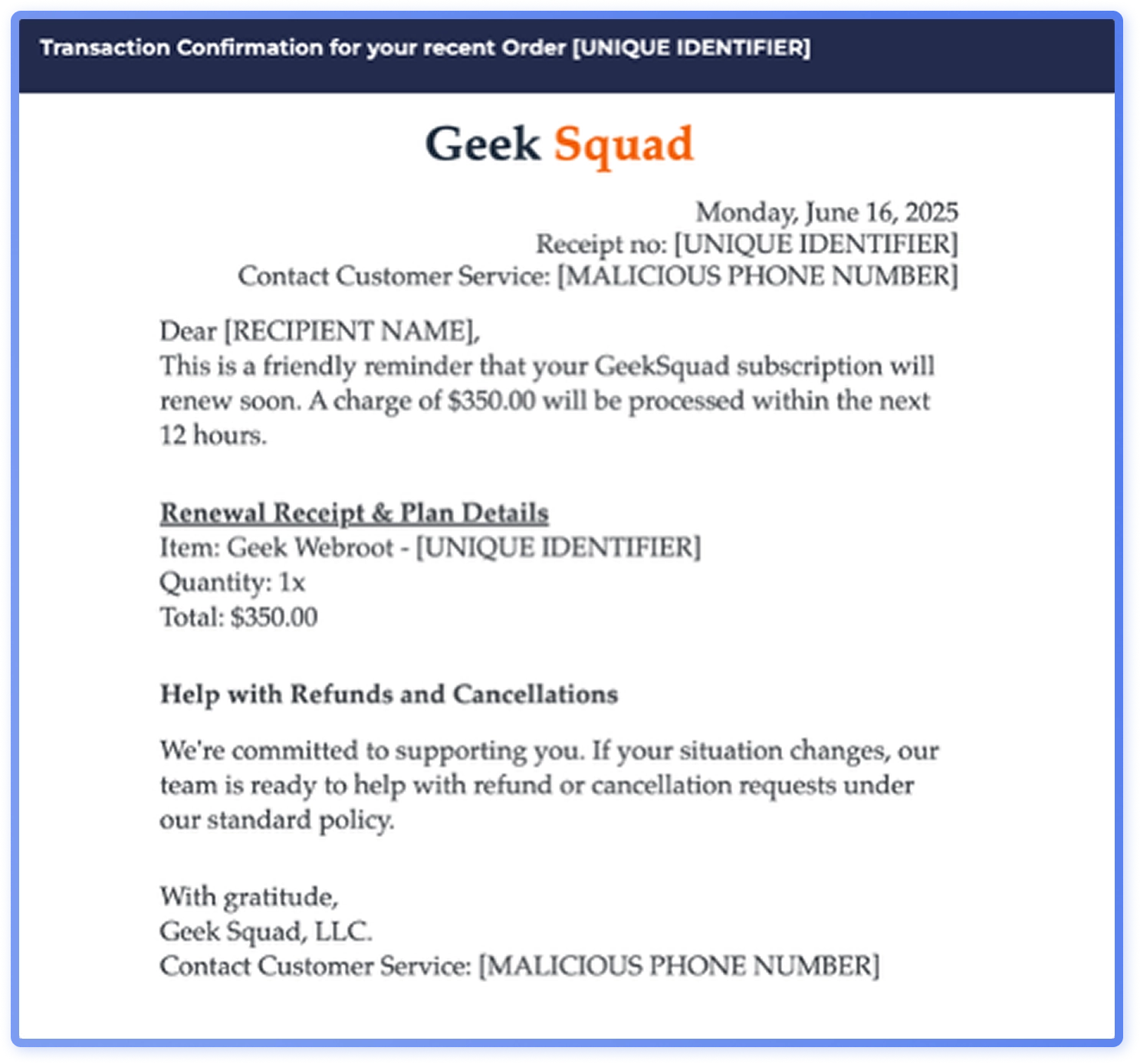
Fake subscription renewal threats which often utilize callback phishing, were observed more frequently in North America. Certain threat actors, such as Luna Moth, have targeted the United States with callback phishing. Commonly impersonated brands include Microsoft, PayPal, Geek Squad and McAfee.
Region: Asia-Pacific
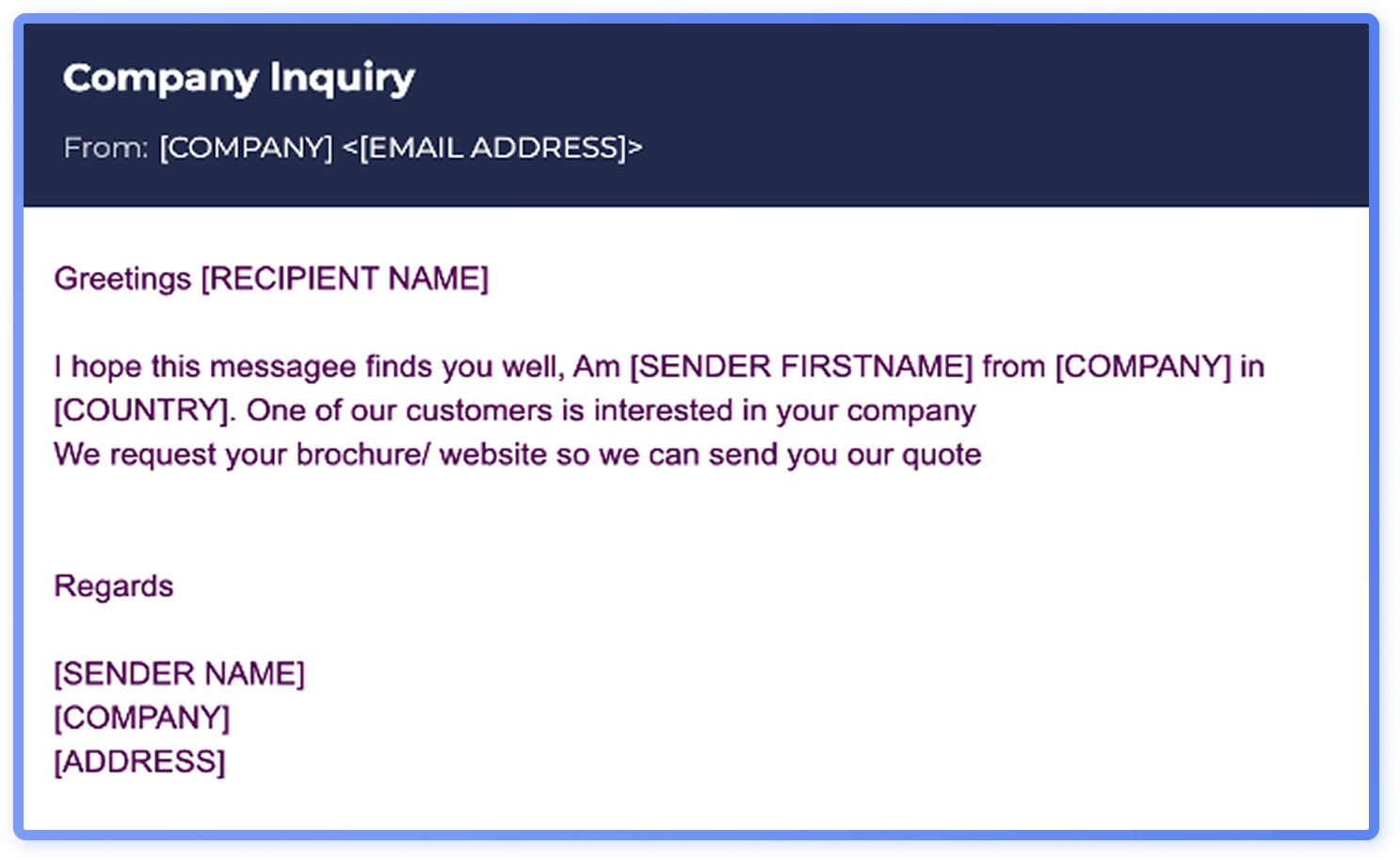
In Asia-Pacific, ‘business opportunity’ lures: opportunities too good to be true, like low-interest loans or investment pitches, are observed more commonly than in Europe or North America.
Region: Europe
In Europe, threat actors are exploiting consumers’ trust in traditional institutions: based on Hoxhunt data, it is possible that financial institution impersonations reflect targeted activity in Europe.
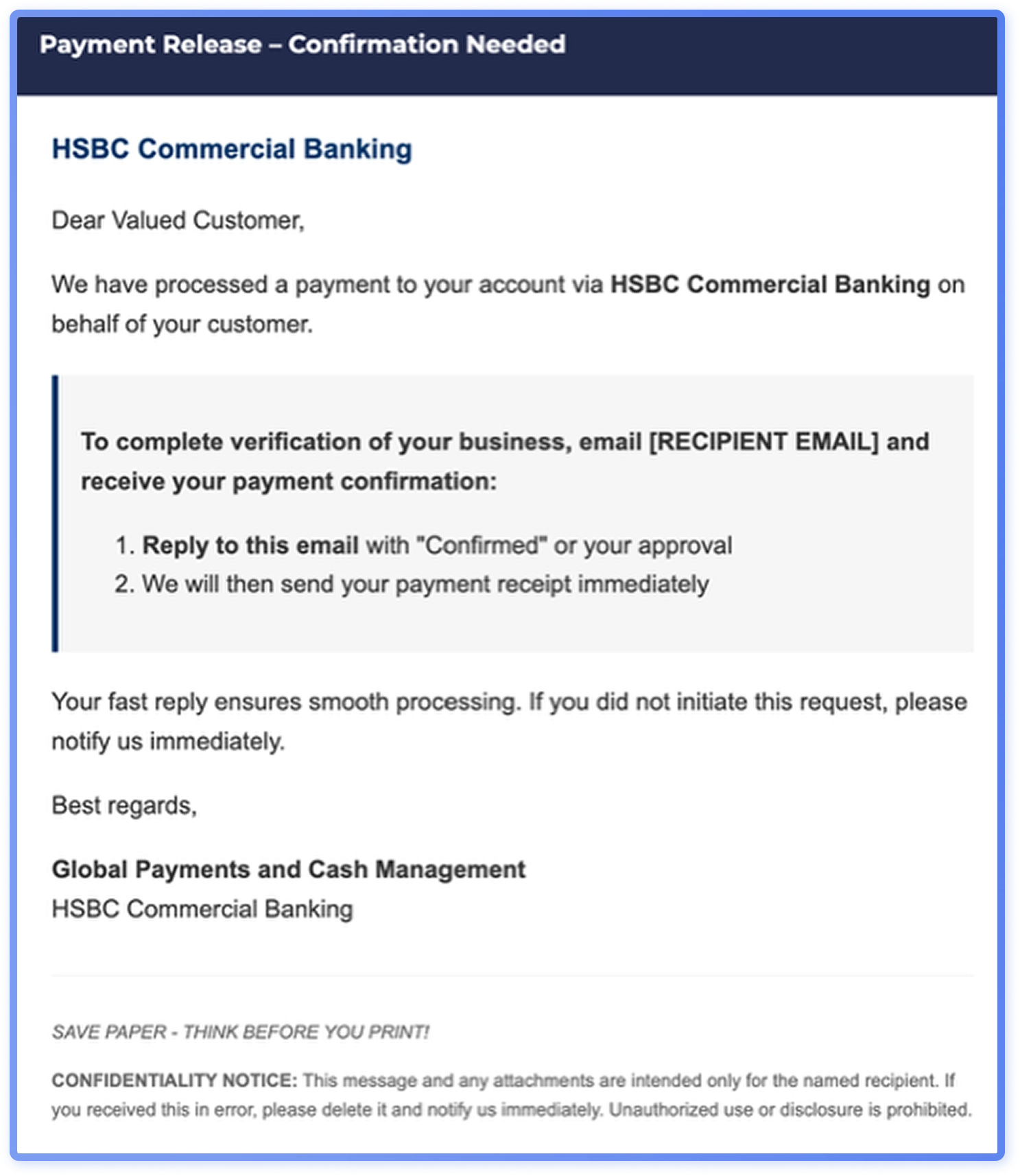
Although many social engineering tactics are globally popular, some groups specialize regionally and may use somewhat different tactics depending on the target region. For example, in Europe, trusted financial institutions are more commonly impersonated than elsewhere, while in North America, particularly the U.S., fake subscription renewal and voicemail-related lures are observed more frequently.
Top attacker techniques
Attachment types
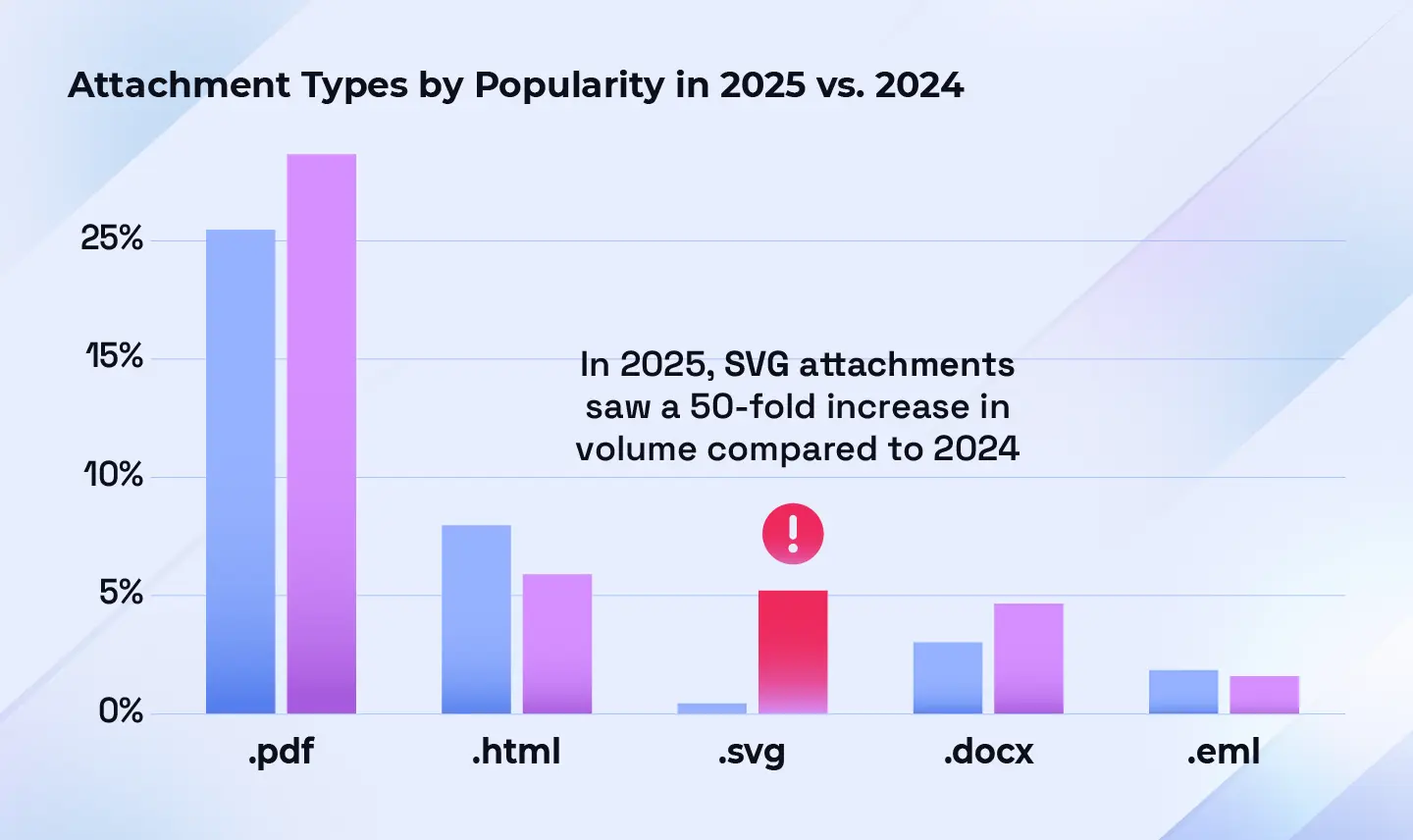
In 2025, PDF attachments remain the top file type used in attachment based phishing, accounting for 23.7% in the first half of the year (Figure 16). PDF attachments included fake invoices with fraudulent payment details and fake Europol letters, and some contained links or additional attachments leading to payloads, often credential harvesters. It is probable that PDFs’ ability to bypass filters and appear trustworthy contributed to their fairly stable share from 2024 (Figure 16).
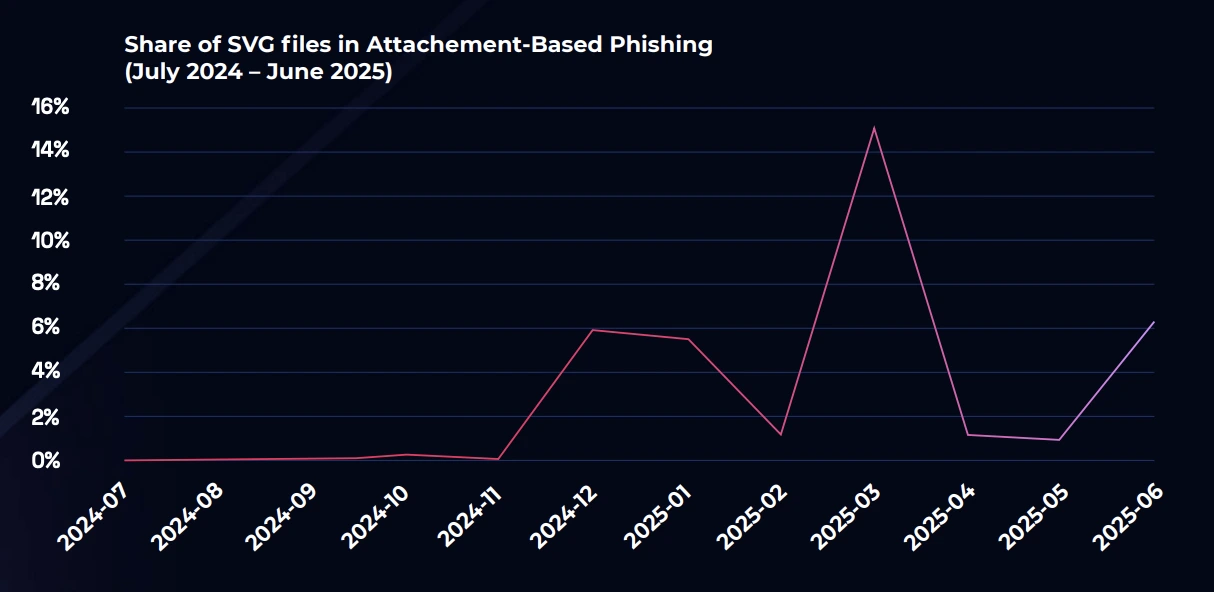
HTML attachments ranked second at 5.6% in H1, down from 10% in 2024 (Figure 16). SVG attachments ranked third at 5.0%, marking a significant increase from near-negligible share in 2024 (Figures 15 and 16).
Microsoft Word documents, were fourth at 4.4%, while EML attachments ranked fifth at 1.4% in H1 2025 (Figure 16). Other 2025 attachments ranged from image files (e.g. fake invoices) to executable files. However, because phishing emails reported to Hoxhunt have always already bypassed filters, executable files which are often blocked by security filters, do not make up a significant proportion of the data set.
On the rise: SVGs
Since late 2024, the use of SVG files in phishing has seen a large increase from a niche baseline. In 2025, attacks utilizing SVG attachments saw 50-fold increase in volume compared to 2024. SVGs appear as harmless graphic files and bypass many anti-spam email tools, making them an attractive technique to attackers. As of September 2025, Microsoft has stopped displaying inline SVG images to mitigate increasing misuse like cross-site scripting(XSS) attacks. SVG attachments continue to be supported.
Read our SVG Phishing Attachments Mini-Report
What are SVGs?
SVG (Scalable Vector Graphics) filesare XML-based image formats used for displaying vector graphics on the web. They can include scripts, links, and interactive elements. SVG files can be used in phishing to embed malicious code or redirect users to fake login pages.
What are the mitigation measures?
To mitigate the risks associated with malicious SVG files, it’s advisable to combine both human-centric and technical solutions. Users should be trained to know the risks associated with SVG-files through adaptive security awareness training, and security operators might consider blocking or quarantining emails with SVG attachments.
QR Codes: Now in attachments
In October 2023, the occurrence of QR codes in malicious email rose from negligible to over 20%. In H1 2025, they only showed up in less than 2% of malicious emails.
What changed: Detections improved and attackers reduced use of QR codes. They are now also hiding QR codes inside attachments like PDFs or otherwise obscuring them, making it harder to track usage.
What it means: Counts may have declined but the risk persists. When attackers do use QR codes, the goal is the same as before: redirecting users to malicious sites.
Bottom line: The 2023 spike reflected filter bypass: as filters caught up, attackers adapted by hiding QR codes in attachments or starting to use different techniques altogether.
Sender domains
In H1 2025, gmail.com accounted for 20% of sender domains in malicious emails, compared with 2.8% for outlook.com, the second most popular origin domain (Figure 17). Two factors likely contribute to the higher share: ease of account creation and Gmail’s role as Google’s sole free consumer option versus Microsoft’s multiple options (Outlook, Hotmail, Live) and their regional variants.
Phishing emails sent from 3rd party services
Threat actors utilize third party services for sending phishing emails to increase perceived legitimacy and bypass email filters. Common types of misuse include sign-ups on Salesforce or Dropbox (or use of compromised accounts) and misuse of Docusign or PayPal message fields.
Since late 2024, threat actors have increasingly used Salesforce’s mailing services, often using [email protected]. More recently, campaigns have evolved to leverage the Salesforce Marketing Cloud, expanding delivery methods beyond traditional transactional senders. Salesforce’s share of sender domains among malicious emails rose from 0.6% in January to 1.8% in June (Figure 18).
Phishing and human risk
Human risk findings
Based on analyzed simulation performance data, we can see which lures users are most likely to fall for, and when phishing attempts are caught and reported.
Lures users fall for
The human layer mirrors the threat landscape: susceptibility rises when messages align with routine workflows and trusted internal roles. Users most commonly fail phishing simulations that appear business-as-usual, such as internal file-share requests, calendar invites or HR requests.
The dominant threat themes of 2025, preying on Microsoft credentials, HR and document sharing requests, supplier interactions, and finance-adjacent threads, represent the same categories where simulations that “feel like work” showed elevated interaction rates.
Simulations hinting at praise or recognition from managers, coworkers, or customers also showed higher failure rates. Threat actors know that exploiting curiosity, desire for feedback and reward-seeking is effective: large HR impersonation campaigns in H1 2025 frequently referenced salary increases and bonuses.
Timing matters: if the email is somewhat expected, users are more likely to comply than question. Tooling and platform cues also matter. If the impersonated system is genuinely used by the recipient, the chance of engagement increases. Similarly, bulk phishing trades precision for scale, accepting non-relevance for most targets and relying on the minority for whom the lure appears as a routine process.
Lures users catch
Users report simulations that clash with their expectations: Unexpected internal messages, like receiving a gift card, tend to raise suspicion and reduce engagement with the email. Repeated HR requests for sensitive information can also trigger doubt, especially when inconsistent with usual HR communication.
Even though Microsoft impersonations remain a persistent threat in the real-world landscape, security alert simulations with strong urgency cues yield high reporting rates.
Delivery-related lures are hit-or-miss. When no parcel is expected or details do not align with reality, most users catch a phishing attempt. Users also often notice, question and report emails that mention unfamiliar platforms or tools, or otherwise deviate from usual workflows.
Classic CEO money‑transfer requests also get caught and reported often, as users do not expect their CEO to send such requests. Simulations that include fake email threads, a popular technique in2025, also produce high reporting rates.
The more unexpected the content or channel, the more likely it is for recipients to pause, think and report. Continuous training remains important also for these themes, as compromised organizational credentials and supply chain or CEO money transfer requests can carry high financial impact when successful.
Overall, the simulation data reinforces a simple but crucial message: pause and think. Threat actors succeed by blending into everyday workflows and impersonating trusted internal roles. Training that teaches people to “look for weirdness” is valuable, but effective programs emphasize questioning routine requests, like shared documents or HR follow‑ups. Exploiting familiar workflows is a core part of threat actors’ toolkits.
Users are increasingly resilient against certain types of bulk phishing campaigns, like security alerts. However, personalized internal impersonations and document-sharing lures continue to drive higher failure rates. Ongoing training is essential to train higher risk users and maintain vigilance among strong performers. Cybersecurity awareness is not a one-time achievement; it’s a constant practice of staying ahead of attackers who are always refining their tricks.
Campaigns, tooling and environments
Microsoft vs. Google environment
The findings below are from comparing emails reported by users of Microsoft environments with those reported by users of Google environment in H1 2025.
Microsoft vs Google malicious email reports
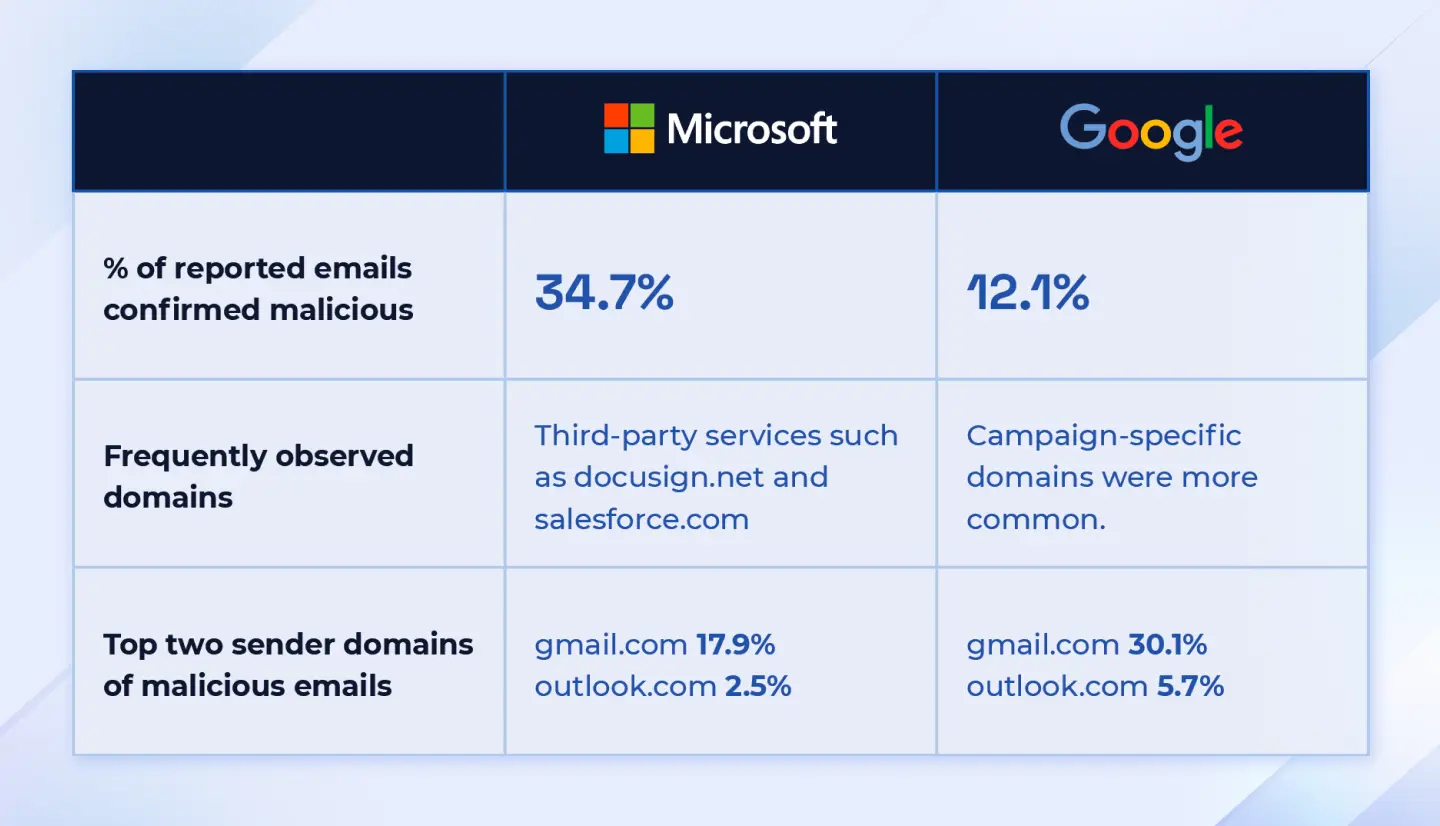
- In environments using Microsoft, 34.7% of user-reported emails were confirmed malicious.
- In Google environments, the share of confirmed malicious emails was lower, at 12.1%.
Frequently observed domains
- Microsoft tenants: Malicious emails often leveraged third-party services, such as
docusign.net and salesforce.com as part of the attack path. - Google tenants: Malicious emails more often used campaign-specific domains created primarily for the phishing or scam campaign.
Top sender domains of malicious emails
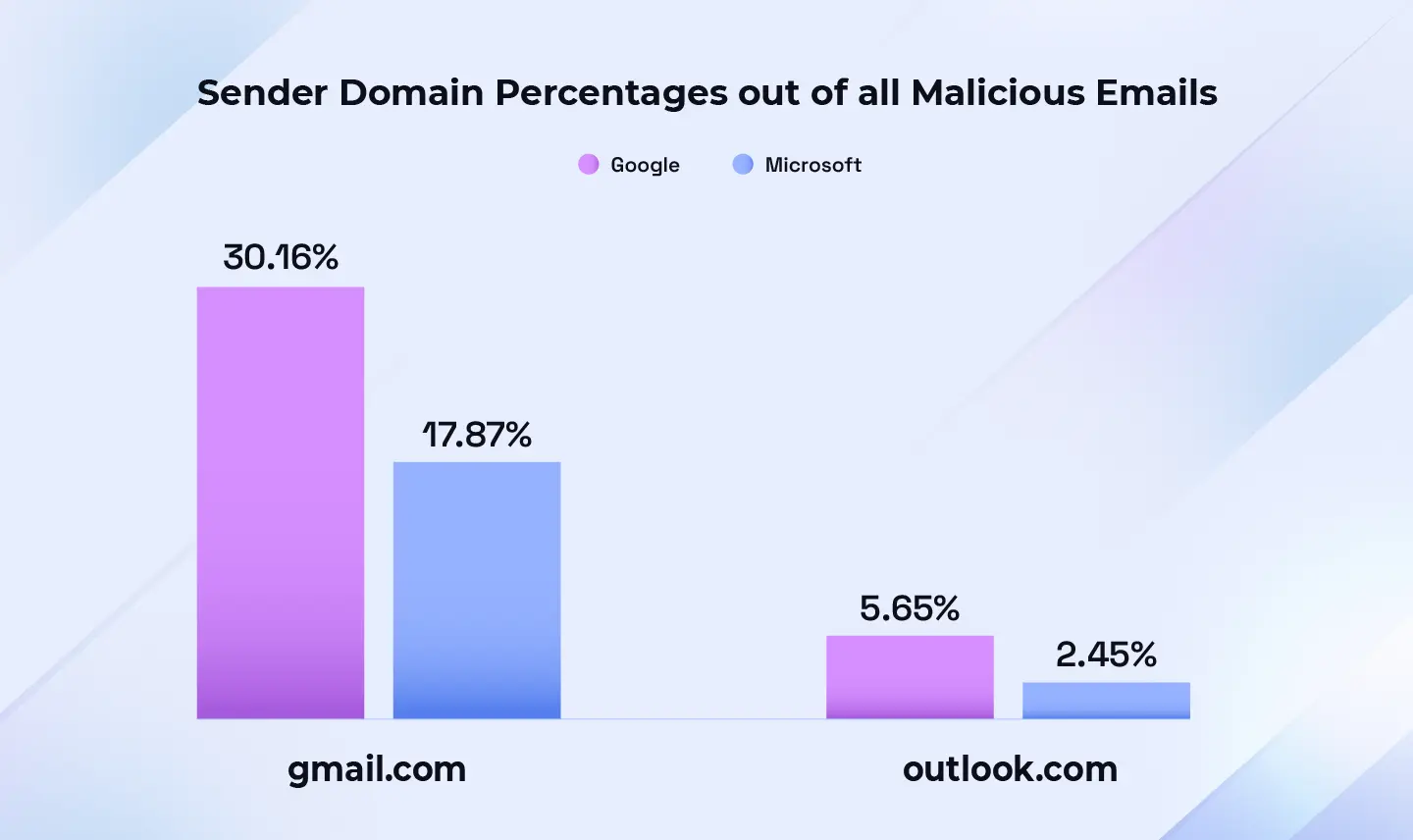
- Microsoft tenants: gmail.com - 17.9% of confirmed malicious emails, outlook.com - 2.5%
- Google tenants: gmail.com - 30.1% of confirmed malicious emails, outlook.com - 5.7%
Overall, a substantial portion of malicious emails in both ecosystems is sent from large, familiar consumer email providers, not just obscure or obviously suspicious domains. Discrepancy in confirmed malicious emails can be due to different spam filtering solutions, variance in phishing campaign types between the environments, and variance in user tenure and reporting skills.
It is possible that Gmail’s role as Google’s sole free consumer service and its single, non-regional domain structure contribute to its higher share relative to Outlook-family domains. Outlook-family addresses are distributed across multiple domains (e.g., Outlook,Hotmail, Live and their regional variants), while Gmail concentrates volume on gmail.com. Beyond the top domains (Figure 21), emails originate from diverse sources, including other free webmail (e.g., hotmail.com, icloud.com),compromised accounts, and misused third-party services.
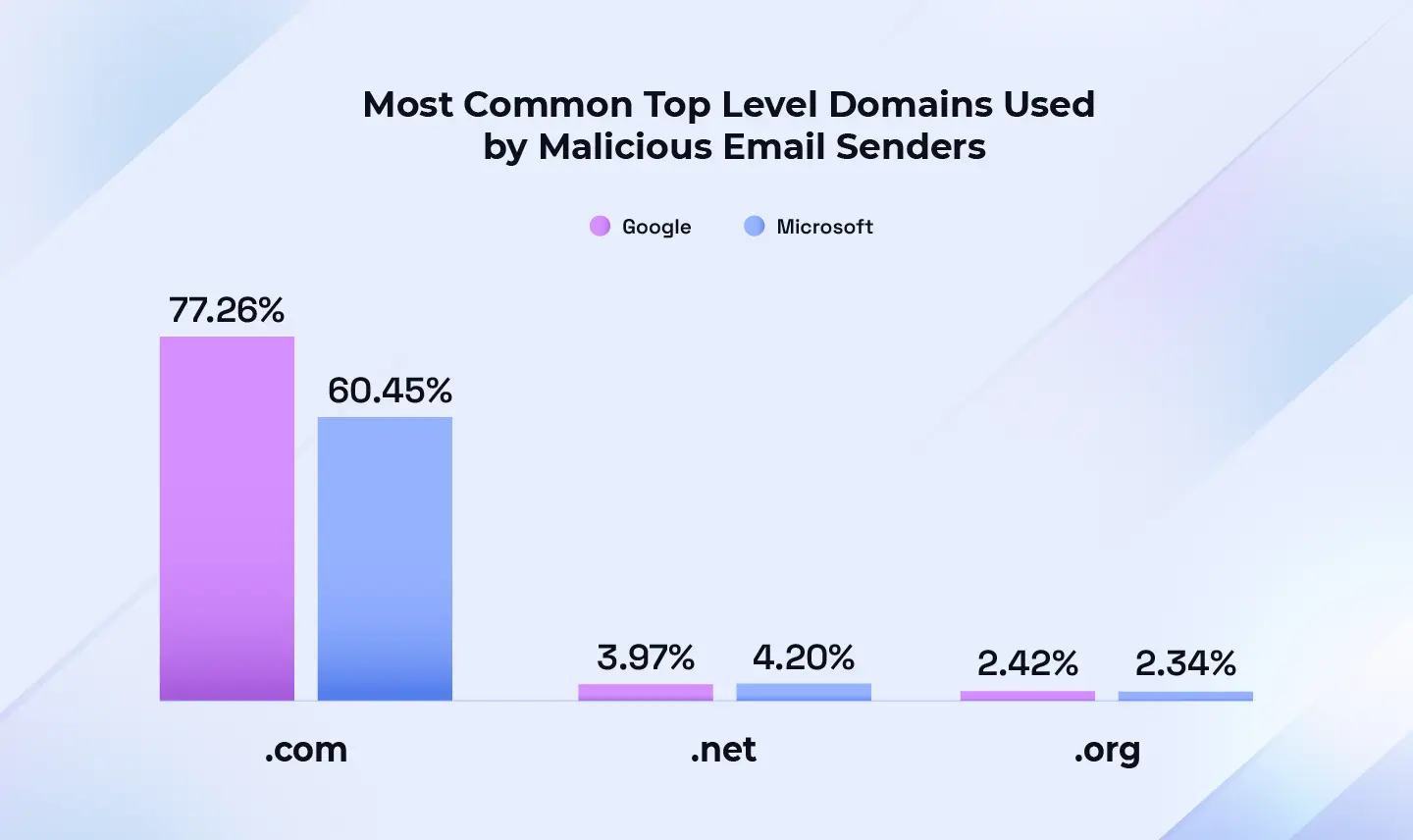
Top-level domain (TLD) = the suffix that appears at the end of a web or email address, such as “.com” in “google.com”. It indicates the website’s category (for example, commercial, governmental, educational) or its geographic origin.
Environment-specific campaigns
The following patterns stand out in the types of the threats sent to each environment:
Microsoft impersonations were more commonly reported by Microsoft environment users, whereas Google impersonation were uncommon in both environment. Users of Microsoft environments reported more internal impersonations claiming to come from HR, often salary- or bonus-themed.
Google environment users reported more Docusign impersonations. Users of Microsoft environments reported documentsigning lures, but the emails were not tied to any specific brand as often as in the Googleenvironment. It is probable that a mix of targeting preferences and environment-specificfiltering differences contributes to these patterns.
Users of both environments reported BEC-related third-party impersonations, fraudulent supplier offers, and fake wire-transfer receipts with no notable differences in quantity or style.
Meta campaign comparisons
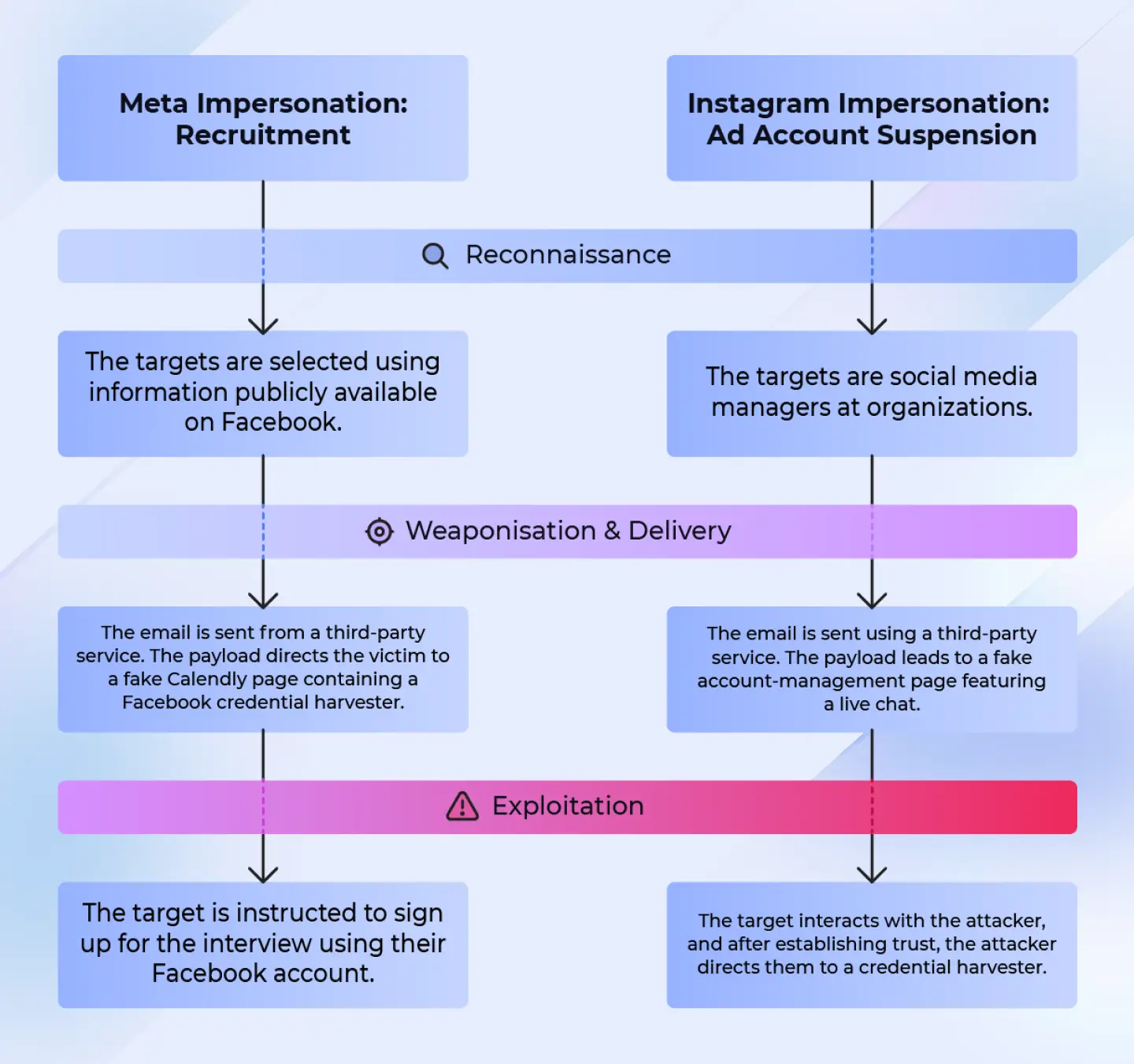
Below we'll highlight two attack examples:
- A recruitment-themed Meta impersonation
- An Instagram impersonation alleging ad-account suspension due to policy violations.
In both cases, the recipients are targeted with customized phishing emails sent using third-party services, leading to fake landing pages impersonating different services such as Calendly. The campaigns are a part of a wave of Social Media related attacks this year, and it is probable that use of third party senders reduced filtering effectiveness.
Initially, most recruitment-themed attacks impersonated Social Media platforms, but later they have expanded to other large well-known companies such as Red Bull, Apple,Marriott or Coca-Cola. While the impersonated organizations span different industries, they all share one trait: a well-known brand to catch the attention of marketing professionals.
The attackers’ goal of gaining access to business Meta accounts also remains the same across the attacks. Even when another brandis impersonated, the recipient is asked to log in to sites like (fradulent) Calendly with their Meta credentials.
Killchain 1: Meta recruitment
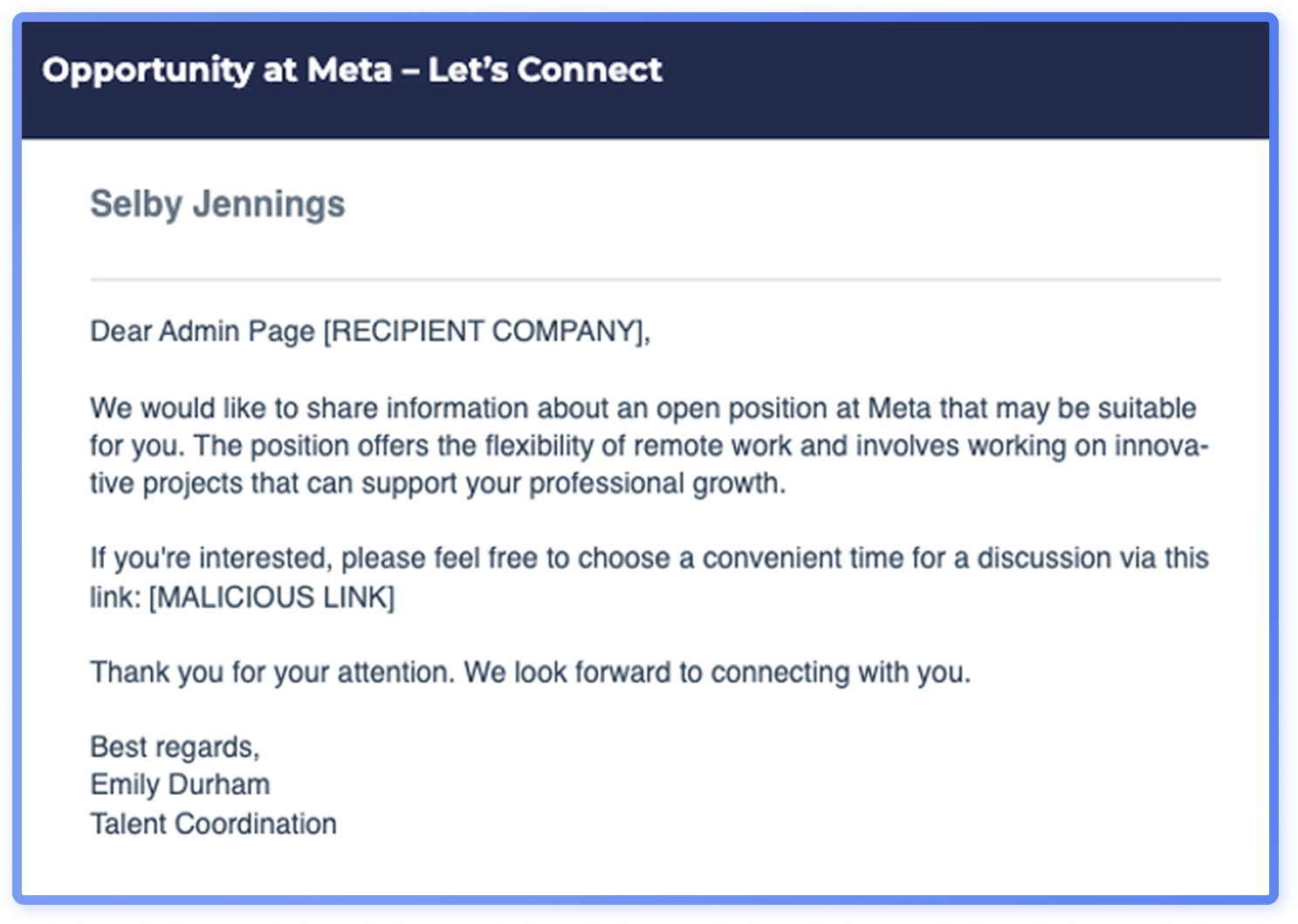
This Meta impersonation campaign targets organizations’ social-media administrators with Social Media related job listing lures. The recipients receive a phishing message that leads to a landing page impersonating Calendly, where they are prompted to authenticate using Facebook.
Phase 1: Reconnasisance
During the reconnaissance phase, adversaries collect the target email addresses by scraping the organizations’ social media pages and extracting contact information. These addresses are then used as the recipients of this attack. The assumption of the attackers is that the contact information would be for social media managers or users in similar roles, making the fake job listing more relevant to them.
Phase 2: Weaponization & delviery
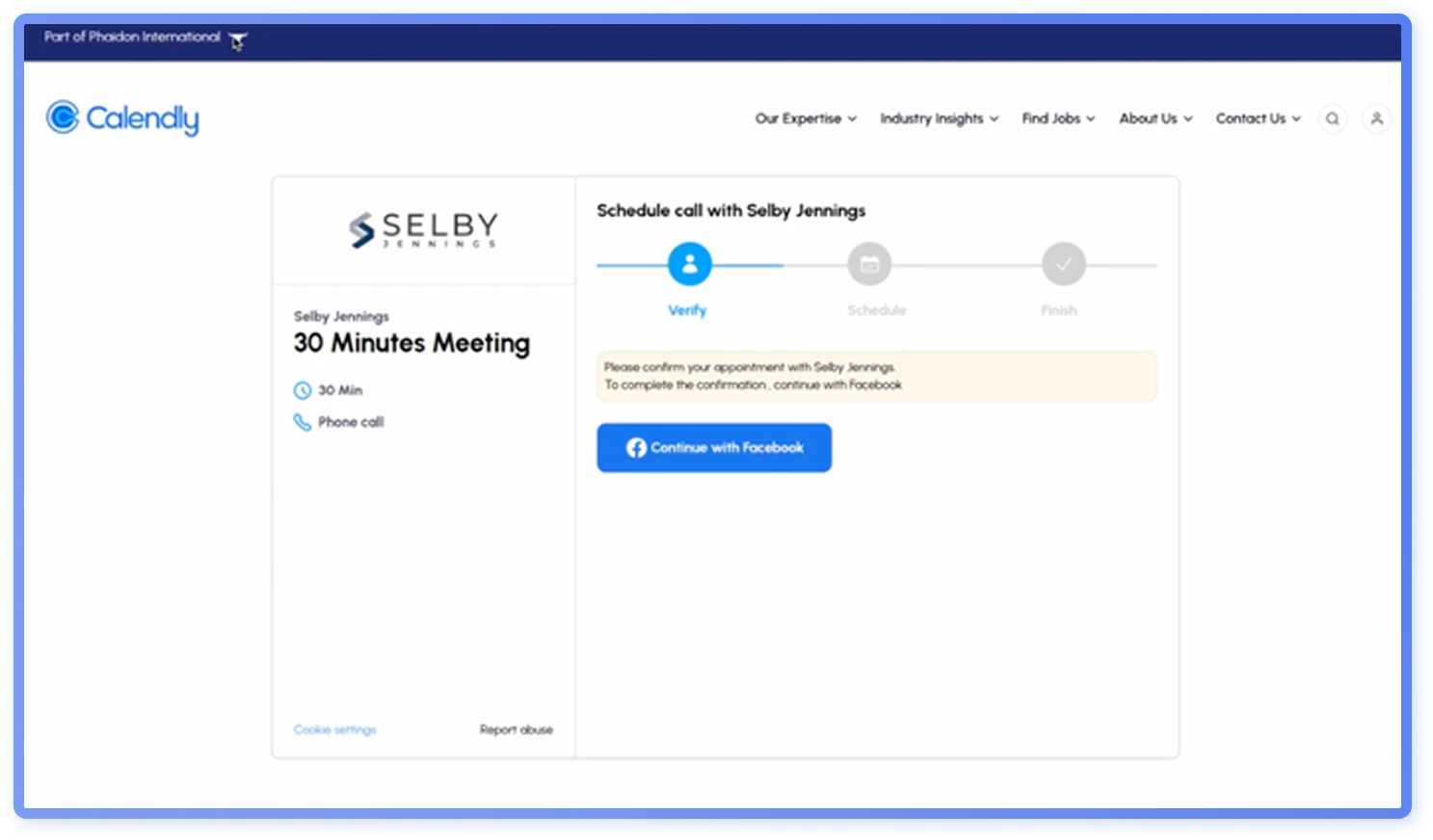
During the weaponization phase, the phishing email and landing page are created. In this campaign, the phishing email (Figure 23) is via Xero, a third-party invoicing service. Using third-party services makes it less likely for spam filters to catch the phishing message. The landing page is made to look like Calendly, an appointment scheduling software, often used by recruiters to book interview slots (Figure 24).
Phase 3: Exploitation
The goal of the attacker is to get the recipient to sign up for the interview slot (Figure 24), using a Browser-in-the-Browser (BitB) credential harvester that displays a fake Facebook login window (Figure 25). BitB harvesters show a fake browser window with spoofed URLs. If credentials are entered, adversaries can access either personal Facebook accounts or organizations’ official accounts.
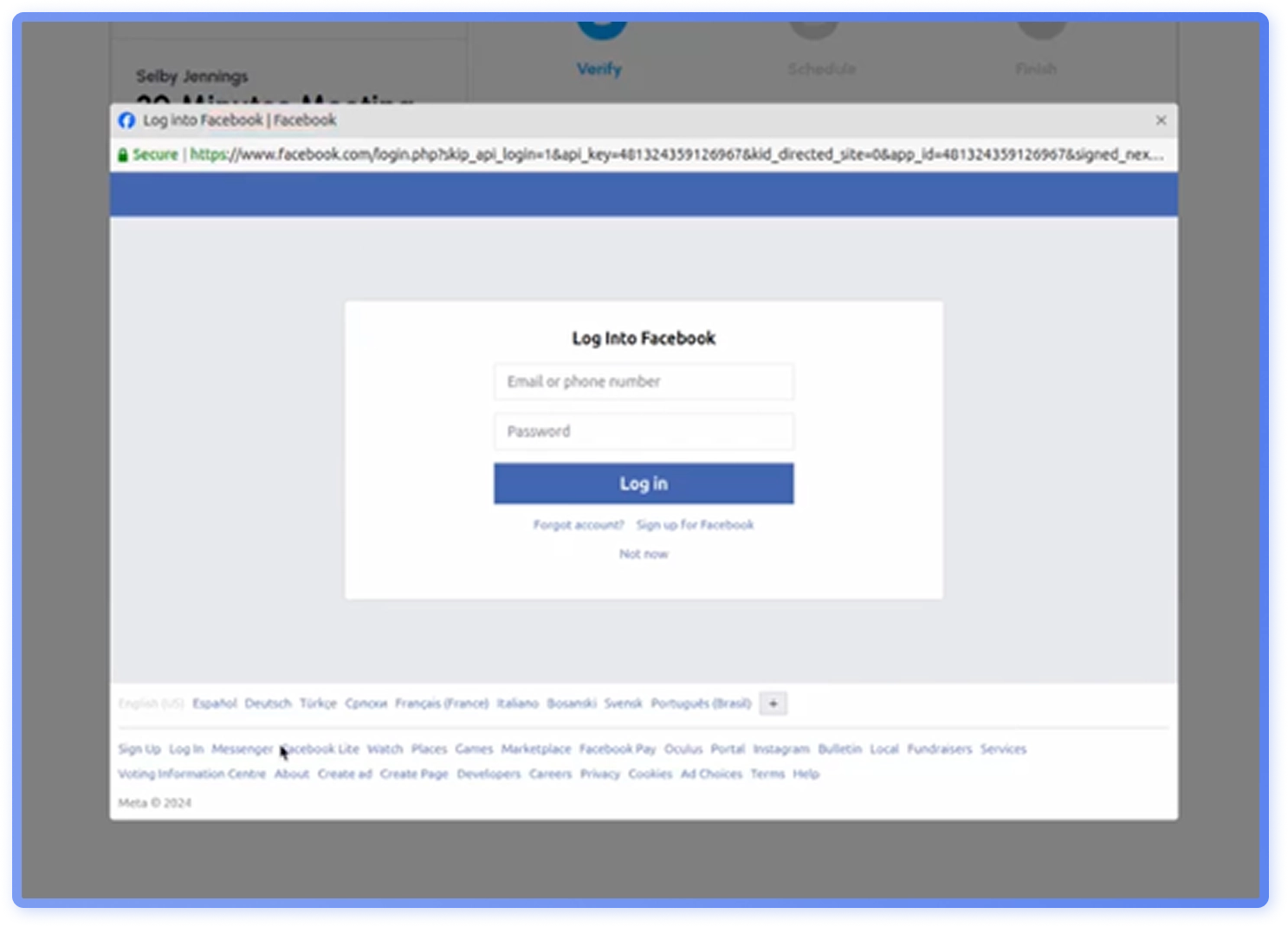
This campaign is a part of a wave of SocialMedia related recruitment attacks this year, which include Coca Cola, Coursera and Robert Walters impersonations.
Killchain 2: Ad policy violation
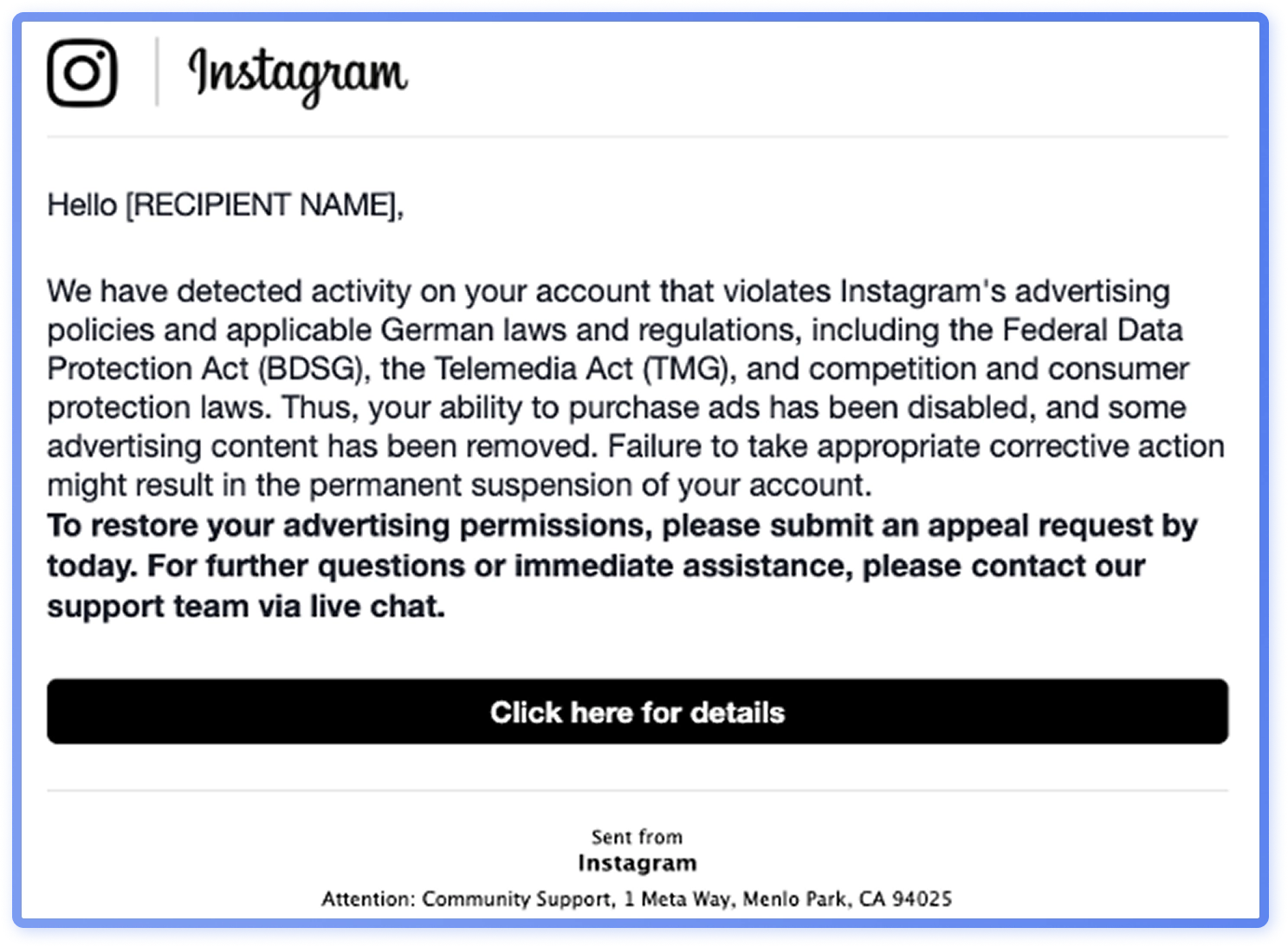
This Meta impersonation campaign targets organizations’ social media credentials, alleging account suspension due to advertising policy violations.The recipients receive a phishing message that leads o a fake support chat with a live agent.
Phase 1: Reconnasisance
During the reconnaissance phase of this campaign, the adversaries select their targets and acquire their email addresses. Similarly to the Meta campaign, the targets are primarily users working in marketing. After the targets are selected, it’s straightforward to acquire their work email addresses through brute forcing (guessing [email protected]) or through other open-source intelligence.
Phase 2: Weaponization & delviery
During weaponization and delivery phase, the phishing email and landing page are created. In this campaign, the phishing email (Figure 26) is sent misusing Salesforce. Similarly to the Meta campaign, using third-party services makes it less likely for spam filters to catch the phishing message. The landing page is made to look like a Meta Accounts Center (Figure 27).
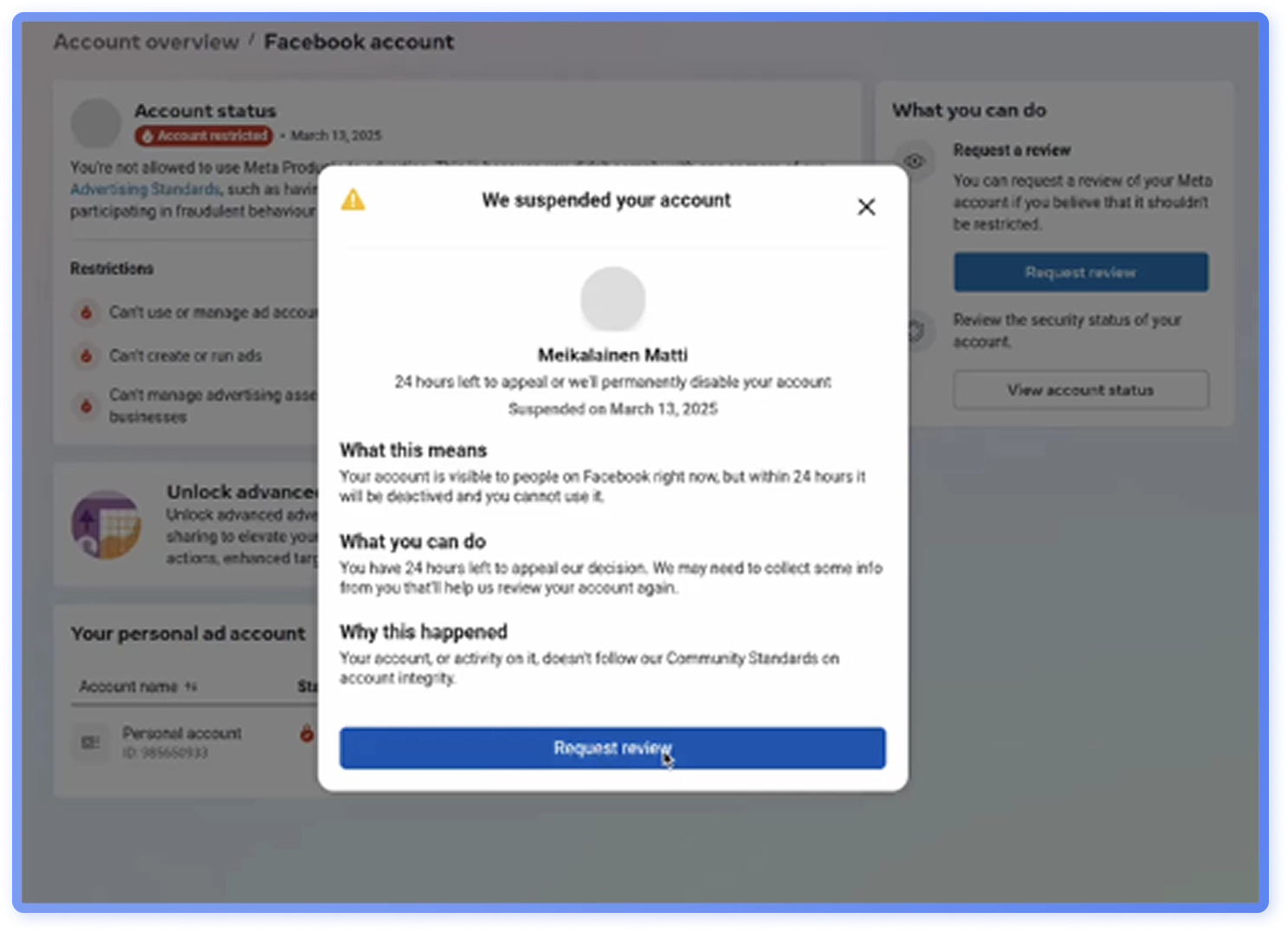
Phase 3: Exploitation
If the recipient decides to act on the email, they are directed to a fake live-chat with an attacker impersonating a Meta support agent (Figure 28). The attacker will initially ask some simple questions related to number of managed accounts or if the user advertises on the platform, before proceeding to ask for a screenshot of the recipient’s Facebook settings page (http://business.facebook.com/settings). The goal of this is twofold: to verify which accounts the target manages, and to get them to complete a simple task. Social engineers often start with easy requests to build rapport and slowly escalate them. The final goal is to compromise the target’s Facebook account.
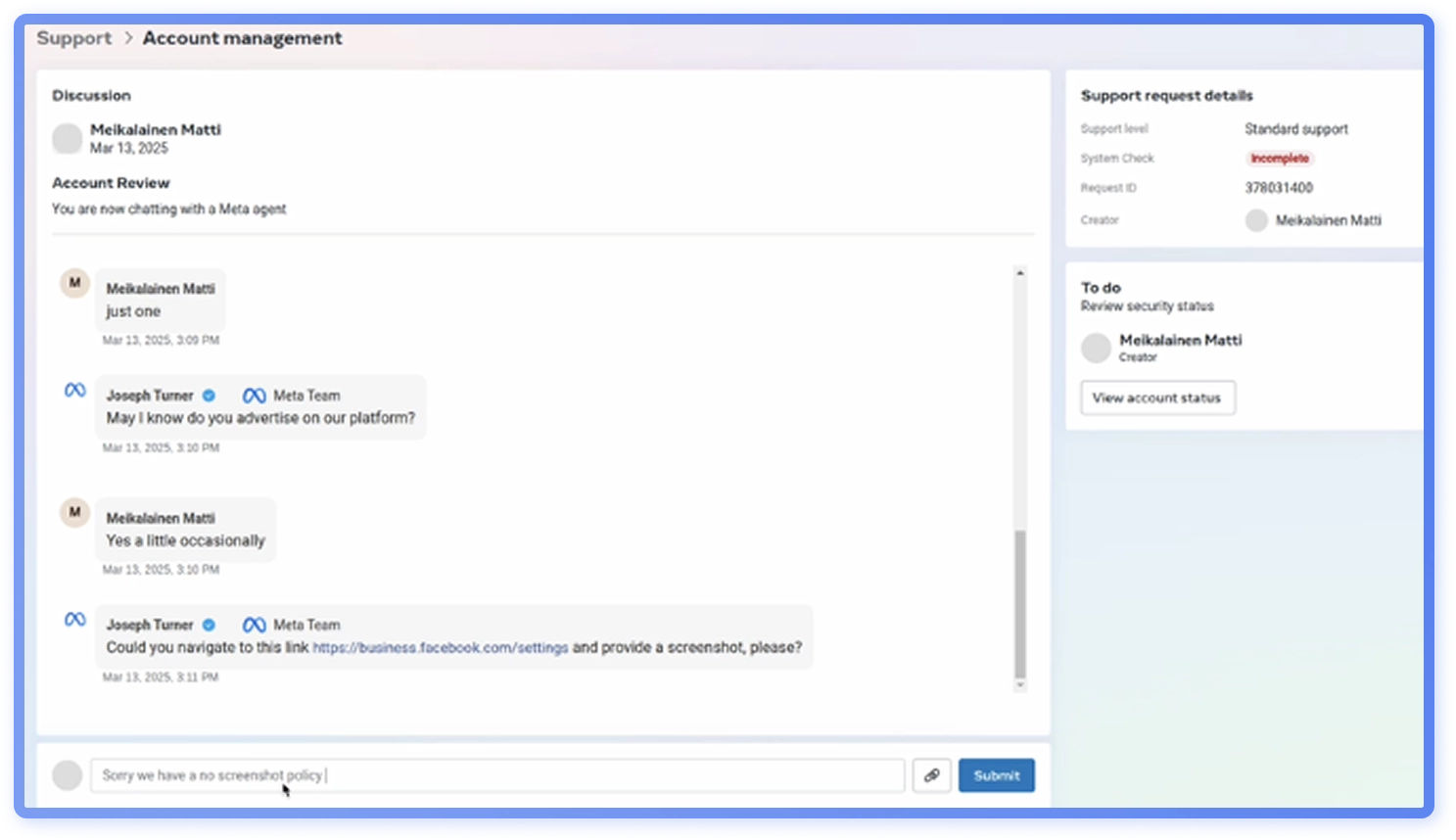
Phase 4: Actions and objectives
Once the adversary has access to the Facebook accounts, there are several possible objectives they may pursue depending on whether the account is personal or associated with the organization.
- Personal accounts: Used to impersonate the victim, spreading further phishing links or conducting scams among their contacts. Access can often also expose private messages, pictures or other personal information which could be used for further social engineering extortion.
- Organizational accounts: Used to post malicious content, redirect followers to phishing pages, conduct financial scams (e.g., crypto fraud), or spread misinformation, damaging brand reputation.
- Lateral movement: If the account is linked to other tools or platforms, such as ad managers or other social media, the attacker can expand their access further.
GenAI in phishing emails: Key findings
Mimicking Microsoft logos
In a dataset consisting of phishing emails assessed as likely GenAI, a recurring feature was a 2x2HTML table mimickingMicrosoft’s logo (Figure 30). Color imitate the logo colors with varying accuracy, often featuring shades noticeably different from the original. It is probable that slight color variations were intentional to avoid exact match filtering. AI tools make generating such variants effortless. While filters learn to spot the classic color set, GenAI enables rapid variant generation at scale, outpacing current defenses.
Phishing emails using HTML tables to mimic Microsoft’s logo are not new, but inQ3 2025, Hoxhunt observed a rise in likely AI-generated emails using these tables and other embedded HTML elements mimicking the logo. This tactic, along with text obfuscation, is well documented and easy to reproduce with generative AI, lowering the technical bar for attackers.Tables require no image hosting and can evade detection tools that focus on images, and they are both simple to create and easy to maintain.
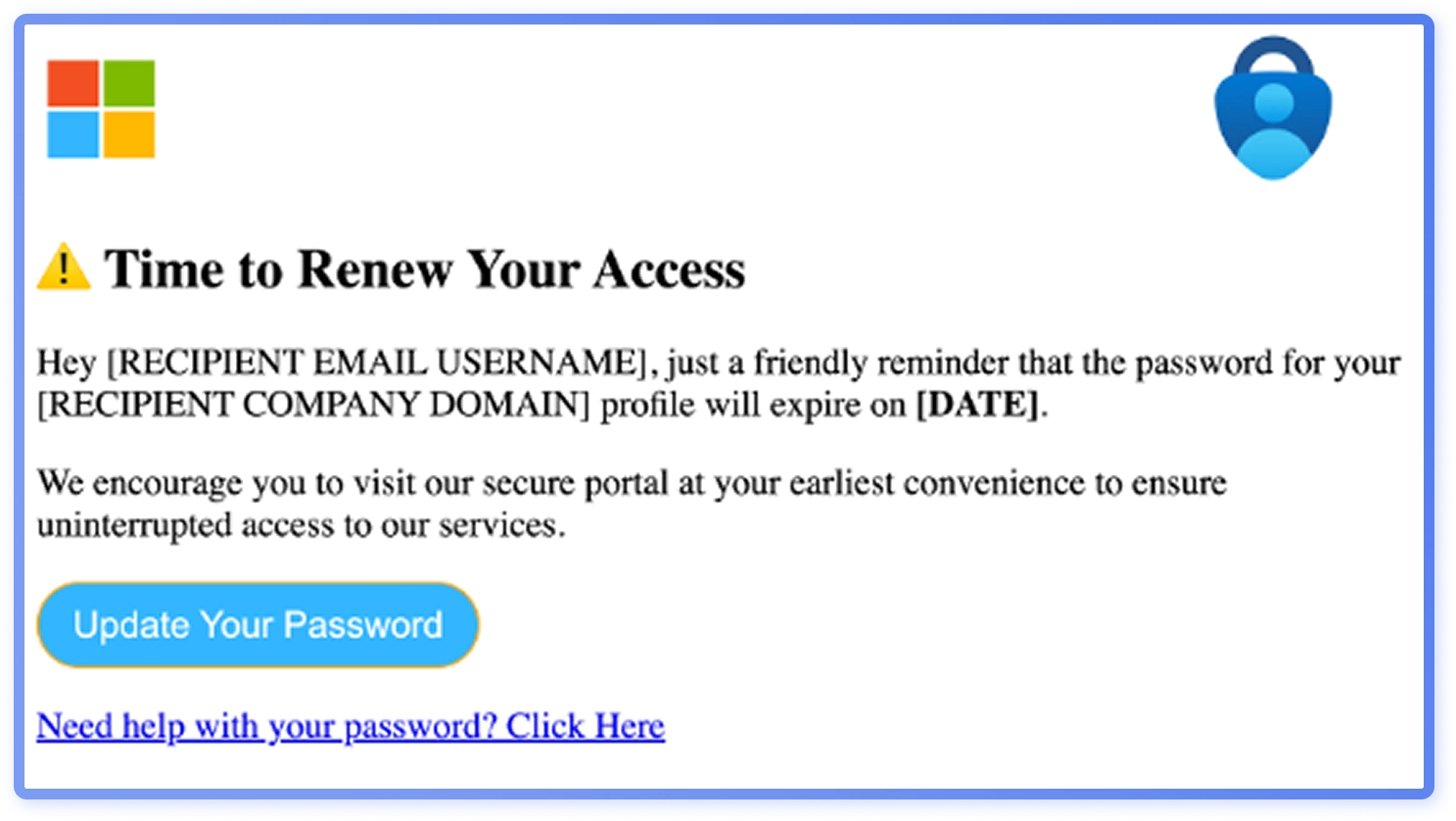
Because the dataset reflects user-reported emails that passed through automatic filtering, this feature being represented so heavily in the data set indicates this low-effort tactic is an effective tactic to ensure phishing emails reach users. The common occurrence ofMicrosoft-themed elements aligns GenAI phishing with broader 2025 threat trends.
Don’t look for typos - look for perfect grammar
Many AI-generated Microsoft impersonations avoid using the word “Microsoft”, not just through obfuscation but by removing it entirely (Figure 30). Attackers often strip flagged keywords and sometimes add hidden, irrelevant text to evade Bayesian filters, campaigns omitting brand names altogether are popular for this reason.
Traditional signs like typos or grammar mistakes are less prominent today. Across multiple languages, including those of smaller nations, many emails were grammatically correct but their English-like sentence structures suggest they were written in English and then machine-translated.
Because AI-enabled tactics and features, such as personalization, perfect grammar and obfuscation can bypass old traditional detection cues, both technical and human, training employees to recognize AI-generated phishing is more critical than ever.
GenAI and automatic personalization
Analysis shows that automatic personalization in GenAI generated phishing emails is frequent but error prone. Templates use placeholders for target details, and when replacement breaks, the leftover text, typically in English, reveals how these campaigns are built in English before translation. Common leftover placeholders like “##victimdomain##”(Figure 31), expose attacker terminology and could unsettle recipients more than successful personalization.
Security awareness training should address this discomfort while reinforcing a positive cybersecurity culture. In 2025, there is no perceived decline in placeholders artifacts, suggesting GenAI phishing has yet to master personalization.
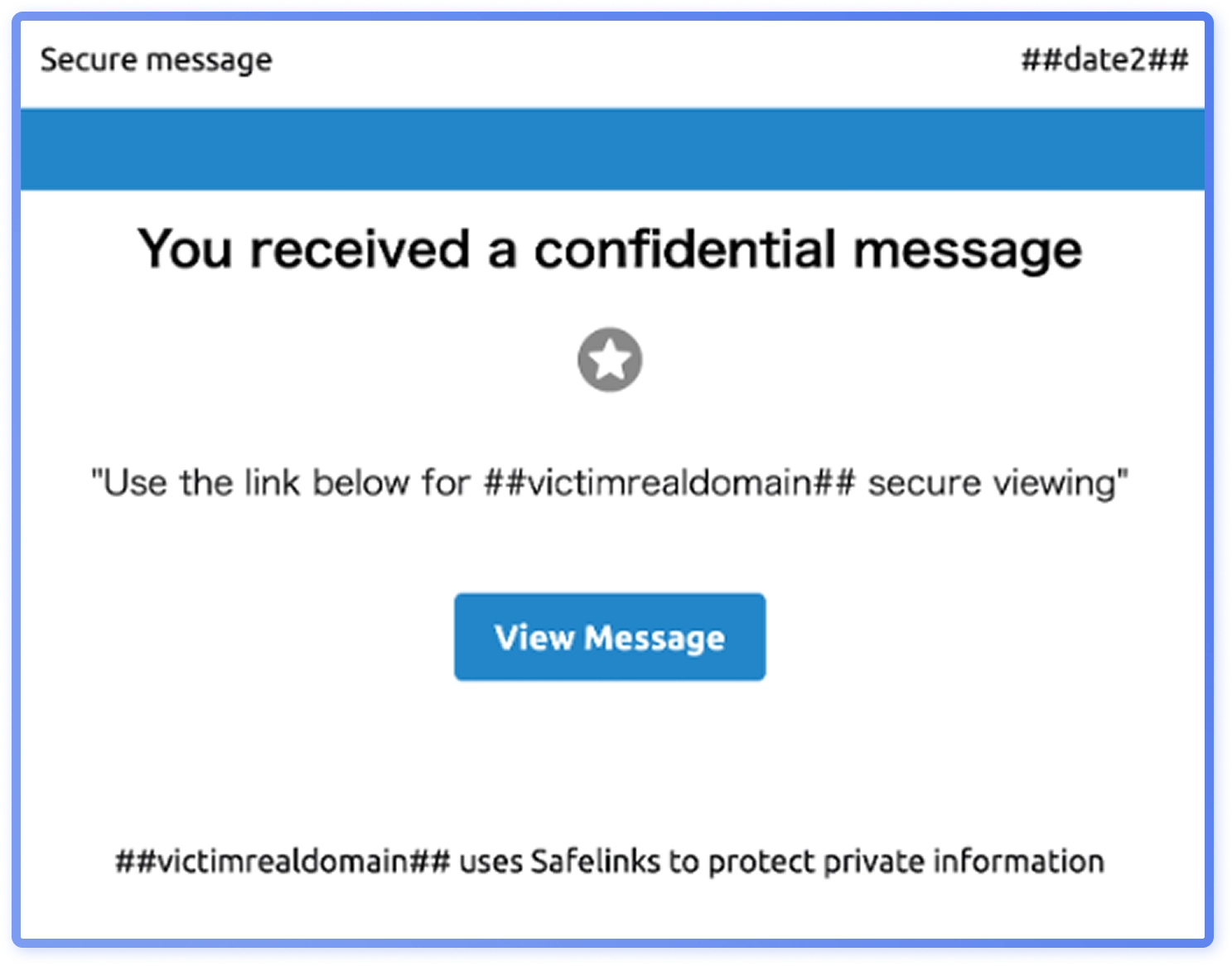
As quality improves with localized pretexts, such as region-specific stories or currencies, it could shift GenAI phishing from bulk campaigns toward more targeted spear-phishing.
Phishing kits: What changed in 2025 (and why it matters)
Different phishing kits & their development
Reverse-proxy kits matured into industrialized products. Evilginx introduced a rewritten proxy engine with deeper, structured HTML/HTTP manipulation, capable of capturing and rewriting headers and bodies and to rewrite login URL paths (evading Safe Browsing path‑pattern checks). Muraena evolved with better domain replacement precision, request‑body content replacement, and optional Red is support for leaner operations. Its companion NecroBrowser continued to automate post‑login actions with stolen sessions.
Browser-in-the-middle tools pushed the stealth bar, with tools like EvilnoVNC streaming an attacker‑controlled real browser. In these setups, the phishing page is reduced to a little more than a canvas element, evading HTML/DOM‑based detection while harvesting the full authenticated session.
These workflows still do not bypass phishing‑resistant WebAuthn or FIDO2, which bind authentication to the device and origin, but they erode OTP, SMS and push-based authentication.
At the same time, the low-skill market continued to thrive through template and subscription services. BlackEye v2.0 resurfaced with dozens of ready‑made phishing ages and simple tunneling, keeping credential‑harvest campaigns accessible to less skilled actors.
Phishing-as‑a‑Service (PhaaS) platforms such as RaccoonO365 sustained large scale delivery: Microsoft and partners just seized ~340 domains tied to it. It is probable that this commoditization has ensured steady attack volume despite rising detection sophistication.
To evade analysis, kit developers moved from “clone and host” to randomization and obfuscation. Research shows kits breaking page‑signature detections via DOM restructuring, title and logo randomization, and visual obfuscation (e.g.,altered backgrounds), while AitM proxies add path and query rewriting to challenge URL heuristics.
Adversary outcomes and defensive implications
Attackers gained quieter, cleaner footprints:
- Reliable MFA bypass via session theft. Expect mailbox rules, MFA method changes, and rapid lateral movement minutes after a successful phish.
- Cleaner footprints. Reverse‑proxy kits can now mirror the victim’s user‑agent and preserve a single SessionID even as the attacker moves between IPs and devices, making logs look rather “normal”.
- Better anti‑scanner behavior. Kits demand real interaction, add bot‑gates, and manipulate paths so that common link‑analysis and page‑matching controls miss them.
Phishing kits are getting harder to fingerprint and easier to operate at scale: email lures can be linked to proxy pages using guided setup tools. Organizations should prioritize phishing resistant MFA (passkeys/FIDO2) or admins and high‑risk roles and phaseout SMS/TOTP fallbacks. Bind sessions to devices and enable token-protection or conditional-access features that disrupt replay. Harden conditional access policies by enforcing compliant devices and geolocations for sensitive apps and reducing session lifetimes. In detection, pivot from static page content to behavioral telemetry: hunt for recurring session IDs across IPs, abrupt user-agent changes mid-session, and rapid mailbox rule or MFA-method changes after login.
Strategic guidance for organizations
Executive overview
Routine-workflow lures
Attacks that imitate everyday tasks, such as file-share notifications, HR updates, or supplier requests, remain the most common phishing tactic. These lures often leverage trusted brands like Microsoft or DocuSign, lending a sense of legitimacy that makes them consistently effective across industries.
Social media business accounts
Platforms such as Meta have become high-value targets for attackers. Threat actors exploit recruiter-themed messages and fake support notifications to hijack business accounts, creating potential reputational and financial risk.
Attachments and file types
PDFs remain the most common attachments, reflecting their ubiquity, trust, and compatibility. However, the rapid rise in SVG files shows attackers are experimenting with vector formats to evade filters and hide redirects. While some types are often malicious (executables, script-heavy HTML), the same behavioral scrutiny should be applied to “safe” business documents like PDFs and Office files. This approach should be backed by safe rendering, CDR, isolation, and preview-before-action controls.
Sender origins
A large share of malicious campaigns originates from consumer webmail and third-party service domains.
Generative AI
The visual and tonal polish of malicious messages has been elevated by GenAI. Smoother language, cleaner layouts, and fewer typos are the new norm. In many cases they now outshine authentic business communications, which are often more plain and utilitarian.
Human risk
True resilience lies in behavior, not technology alone. Organizations that pair identity guardrails with trusted communication channels, encourage message previewing before engagement, and enforce verified callbacks or two person checks see lower compromise rates. Above all, a psychologically safe, report-first culture transforms human error from a liability into an early-warning system.
Top 5 actions for security practitioners
- Pause before acting: Institutionalize brief pauses for context checks, particularly for sensitive requests or routine workflows.
- Raise authentication assurance: Require phishing-resistant factors for high-risk roles and restrict unreviewed OAuth/app consents to reduce token-grant exposure.
- Publish & enforce trusted channels: Define the approved services for signing, sharing, scheduling, and paying, and route anything else through known portals until verified.
- Handle attachments by behavior: Preview before action and assess the request (links, forms, credential capture, payments)rather than relying on the file type alone.
- Embed business-process guardrails: Require verified callbacks and two-person approvals for payments or bank-detail changes, and do not permit approvals by email.
CISOs: Priorities and risk comms
This report details the tactics and techniques that allow threat actors to bypass email filters, blend into familiar workflows, target certain job roles, industries and regions, and AI-enhance their emails. There is no silver bullet in technological solutions, as hundreds of thousands of emails that bypass filters are still reported to Hoxhunt each month. Therefore, the human layer is critical for security.
Checklist:
- Turn intel into action. Use this year’s findings to drive simulations and training on what actually lands in inboxes: HR impersonation, internal share links, file sharing baits, SVG/HTML-in-attachments,QR codes. Set a simple SLA: convert fresh indicators into detections and training in 2-4weeks.
- Personalize by role and region. Not everyone needs the same content.Marketing/social teams face Meta credential traps; regions see different lure types (NA vs. Europe vs. Asia). Favor solutions that auto-target by latest threats, org landscape, and geography at scale.
- Retire outdated advice. Drop “look for typos” and “be wary of links.” Teach Pause→ Verify → Report and evaluate messages in context (sender, request, timing, channel).
- Keep workflows & tools private.“Business-as-usual” attacks are increasingly successful. Remove process docs, portalURLs, and tool names from public pages and OSINT-friendly sites to raise attacker effort.
- Make dwell time a KPI. Encourage fast reporting and track two metrics quarterly:report rate and time to report (dwell time). Publish trends to leadership and push the curve down.
- Tighten the reporting to response loop. Review reporting pathways for friction. Bring in tools like Hoxhunt Respond to speed triage, enrichment, and remediation for the SOC.
Security awareness teams: Program & messaging
In 2025, common and often successful phishing looks like normal workflows. Train for routine looking requests, not only for urgent security alerts. Generative AI has removed many of the old tells. Polished layouts, fluent copy, and even replicated logos built from HTML elements often show up in bulk phishing, so “no typos” is not a reason to trust. Regional patterns exist in the dataset (e.g., voicemail/fax/callback in North America; bank impersonations in Europe) but in terms of the overall landscape, attack vector variations are minor.
Attachments evolved as well: PDFs remain the top carrier, SVG use jumped from niche to material share and QR codes have largely moved into attachments rather than the message body. Attack delivery increasingly rides on legitimate services, especiallySalesforce, and social platform lures focus on marketing teams via recruiter stories or fake “policy violation” notices.
Checklist:
- Choose simulation themes that fit your employees’ routines. Focus on HR salary/bonus lists, internal share links, and fake email thread scenarios. Track time to report and report rate by theme; don’t measure success only by click rate.
- Localize at scale. Re-emphasize global bulk-phishing tactics but tailor by region, for example by prioritizing voicemail or callback lures for North American employees.
- Teach actions on file types. Emphasize that some file types (executables, script heavy HTML) are often malicious but also include PDFs and SVGs in simulations so employees learn to treat them with scrutiny and preview before action.
- Target the right roles. For marketing and social teams, mirror social platform killchains. Emphasize the “small ask →bigger ask” escalation.
- Build a modern GenAI literacy module. Show side-by-sides of older vs. newer templates, the 2×2 HTML table Microsoft logo trick, and failed personalization tokens like “##victimdomain##.” Reframe flawless language as something to question.
- Teach third-party sender baselines. Walk through what common third-part service use(Salesforce, Docusign…) looks like in your organization and when to report variances.
- Measure “routine skepticism”. Track whether people escalate or verify when a message looks internal but arrives via a third-party sender, and how quickly routine-looking lures get reported.
- Change culture with managers. Managers can help implement thePause → Verify → Act model and create a culture where blameless reporting, even after a click, is encouraged.
SOC / IT / Defender: controls, detection and IR
Attackers are leaning on legitimate services to reach inboxes; gmail.com is the single most common sending domain in malicious phishing reports during H1 2025. Third-party service misuse is also notable. SVG attachments matter now. Outlook for the web and the new Outlook for Windows no longer display inline SVG as of September-October 2025; SVG attachments still arrive, and their share rose from negligible to ~5% of attachment based phishing. Links might route via t.coand google.com/url and Dropbox remains a popular document-share destination within phishing flows. Treat these destinations as resolvable, not inherently safe. Reverse proxy kits and browser-in-the-middle workflows make token theft scalable. Defenses need to assume session theft rather than just password theft.
Checklist:
- SVG attachments. Consider blocking or quarantining image/svg+xml by default and introducing an exception path. When exceptions are granted, inspect SVG DOM for scripting, xlink:href, and data: URIs.
- QR-in-attachments pipeline. Extract QR codes from PDFs/images/SVGs and resolve targets inside a sandboxed redirect resolver at click-time.
- Third party sender posture. Add mailflow analytics for often misused domains like salesforce.com and docusign.net. Consider extra scrutiny for [email protected] given it’s often abused. Prefer per-business-unit allowlists over global ones.
- Redirect handling. Expand common redirecting URLs like t.co and google.com/url chains in a sandboxed resolver at click-time and make decisions on the final eTLD+1, not the intermediary.
- “Fake-thread” heuristics. Alert when In-Reply-To/References claim a thread the tenant has never seen, or when a message reads as internal but the MessageID domain is external. Start in audit mode to tune for legitimate edge cases.
- Identity hardening for AitM reality. Move admins and high-risk roles to phishing-resistant MFA (passkeys/FIDO2). Bind tokens to devices (e.g.,Token Protection (Entra CA) for refresh/app tokens) and enable Automatic Attack Disruption; shorten session lifetimes for sensitive apps. Add hunts for same session ID from different IPs, mid session user agent pivots, mailbox rule creation or MFA changes shortly after login, and automatically revoke tokens and sign out on detection. Favor detections that score interaction/proxy artifacts over fragile DOM lookalikes; these help against noVNC/browser-in-the-middle kits.
- Marketing / business platform guardrails. Enforce SSO + phishing resistantMFA for Meta Business accounts and other similar services and centralize ownership.
Using this threat intelligence report to navigate the 2025 threat landscape
Security teams that understand the threat landscape in context move faster than attackers. This threat intelligence report brings together real phishing data, human behavior insights, and attacker tooling trends so you can prioritize the alerts, controls, and training that actually reduce risk. Use it as a playbook to tune detections, harden identity, and turn people into an active sensor network across your organization.
About Hoxhunt
Hoxhunt is the leading platform for human cyber-risk management. Our solution goes beyond security awareness to drive behaviour change and measurably lower human cyber-risk. Combining AI and behavioural science, we create individualized training moments people love. We work with leading global companies such as Airbus, IGT, DocuSign, Nokia, AES, Avanade, and Kärcher and partner with global cybersecurity companies such as Microsoft and Deloitte.
By combining continuous phishing simulations, personalized micro-training, and live threat intelligence from millions of reported emails, Hoxhunt helps organizations adapt to an evolving threat landscape instead of training on last year’s attacks.
The platform plugs into your existing email and identity stack, automates large parts of phishing response, and feeds high-fidelity reports to SOC and threat intel teams. Employees get short, in-the-moment coaching; defenders get cleaner signals, better visibility into human-layer risk, and measurable reduction in successful phishing attempts.
Organizations use Hoxhunt to:
- Mirror real attacker techniques instead of generic templates
- Increase report rates and cut time-to-report on suspicious activity
- Continuously align awareness, detection rules, and threat intel around the same threat landscape
Below you can see how Hoxhunt uses AI to delivery adaptive phishing training that employees actually enjoy.

