


If your organization has been running KnowBe4 for years but phishing click rates have plateaued - or the program feels like a compliance checkbox - this guide compares leading enterprise security awareness training and phishing simulation platforms.
The leading KnowBe4 alternatives for enterprise security awareness training in 2026 are Hoxhunt, Proofpoint, SoSafe, Cofense PhishMe, and MetaCompliance. The right choice depends on the constraint driving your switch: an adaptive behavior platform when outcomes plateau and admin effort climbs, or a broad content library when compliance coverage is the priority. This guide compares them on outcomes, admin effort, reporting, and integrations.
Methodology: This guide is based on publicly available customer reviews and practitioner discussions (G2, TrustRadius, Reddit, and Info-Tech’s SoftwareReviews), plus vendor documentation.
Quick definitions
- Security awareness training: Ongoing education that builds safer day-to-day decisions (phishing, credential hygiene, data handling, social engineering).
- Phishing simulation: Controlled testing to improve behavior - often measured by reporting rate, time-to-report, and repeat patterns (not just clicks).
- Human risk management (HRM): Using training + simulations + behavioral signals to reduce real exposure over time and focus effort on higher-risk cohorts.
- AI-assisted security awareness content generation: Using AI to turn organizational context - such as policies, guidelines, URLs, or existing training materials - into editable security awareness lessons. This helps teams close content gaps, localize training faster, and keep education aligned with internal practices rather than relying only on generic library content.
KnowBe4 alternatives compared (2026): Top platforms at a glance
The six platforms in this guide, in the order they appear (G2 ratings as of July 2026):
- KnowBe4: the incumbent, with the largest content library and full campaign configurability; teams start looking elsewhere when outcomes plateau and admin effort climbs. Rated 4.6/5 on G2 across 2,364 reviews.
- Proofpoint ZenGuide: strongest inside its own email security ecosystem, where awareness rides the same stack as email defense. Rated 4.5/5 on G2 across 330 reviews.
- SoSafe: European localization for multilingual workforces. Rated 4.5/5 on G2 across 796 reviews.
- Cofense PhishMe: phishing simulation depth tied to detection and response workflows. Rated 4.4/5 on G2, though on only 5 reviews there.
- MetaCompliance: compliance-first, with policy workflows and audit trails at the core. Rated 4.6/5 on G2 across 1,116 reviews.
- Hoxhunt: adaptive, gamified simulations with per-user difficulty, built for measurable behavior change. Rated 4.8/5 on G2 across 3,685 reviews.
Enterprises also frequently evaluate Microsoft Attack Simulation Training alongside this list; it is included with Microsoft Defender for Office 365 Plan 2 (part of Microsoft 365 E5) and covers phishing simulation with follow-up training assignments inside the Microsoft stack.
| Platform | Best for | Strengths | Trade-offs to validate |
|---|---|---|---|
| KnowBe4 |
|
|
|
| Proofpoint |
|
|
|
| SoSafe |
|
|
|
| Cofense PhishMe |
|
|
|
| MetaCompliance |
|
|
|
| Hoxhunt |
|
|
|
Why enterprises look for KnowBe4 alternatives in 2026
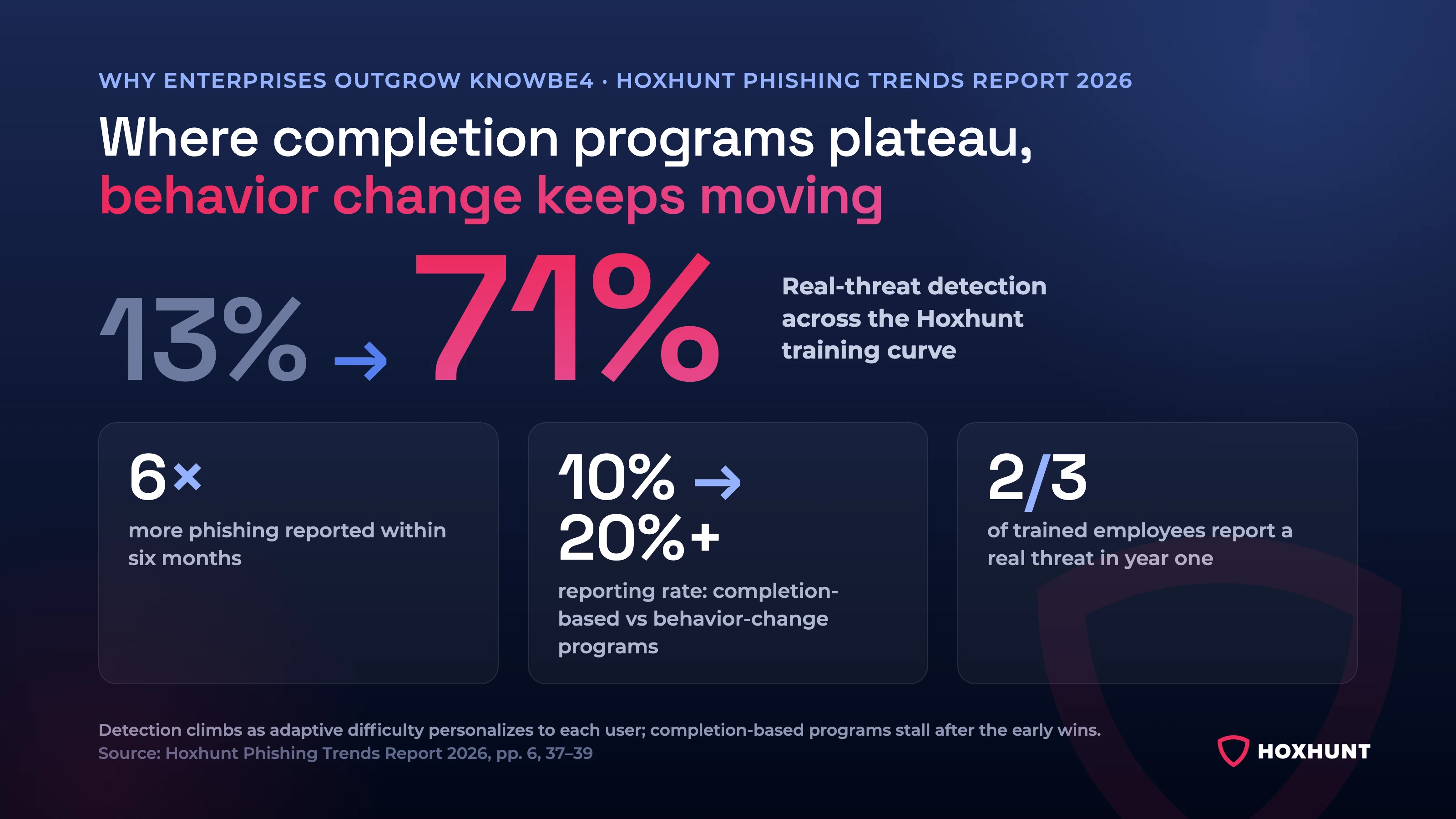
Where completion-based programs plateau, behavior-change programs keep moving: Monster Energy cut its failure rate from 16-18% with legacy security awareness training to 4% (Monster Energy case study). The differentiator comes down to whether the model keeps changing behavior after the early wins.
Simulations can become less predictive without the right incentives
Phishing simulations still have value, but some teams find the results become harder to interpret if people optimize for “passing the test” rather than building safer habits. If a program feels punitive, it can also reduce reporting and trust. This pushes buyers toward platforms and program models that emphasize report-first habits, positive reinforcement, and coaching that supports improvement without embarrassment.
Completion rates rise while real behavior stays the same
Awareness managers often describe a familiar gap: completion rates look fine, but users treat training as a checkbox and nothing changes day to day. Alternatives are commonly evaluated on whether learning feels adult, relevant, and low-friction - with shorter lessons, smarter timing, and targeting by role and risk (instead of long, quarterly “video blocks”).
The gap is measurable: completion-based training tends to see threat reporting around 10%, while behavior-change programs push it above 20% (Hoxhunt Phishing Trends Report 2026). Completion is easy to report upward; sustained reporting behavior is the signal that risk is actually moving.
Realism and update cadence matter more than library size
In 2026, teams care less about the size of a content library and more about whether scenarios reflect what employees actually see and whether the content is updated in a meaningful way over time. A large catalog can become a burden if it requires constant curation, localization work, and manual mapping to emerging threat patterns.
Admin overhead becomes the hidden cost at enterprise scale
Switching discussions are often triggered by day-to-day operational drag - building cohorts, rotating content, managing exceptions, chasing completions, and producing reports that still require spreadsheets. Buyers increasingly prioritize automation for audience segmentation, content rotation, nudges/follow-ups, and reporting.
Leadership wants clearer evidence of risk reduction
CISOs are being asked to demonstrate that awareness work changes risk posture, not just audit posture. That increases demand for dashboards that explain trends in plain language, highlight where risk is concentrated, and - where feasible - tie awareness signals to operational outcomes such as reporting volume/quality, faster triage loops, and reduced repeat exposure.
The rise of AI-powered and multi-channel threats
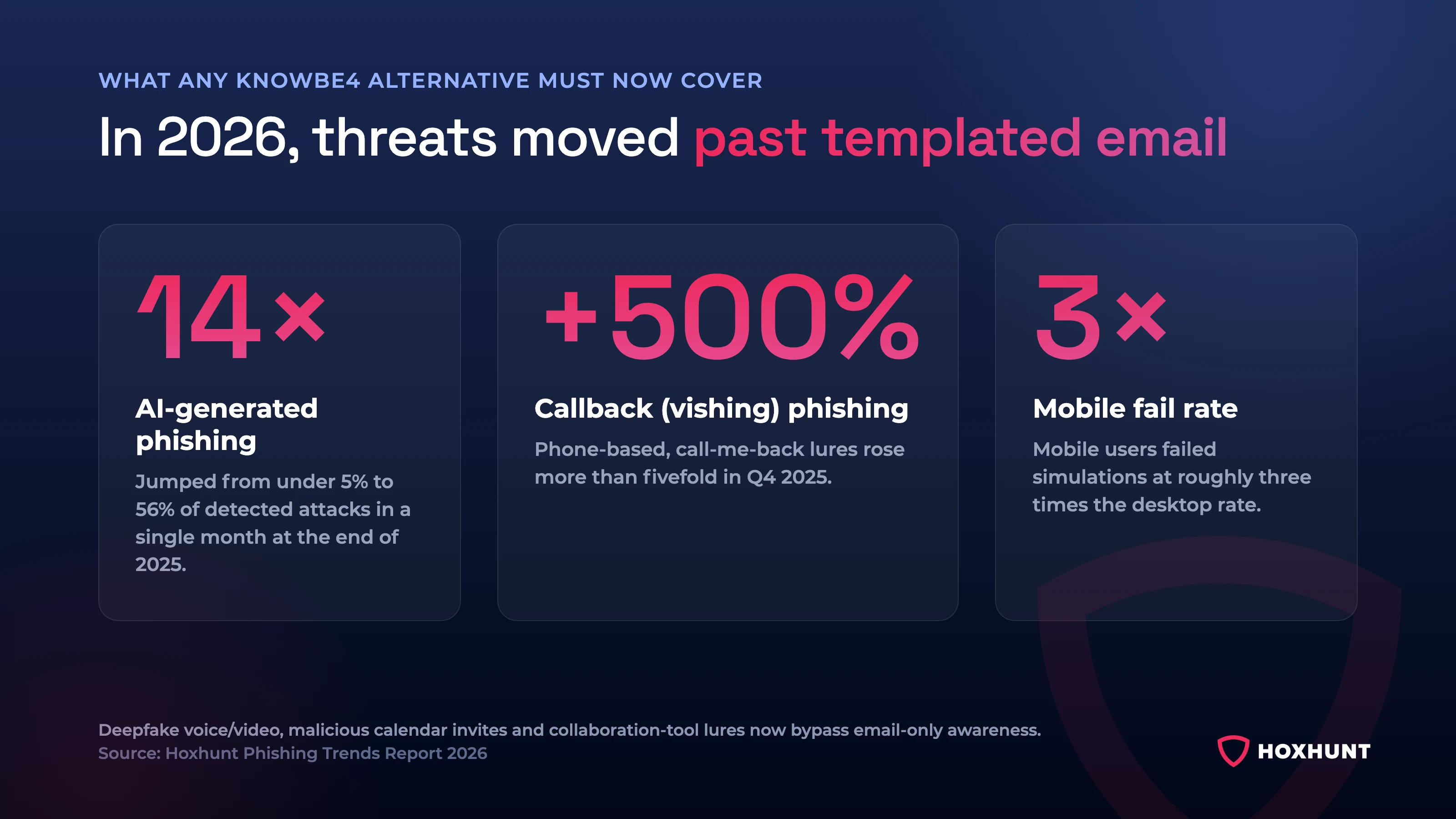
Security programs must now prepare employees for emerging, sophisticated attacks that bypass traditional defenses. This includes AI-generated deepfake voice and video messages used in vishing, malicious calendar invites, and complex social engineering scams on collaboration platforms like Teams and Slack.
The shift is steep: AI-generated phishing surged roughly 14× at the end of 2025 (from under 5% to 56% of detected attacks in a single month), while callback (phone-based) phishing rose more than 500% in Q4 2025 and mobile users failed simulations at about 3× the desktop rate (Hoxhunt Phishing Trends Report 2026). Any alternative you shortlist should prepare users for attacks well beyond templated email.
How to choose a KnowBe4 alternative (enterprise quick checklist)
When shortlisting KnowBe4 alternatives, most enterprise teams prioritize:
- Measurable behavior change (not just clicks): reporting rate, time-to-report, repeat patterns, and trendlines over time.
- Realistic, frequently updated threats: phishing that resembles what users see today (not “template-y”), plus guidance that stays current.
- Low admin overhead at scale: automation for targeting, scheduling, follow-ups, exceptions, and recurring reporting (so you’re not living in spreadsheets).
- Exec-ready reporting: dashboards leadership can understand - what improved, where risk clusters, and what changed since last quarter.
- Program design that avoids “gotcha” culture: reinforcement that increases reporting and reduces backlash/fatigue.
- Coverage beyond basic email: training for QR phishing, MFA fatigue/push scams, vishing/social engineering, collaboration-tool lures, and impersonation patterns (even if simulations remain email-first).
- Enterprise governance: RBAC/delegated admin, multi-entity structures (regions/BUs), audit logs, and scalable localization.
- Identity + ecosystem fit: clean SSO/provisioning and practical workflows in the tools you already use (reporting button, triage flow, integrations where they matter).
Top KnowBe4 alternatives for enterprises (2026)
KnowBe4 (large library)
Best for
Teams that want a large, off-the-shelf content library and the ability to run a wide range of awareness topics and phishing simulations across different functions and regulatory needs.
Strengths (what teams tend to like)
- Ease of use for core workflows: reviewers often describe it as intuitive for running phishing campaigns and training administration.
- Comprehensive content coverage: a large library that’s described as frequently updated, with interactive modules across multiple cybersecurity topics.
- Reporting clarity (for simulations): reporting and analytics on phishing simulation results are often called out as helpful for tracking progress and identifying weak spots.
Trade-offs to validate (common friction points)
- Content overload / navigation: some users find the volume of material overwhelming to browse and manage, and note parts can feel repetitive or too basic for more experienced audiences.
- Customization depth vs admin time: there’s feedback that more advanced tailoring (e.g., aligning simulations to specific org risks or tuning difficulty by skill level) can be limited or requires more manual effort to achieve.
- Simulation realism (especially for advanced users): some users want more variety and realism in templates/scenarios to keep long-running programs effective.
- Reporting timeliness (edge cases): a few users mention report delays affecting timely response.
Enterprise notes (how to evaluate in a pilot)
- If your current pain is “plateaued outcomes”, make sure you can segment cohorts (role/risk) and show trendlines beyond a single failure metric.
- If your pain is admin load, test what “steady state” looks like once the initial setup is done: content selection, rotation, follow-ups, and exec reporting, without spreadsheets.
.webp)
Proofpoint (integrated email security)
Verdict: the right call when awareness must live inside the Proofpoint email security ecosystem; less compelling as a standalone behavior program.
Best for
Teams that want security awareness tightly connected to broader email security and threat detection workflows, especially when “ecosystem fit” and integration are a major buying factor.
Strengths (what teams tend to like)
- Realistic phishing simulations: users cite simulation testing that reflects real-world threats and tracks current tactics and trends.
- Integration with threat detection: awareness training is positioned as integrating with Proofpoint’s threat detection tooling (prevention + admin notifications).
- User-friendly training experience: reviewers mention a usable interface plus interactive modules/quizzes intended to keep learning accessible.
Trade-offs to validate (common friction points)
- Complex setup and management: initial setup can be time-consuming, particularly when connecting integrations between threat detection and SAT; customization can add configuration complexity and a learning curve.
- Support/documentation gaps (reported by some users): delays in support response times and documentation gaps are called out, especially around more complex integrations.
- Content depth and time burden: some admins prefer to customize content because they don’t find it in-depth/up-to-date enough for their needs, and some training can take 5-15 minutes for end users to complete.
- Less personalized learning paths: Proofpoint training can be “one-size-fits-all,” with simulations/training not tailored to individual users- important if your main goal is measurable behavior change.
Enterprise notes (how to evaluate in a pilot)
- If your main pain is behavior change (plateaued outcomes, “users gaming tests”), validate whether Proofpoint supports the level of individual personalization/adaptive paths you want, since the blog flags limited tailoring.
- If your main pain is admin burden, test “steady state” explicitly: time spent on setup, integrations, ongoing configuration, and reporting because complexity and learning curve are recurring themes in the feedback.

SoSafe (localized training)
Verdict: the localization pick: strong European language coverage for multinational rollouts.
Best for
Driving longer-term behavior change with interactive, gamified training, especially where micro-learning and engagement mechanics fit internal culture.
Strengths (what teams tend to like)
- Localized microlearning: SoSafe delivers quizzes and micro-learning sessions with strong European localization; teams weighing it on sustained engagement should test that against behavior-first platforms.
- Behavior-based adaptation: the training is described as adapting to an individual’s behavior and maturity - sending more focused simulations/training to users who struggle, and more advanced threats to users who do well.
- Phishing simulation customization: some users praise the ability to customize phishing tests to better resemble threats relevant to their industry or regions.
Trade-offs to validate (common friction points)
- Complex initial setup: some users report setup and configuration can be time-consuming, especially when tailoring simulations and features to specific needs.
- Dashboard depth and customization limits: feedback includes wanting more detailed insights in the dashboard, and that customization may be more limited than some competitors for highly specific scenarios.
- Accessibility for distributed workforces: limited mobile and offline functionality is noted as a friction point for remote/field employees who need more flexible access.
- Global program needs: some global organizations want broader language support and more localized content for cultural or compliance contexts.
Enterprise notes (how to evaluate in a pilot)
- If your current pain is moving beyond checkbox training, validate whether SoSafe’s engagement model resonates with your employee culture.
- If your current pain is admin overhead, pilot setup and steady-state operations explicitly (cohorting, content rotation, follow-ups, reporting), since setup complexity is a recurring theme.
- If you run a global program, test language coverage and localization quality early.
.webp)
Cofense PhishMe (detection and response)
Verdict: strongest when simulation feeds a detection-and-response loop your SOC actually runs.
Best for
Security teams that want phishing simulation and measurement depth, and may also be considering adjacent phishing response capabilities (e.g., reporting/triage/quarantine) as part of a broader approach.
Strengths (what teams tend to like)
- Customization and realism options: a fairly wide range of pre-made phishing templates based on real-world threats, plus the ability to tailor themes/timing/messaging and create custom scenarios for specific industries/environments.
- Comprehensive reporting and analytics: detailed reporting on open/click/reporting rates, with both high-level summaries for managers and more granular statistics for analysis and risk assessment.
- Support experience (per user feedback): users report prompt support for technical issues and campaign customization, including onboarding and integration help to reduce the learning curve.
Trade-offs to validate (common friction points)
- UI and navigation: some users describe the dashboard as unintuitive and want clearer navigation and improved data visualization; there’s also feedback that scenario-specific metrics could be shown more transparently.
- Localization and global relevance: feedback includes requests for more region-specific templates, additional language options, and culturally relevant references to increase realism for globally distributed workforces.
- Template richness + who gets coached (author note): the author review says the phishing templates can be “quite basic” (mostly text) and flags that only end users who fail a simulation receive an educational moment, meaning others may receive less ongoing reinforcement.
Enterprise notes (how to evaluate in a pilot)
- If your priority is leadership-ready risk trending, test whether the reporting experience is usable without heavy manual work (given dashboard/navigation feedback).
- If you run a global program, validate language coverage and localization quality early (template realism often breaks at scale when it’s too region-generic).
- If your biggest problem is behavior change plateau, explicitly test whether learning moments and reinforcement reach more than just failures.

MetaCompliance (compliance-first awareness)
Verdict: built for audit evidence and policy workflows first; behavior change is secondary.
Best for
Teams that are primarily using awareness to support regulatory/compliance frameworks and want security awareness training closely paired with policy management and compliance-oriented modules.
Strengths (what teams tend to like)
- Customizable, visually engaging content: users describe interactive materials that make complex topics easier to absorb, with modules and quizzes that can be tailored to organizational needs.
- Straightforward deployment and admin controls: feedback highlights a user-friendly interface and intuitive admin controls for tracking progress and assigning content.
- Compliance emphasis and culture support: users call out value in regulated environments where meeting standards and reinforcing policy alignment is a core goal.
Trade-offs to validate (common friction points)
- Limited integrations + less comprehensive reporting: some users note fewer integration options with other systems and reporting that feels less detailed than other platforms - important if you need executive-level trend views without manual work.
- Content breadth + update cadence: some teams want broader phishing scenarios and more frequent content updates to keep pace with evolving threats.
- Simulation operations: simulations must be manually initiated and are delivered randomly, which can create repetitiveness in programs that run frequent simulations.
- Occasional technical issues: minor issues like loading delays or content access problems are mentioned as possible disruptors to engagement.
Enterprise notes (how to evaluate in a pilot)
- If your leadership is asking for risk posture and behavior change, validate whether reporting can communicate “human risk” clearly (the author review explicitly flags this as a gap).
- If your team is optimizing for low admin overhead, test how much work is required to run simulations continuously vs manual initiation and random delivery.
- If your program is long-running, include “content freshness” in the pilot criteria (how often new scenarios appear and how much you need to curate yourself).

Hoxhunt (adaptive simulations + behavior-focused)
Best for
Teams that want a security awareness program oriented around behavior reinforcement, risk visibility, and scalable customization, with an emphasis on running training continuously with less manual effort.
Strengths (what teams tend to like)
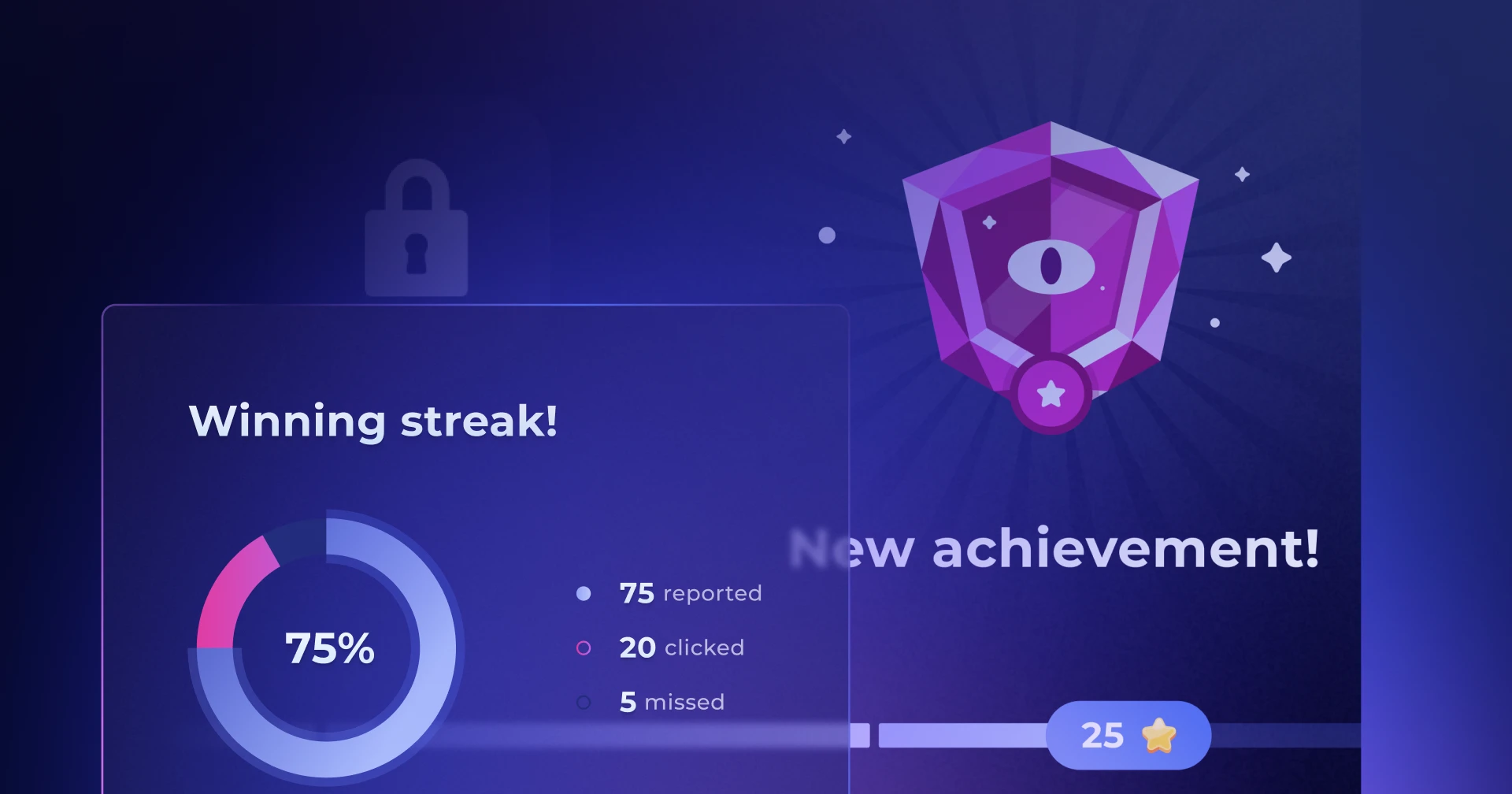
- Engaging user experience: Users cite gamification elements such as star ratings, achievements, and leaderboards, and describe the experience as more engaging - boosting participation and reinforcing a positive security culture.
- Instant feedback on simulations: The platform provides immediate feedback after simulations, helping employees correct mistakes and learn in context.
- Automated, adaptive phishing simulations: Hoxhunt adjusts simulations to user behavior and skill level, helping reduce fatigue by avoiding scenarios that are consistently too easy or too difficult.
- Custom AI-assisted training content: Hoxhunt can help teams generate security awareness lessons from internal context such as policy documents, web links, and existing training modules, reducing content gaps and manual production work.
- Global and branded training support: Hoxhunt supports 42 languages, AI translations, branded themes, and editable lesson content, making it easier to tailor training for distributed workforces.
- Human-risk oriented dashboarding: Hoxhunt’s Human Risk Dashboard offers high-level and drill-down views of behavior over time.
Trade-offs to validate (common evaluation points)
- Culture fit for gamification: some organizations are skeptical of gamification in security training; it’s worth validating tone and fit with your internal culture during a pilot.
- Limited manual control: The program is highly automated. Teams that require precise, manual control over the creation and scheduling of every individual campaign may find this approach less flexible than other platforms.
Enterprise notes (how to evaluate in a pilot)
- If your current pain is admin burden, test steady-state operations: how much manual work is required for targeting, content creation, translations, rotation, follow-ups, and reporting once the pilot is live.
- If your current pain is content relevance, test whether Hoxhunt can turn one internal policy or guideline into an accurate, editable, employee-ready lesson.
- If your current pain is metrics that leadership doesn’t trust, ask to see how reporting explains trends - then sanity-check whether security, HR, and leadership stakeholders find it actionable.
- If your current pain is fatigue, validate whether adaptive difficulty and reinforcement reduce complaints while maintaining or improving reporting behavior.

KnowBe4 vs top alternatives (quick comparisons)
KnowBe4 vs Proofpoint
| Proofpoint fits best when | KnowBe4 fits best when |
|---|---|
| your awareness program is meant to sit close to your email security stack and you value ecosystem alignment (e.g., tying awareness activity into broader threat workflows). | you want a very broad training library spanning many industries and regulatory needs. |
What to validate in a pilot: setup/admin effort, how “one-size-fits-all” the learning experience feels, and whether reporting is executive-friendly without heavy customization.
We compare these two in depth in KnowBe4 vs Proofpoint for enterprise security awareness.
KnowBe4 vs SoSafe
| SoSafe fits best when | KnowBe4 fits best when |
|---|---|
| your priority is European localization for multilingual EU workforces. | you need breadth: library size and topic coverage across many training needs. |
What to validate in a pilot: culture fit for gamification, dashboard depth, and how much effort is needed to configure/operate at enterprise scale (SoSafe’s “setup complexity” and “dashboard insight” themes show up in the user feedback).
KnowBe4 vs Cofense PhishMe
| Cofense fits best when | KnowBe4 fits best when |
|---|---|
| your priority is phishing reporting and SOC/response workflows, where the response pipeline matters more than continuous per-user behavior change (Cofense’s ecosystem includes response tooling). | your core requirement is a large training library and an “all-in-one SAT baseline.” |
What to validate in a pilot: UI/report navigation and whether coaching/reinforcement reaches more than just users who fail simulations.
KnowBe4 vs MetaCompliance
| MetaCompliance fits best when | KnowBe4 fits best when |
|---|---|
| your primary goal is compliance training and policy management, with policy and regulatory alignment as the central value. | you want broader phishing simulation variety and deeper awareness content breadth as the central value. |
What to validate in a pilot: integrations and executive reporting depth (MetaCompliance feedback notes limited integrations and less comprehensive reporting; your author review notes the lack of a human-risk posture dashboard).
Hoxhunt vs KnowBe4
| Choose Hoxhunt when | KnowBe4 fits best when |
|---|---|
| your main pain is: “the program runs, but outcomes plateau,” “admin overhead is high,” or “leadership wants clearer risk trending.” | your primary value is the breadth of a large training library across many topics and compliance contexts. |
What to validate in a pilot: whether adaptive difficulty and reinforcement improve reporting behaviors without increasing fatigue and whether reporting/dashboards reduce manual reporting work.
Quick rule: If the main constraint is breadth of library → KnowBe4. If the main constraint is plateau + admin overhead + exec reporting clarity → Hoxhunt.
Want a deeper dive? We also published a detailed, side-by-side comparison: Hoxhunt vs KnowBe4.
Which KnowBe4 alternative should you choose?
Most enterprise teams get to a better shortlist by starting with the constraint that’s actually driving the switch. Use the scenarios below to narrow to 1-2 options, then validate in a pilot. Hoxhunt is one entry in the broader best security awareness training roundup.
If your program has plateaued (and leadership wants proof beyond click rate)
Choose Hoxhunt when you’re seeing one or more of these:
- click rates stopped improving year-over-year
- users treat simulations as “tests” and behavior change feels stalled
- you want to optimize for reporting rate, time-to-report, and repeat patterns
- the program takes too much manual coordination to run continuously at scale
- you need exec-friendly reporting that tells a clear trend story without spreadsheets
If your primary goal is a broad training library and maximum configurability
Shortlist KnowBe4 when you need wide topic coverage across different functions and compliance contexts, and you have the time/operating model to curate and tune a large program over time.
If awareness needs to align closely with an email security ecosystem
Shortlist Proofpoint when you want security awareness that fits tightly into broader email security workflows and suite-style operations - especially if your organization prefers consolidating around a larger ecosystem.
If employee engagement is the biggest blocker (and you want a behavior program feel)
Shortlist SoSafe or Hoxhunt when your current program feels like a checkbox and you want a more interactive, engagement-led approach - then validate culture fit and reporting depth during the pilot.
If you want phishing simulation depth and analytics
Shortlist Cofense PhishMe or Hoxhunt when you need strong simulation tooling and detailed analytics, and you want to evaluate how it fits alongside phishing reporting/triage processes.
If compliance training and policy workflows are the main requirement
Shortlist MetaCompliance when your awareness program is primarily compliance-driven and you want strong policy/training alignment, then validate reporting depth and integrations against your enterprise requirements.
Pilot checklist for evaluating KnowBe4 alternatives (enterprise)
Use this as a “must-pass” checklist before committing to a platform switch:
- Run a real pilot cohort mix: include at least two cohorts (general users + higher-risk/privileged roles) so results aren’t skewed by one population.
- Measure behavior, not activity: track reporting rate, time-to-report, and repeat patterns over multiple weeks (not just click rate or completion).
- Validate steady-state admin effort: test the weekly work: cohorting/targeting, scheduling, follow-ups, exceptions, and recurring reporting, without exports/spreadsheets.
- Test realism + fatigue at the same time: review scenario quality with stakeholders and monitor user feedback/complaints while the cadence is running.
- Do an executive readout before you buy: show leadership the dashboards and trend story and confirm they answer: “Are we improving? Where is risk concentrated? What changed?”
- Stress-test the “boring migration” details: confirm SSO + provisioning, group logic, reporting workflow, governance/delegated admin, localization needs, and what data/baselines you can (and can’t) carry over.
About Hoxhunt (enterprise fit)
At Hoxhunt, we help enterprises run security awareness and phishing training as a continuous, low-friction program - with an emphasis on behavior change. Teams typically evaluate us when outcomes have plateaued, when the program takes too much manual effort to operate at scale, or when leadership wants clearer proof of progress than a single click-rate metric.
“We’d hit a wall with our previous platform on getting our users to report suspicious emails. Hoxhunt helped us break that plateau almost immediately.” — Dave Bang, Senior Trust Advisor, LyondellBasell
The pattern repeats on the US side: after switching from its previous solution, IGT cut simulation fail rates from the 30 percent range to between 4 and 6 percent, with onboarding engagement several times higher than before. Hoxhunt is also a Customers’ Choice vendor in the 2024 Gartner Peer Insights Voice of the Customer for Security Awareness Computer-Based Training (the category’s most recent edition); the recognition and what reviewers weighted is summarized here.
30% → 4–6%
IGT simulation fail rate after switching to Hoxhunt
Source: Hoxhunt case study
Read the case study →Customers’ Choice
Gartner Peer Insights ‘Voice of the Customer’ for Security Awareness Computer-Based Training, 2024 — the category’s most recent edition
Source: Gartner Peer Insights
Read the announcement →What enterprises typically choose us for
Enterprises typically choose Hoxhunt when they want an awareness program that runs continuously with less manual coordination, and when success is defined as improved reporting behavior and risk trending over time. If your current program is mature and results have plateaued, we’re usually evaluated for our adaptive reinforcement approach and executive-friendly visibility into behavior change.
What to validate if you’re shortlisting us
- Adaptive reinforcement: how we adjust training and simulation difficulty based on user behavior over time, and whether that improves engagement without increasing fatigue.
- Metrics leadership will actually use: whether our reporting helps you communicate trends like reporting rate, time-to-report, and repeat patterns, without living in exports.
- Enterprise operations and governance: how automated the steady-state work is (targeting, rotations, follow-ups, exceptions), plus whether our admin model fits your governance needs (delegated admin/RBAC, audit trails, localization).
| G2 rating (out of 10) | Hoxhunt | KnowBe4 |
|---|---|---|
| Meets Requirements | 9.6 · 2,747 reviews | 9.3 · 1,733 reviews |
| Ease of Use | 9.7 · 2,853 reviews | 9.0 · 1,877 reviews |
| Ease of Setup | 9.7 · 811 reviews | 8.8 · 1,650 reviews |
| Ease of Admin | 9.5 · 128 reviews | 9.0 · 1,579 reviews |
| Quality of Support | 9.5 · 1,804 reviews | 9.3 · 1,635 reviews |
| Has the product been a good partner in doing business? | 9.7 · 130 reviews | 9.4 · 1,564 reviews |
Source: G2 — Hoxhunt vs KnowBe4, category scores as of July 2026.
When Hoxhunt is typically a strong fit
We’re usually a good fit if you want to:
- Run awareness continuously with less manual work
- Improve reporting behaviors and risk trending beyond click rates
- Tune training by cohort instead of sending the same content to everyone
- Generate custom awareness lessons from internal policies or guidance
- Localize training for global teams across many languages
- Brand training so it feels familiar and trusted by employees
- Connect behavior change, policy education, and measurable human risk reduction
A simple enterprise pilot approach
Pilot with two cohorts - general users and higher-risk or privileged roles - for several weeks. Track reporting behavior trends and repeat patterns alongside weekly admin time, employee sentiment, and content production effort.
As part of the pilot, include one content test: provide a real internal policy or guideline and ask Hoxhunt to generate a training lesson from it. Review the output for accuracy, tone, editability, localization quality, and whether the final lesson is ready for employee rollout.
Below you can see how Hoxhunt drives engagement through targeted learning experiences - automate training with workflows and reminders, and precisely tailor learning experiences to each employee.
FAQ: Key questions teams ask when shortlisting KnowBe4 alternatives
Why aren’t our phishing click rates improving anymore?
Plateaus are common in mature programs. Users learn patterns, low-risk users “graduate,” and the remaining risk concentrates in specific cohorts. When comparing alternatives, prioritize platforms (and program designs) that improve reporting rate, time-to-report, and repeat patterns - not just click reduction.
Are phishing simulations still effective, or are users just gaming them?
They’re effective when the program rewards the right behavior. If people focus on “passing,” results become less predictive. Look for approaches that emphasize realism and variation, reinforce report-first habits, and avoid punitive-feeling coaching, so employees report suspicious messages even when unsure.
How do we prove awareness is reducing real risk (not just satisfying audits)?
Shift from activity metrics (completion, click %) to outcome signals leadership understands:
- Reporting rate + time-to-report (detection signal)
- Repeat behavior trends (where risk persists)
As a benchmark, behavior-change programs get roughly two-thirds of trained employees reporting a real threat within their first year (Hoxhunt Phishing Trends Report 2026) — a detection signal completion rates never capture.
How do we stop training from feeling like a checkbox (or childish)?
In practice, shorter reinforcement wins: microlearning, better timing, and targeted content by role/risk. In evaluation, review tone with HR/comms and test employee sentiment in a pilot.
Which vendors keep content realistic and meaningfully updated?
Don’t evaluate by “library size.” Ask for current samples (shared-doc lures, HR/benefits, invoice/payment, SaaS login) and specifics on update cadence: what changes, how often, and how updates roll into your program without you rebuilding campaigns.
What should we pilot before committing at enterprise scale?
Pilot the “boring” realities, not just the demo:
- two cohorts (general + higher-risk/privileged)
- behavior metrics over weeks (reporting rate, time-to-report, repeat patterns)
- steady-state admin time (automation vs spreadsheets)
- exec dashboard readout
- SSO/provisioning + governance + reporting workflow validation
Can Hoxhunt create custom security awareness training from our own policies?
Yes. Hoxhunt includes AI content generation that can use uploaded context such as policy documents, web links, and existing Hoxhunt modules. This allows teams to turn internal guidance into editable awareness lessons instead of relying only on generic training content.
Can Hoxhunt training be branded?
Yes. Hoxhunt supports branded themes using corporate colors and font styles. This helps training feel more familiar to employees and better aligned with internal communications.
How do KnowBe4 alternatives compare on pricing?
All six platforms sell per-user annual subscriptions, tiered by module scope and organization size; KnowBe4 publishes per-seat list prices on its site, the others quote on request. In practice the comparison that matters is cost per user against admin time saved and measurable risk reduction: a cheaper license that needs a full-time admin to run campaigns usually costs more than an automated platform at a higher per-seat price. Request like-for-like quotes for your exact user count and validate admin effort in the pilot (checklist above).
Sources
Hoxhunt Reviews and Comparisons - G2; Software Advice; TrustRadius; Gartner
KnowBe4 Security Awareness Reviews and Comparisons – Gartner; Corporate Compliance Insights
Proofpoint Email Protection & Essentials Reviews – TrustRadius; SoftwareReviews; Expert InsightsSoSafe Feedback and Comparisons – Gartner; FeaturedCustomers; SoftwareReviews
Cofense PhishMe Reviews – Gartner; TrustRadius; Software Advice
MetaCompliance Security Awareness Training Feedback – G2; TrustRadius; Gartner Comparison with KnowBe4
Get more cybersecurity insights like this
- Subscribe to All Things Human Risk to get a monthly round up of our latest content
- Request a demo for a customized walkthrough of Hoxhunt
.webp)
.avif)