The short answerCustomizable security awareness training means building lessons from your own security policies instead of a fixed vendor catalog, and without rebuilding content by hand. Hoxhunt Content Studio drafts a module from your documents in about a minute, targets it by role, brands it as yours, and translates it into 40+ languages, all reviewed and edited before anything reaches an employee.
Most security awareness content is written for everyone, which means it rarely fits anyone. When the vendor library does not match your policies, your tools, or the way your organization actually works, the fix has usually been to rebuild it by hand. For a small security team that becomes a second job: writing modules, versioning them for different roles, translating them, and redoing it every time a policy changes. And it never ends, because the strongest programs put a fresh exercise in front of employees roughly every 10 days (Hoxhunt Phishing Trends Report 2026), a cadence no one sustains building content by hand. Customizable security awareness training answers this by generating training from your own material instead, so it fits your organization without the manual grind. This guide covers what that means, how Hoxhunt Content Studio does it, and how it compares to relying on an off-the-shelf catalog.
~1 min
to draft a training module from a document
Hoxhunt Content Studio
Up to 13 hrs
of manual work saved per week
Hoxhunt Content Studio
40+
languages via AI translation
Hoxhunt Content Studio
Every 10 days
the cadence the strongest programs sustain
Phishing Trends Report 2026
What customizable security awareness training actually means
Most platforms ship a large ready-made library, and a broad catalog is genuinely useful. The limit is fit: a library written for everyone rarely matches the exact tools, policies, and context of any one organization, so awareness managers end up compromising on generic content or rebuilding it by hand. Customizable security awareness training closes that gap on a few concrete capabilities you can evaluate directly:
- Generate training from your own source material (policies, guidelines, an internal document) rather than only picking from a fixed catalog.
- Review and edit every lesson before it ships, so the wording matches how your organization actually works.
- Set the job function and level, and deliver to the right audience, so depth and language fit the people taking it.
- Brand the training with your own colors and fonts.
- Localize it into the languages your workforce speaks.
- Export it into the systems you already run, such as your LMS.
The rest of this guide walks through how Hoxhunt Content Studio does each of these.
Generate training from your policies instead of building it by hand
The point of generating training is to stop building it by hand. Hoxhunt Content Studio turns security documents like policies and guidelines into ready-to-distribute training, drafting a module in about a minute, and Hoxhunt reports teams save up to 13 hours of manual work per week with Content Studio. Here is how it works.
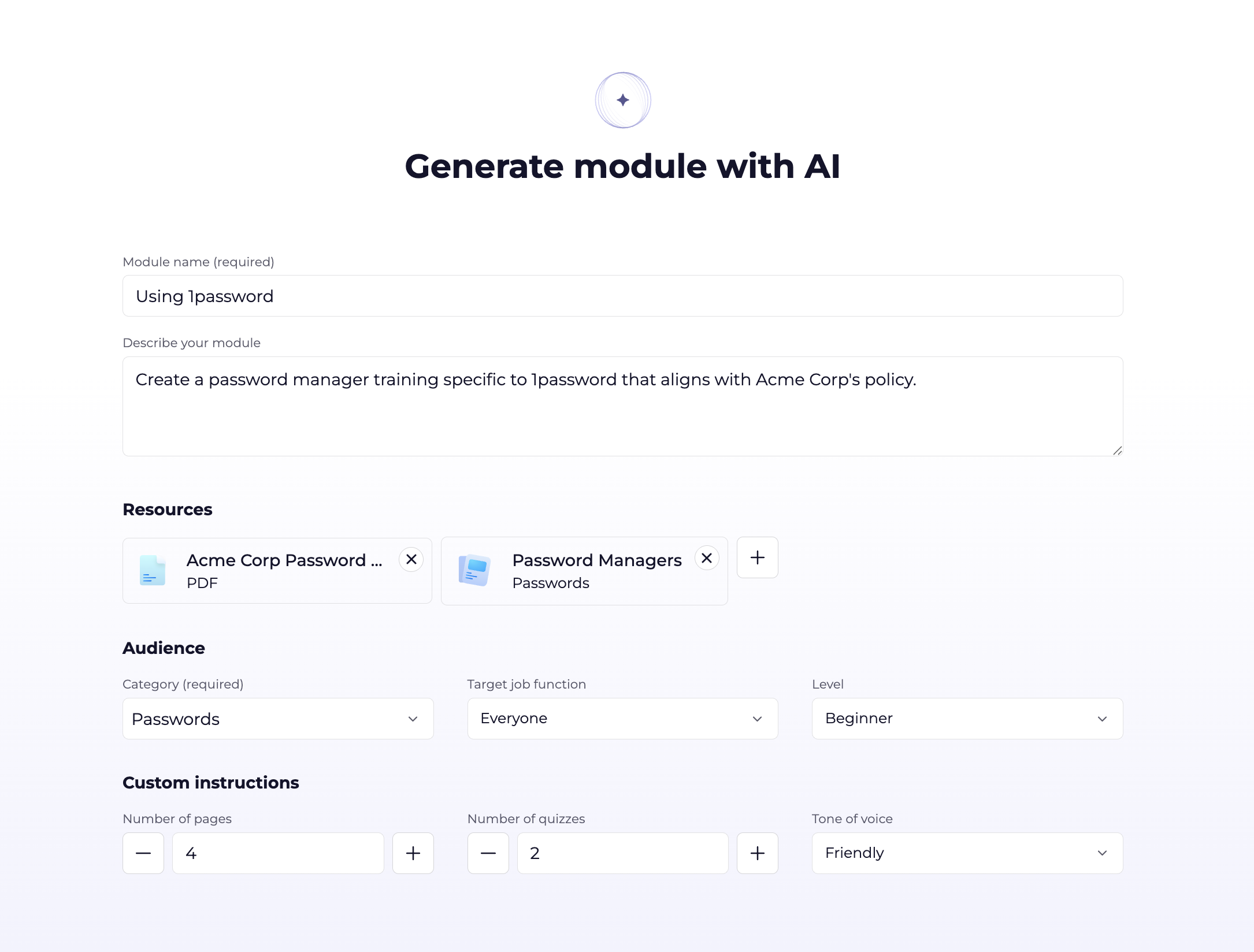
- Prepare your source content. Start with the security policy document, web link, or existing module you want to ground the training in. As with most generative AI use cases, the quality of the input directly affects the quality of the output, so the source should be comprehensive, well structured, and include the essential information.
- Run the content through AI generation. Add a short prompt and your material in Content Studio. The AI Content Generator drafts a module made up of training cards that communicate the information and a quiz that confirms the learner understood it, typically in about a minute.
- Review, edit, and publish. The AI writes the first draft; your team shapes the final. Review the lessons, edit any details, then set the audience and publish. No draft reaches an employee until your team reviews and explicitly publishes it.
Set the audience so the right people get the right training
A generic library forces one-size-fits-all, so the content is only useful if the right people see it at the right depth. When you build a module you set the job function and level so the language and depth fit the people taking it, then target the audience the training reaches. As new policies or guidelines are formed, push them into Hoxhunt to create fresh, specific training, so the latest practices are immediately available to the people they apply to instead of waiting for a catalog update.
Brand the training with your own look and feel
A generic catalog carries someone else’s look and feel, and custom content should still look like it comes from your organization. Content Studio’s Theme Editor sets your fonts, text styles, and colors across the whole training experience, in both light and dark mode, so the training employees see is branded as yours.
Localize training into 40+ languages in a few clicks
Learners prefer training in their native language. Hoxhunt’s ready-made library is professionally translated, and content you generate yourself supports Hoxhunt’s 40+ training languages. When editing a lesson, select the target languages you need, a few or all of the supported languages, and Hoxhunt creates the language versions with AI translation. Each version can be reviewed and edited before it reaches multilingual learners. The mechanics are covered in more depth in AI-powered translations for security awareness training.

Export custom training to your LMS with SCORM
If your organization delivers learning through an existing LMS, training you build in Hoxhunt does not have to stay siloed. The Hoxhunt SCORM connector lets you deliver training through your LMS alongside the rest of your learning catalog. The setup is covered in linking security awareness training to your LMS with the SCORM connector.
Content Studio compared to an off-the-shelf training library
A ready-made library and generated content are not mutually exclusive, and Hoxhunt ships both. The table below compares the two approaches on the dimensions that decide fit, so you can see where generating from your own material changes the outcome.
| Dimension | Off-the-shelf library only | Hoxhunt Content Studio |
|---|---|---|
| Source of content |
|
|
| Time to draft org-specific training |
|
|
| Keeping pace with policy changes |
|
|
| Editing and review |
|
|
| Branding |
|
|
| Languages |
|
|
| Delivery |
|
|
The bottom lineA ready-made library and generated content are not an either/or choice. Hoxhunt ships both, so you start from a broad catalog and close the fit gap with training built from your own policies, branded as yours, in your languages, without turning content upkeep into a manual second job.
Ready to build training that fits your organization? See how it works on the Hoxhunt security awareness training platform, or book a demo to see Content Studio for yourself.
Frequently asked questions
Can I create security awareness training from my own security policies?
Yes. Hoxhunt Content Studio takes a policy document, web link, or existing module, runs it through the AI Content Generator, and drafts ready-to-review lessons with training cards and a quiz, typically in about a minute.
Can I edit the training content after it is generated?
Yes. The AI writes the first draft and your team shapes the final. Every lesson is reviewable and editable, and no draft reaches an employee until your team reviews and explicitly publishes it.
Can I brand the training with our own look and feel?
Yes. Content Studio’s Theme Editor applies your fonts, text styles, and colors across the whole training experience, in both light and dark mode.
What languages does customized training support?
Content you generate supports Hoxhunt’s 40+ training languages. You select the target languages when editing a lesson and Hoxhunt creates the versions with AI translation for review.
Can I deliver Hoxhunt training through my existing LMS?
Yes. The Hoxhunt SCORM connector lets you deliver training through your LMS alongside the rest of your learning catalog.
How is customizable training different from a ready-made content library?
A ready-made library is a fixed catalog written for a general audience. Customizable training is generated from your own policies and context, branded as yours, editable before it ships, and updatable the moment a policy changes. Hoxhunt provides both.
Get more cybersecurity insights like this
- Subscribe to All Things Human Risk to get a monthly round up of our latest content
- Request a demo for a customized walkthrough of Hoxhunt
.webp)