You prove security awareness is working with four behavior metrics: reporting rate, time-to-report, miss rate and repeat-clicker reduction. Completion rates and click rates only show activity. When employees report more threats, report them faster, ignore fewer simulations and stop failing repeatedly, human risk is measurably going down.
Whether the program is actually reducing human risk is the question leadership cares about, and this guide answers it metric by metric: what each signal means, what can distort it and how to turn the four into a defensible narrative. The same measurement backbone anchors how to build a human risk management program.
None of these four metrics mean much without a program behind them. If you are still building yours, start with how to measure security awareness training effectiveness.
Why fail rate is an incomplete security awareness metric
Phishing fail rate became the default metric for awareness programs because it’s easy to understand and easy to report.
But measuring security awareness purely through phishing click rate creates a distorted picture of risk. It focuses on isolated mistakes instead of how people actually behave when they encounter suspicious messages.
1. It measures mistakes and says nothing about defense
Fail rate answers one narrow question: Did someone click the simulated attack? But what you really want to find out is whether employees detect and report threats.
Reporting is far more valuable operationally. When an employee reports a phishing email, they help security teams detect threats earlier and protect others.
High performing awareness programs track defensive behavior as well as failures.
2. It hides disengaged users
Fail rate usually classifies people into two groups:
- Clicked the phishing email
- Reported the phishing email
But there’s a third group that often gets ignored: users who do nothing.
They might delete the email, ignore it, or miss it entirely.
From a risk perspective, this group is important because their behavior is unknown. If the message had been a real attack, would they report it? Ignore it? Click later on mobile?
Fail rate doesn’t capture this risk at all.
3. It can be easily gamed
Fail rate can also be unintentionally manipulated depending on how simulations are designed.
For example, you can lower fail rate by sending:
- Obvious phishing emails
- Predictable templates
- Unrealistic attacks
- Overly simple simulations
This makes the metric look better without improving real-world resilience.
4. Real attackers don’t care about your metric
Attackers don’t send “training-style” phishing emails.
They send realistic attacks like:
- Vendor invoice fraud
- Credential harvesting pages
- Executive impersonation messages
- Multi-channel attacks via Teams, Slack, SMS, or WhatsApp
Programs optimized around fail rate often train employees to recognize templates rather than real attacks. This is why many teams see a frustrating pattern: training metrics improve, but incidents don’t decrease.
Measure defensive behavior alongside failure
Instead of asking “Who clicked?”, more mature programs ask: “Who detected and reported the threat?”
That shift leads to a better set of metrics, including:
- Reporting rate
- Time-to-report
- Miss rate
- Repeat clicker reduction
These metrics show whether employees are actually becoming part of the organization’s defense.
Security awareness metrics that matter: which ones show behavior change?
Four metrics show behavior change: reporting rate, time-to-report, miss rate and repeat-clicker reduction. Each one tracks what employees do when a suspicious message lands rather than whether they sat through training.
Most awareness programs track a lot of activity metrics:
- Training completion
- Course scores
- Number of simulations sent
These metrics show that a program is running, but they don’t show whether risk is changing.
Security leaders are now shifting to behavior metrics. These capture what employees actually do when they encounter a suspicious message.
| Activity metrics (prove the program ran) | Behavior metrics (prove people changed) |
|---|---|
|
|
Why behavioral metrics matter operationally
Behavioral metrics are useful because they map directly to real attack outcomes.
For example:
- Reporting rate → determines how often threats are surfaced to security teams
- Time-to-report → determines how quickly incidents can be contained
- Miss rate → reveals disengaged users who may ignore attacks
- Repeat clickers → identifies concentrated risk among a small group of users
Instead of looking at isolated campaign results, these metrics show how the human detection layer is performing.
And that’s the real goal of security awareness: turning employees into an early warning system for attacks instead of merely training them to avoid mistakes.
Security awareness KPIs: which are leading indicators and which are lagging?
The four behavior metrics are the leading indicators of your program: they move first, and they predict incident outcomes. Reporting rate and time-to-report are leading indicators of detection capability. Miss rate is a leading indicator of disengagement risk, and repeat-clicker reduction is a leading indicator of concentrated exposure. Incident counts, breach costs and audit findings are the lagging indicators they feed. Tracked quarter over quarter, they are also the most direct way to measure human cyber risk reduction itself: behavior moves first, and incident numbers follow.
This is also the vocabulary compliance frameworks expect. NIST SP 800-50 Rev. 1, the 2024 guide to building a cybersecurity and privacy learning program, includes suggested metrics and evaluation methods for exactly this purpose, and ISO/IEC 27001:2022 requires both information security awareness training (Annex A control 6.3) and evidence that security performance is monitored, measured and evaluated (clause 9.1). When an auditor asks how you know the awareness control works, these four KPIs are the evidence.
Reporting rate: proof employees detect threats
If you only track clicks, you’re measuring the moment someone makes your life harder. Reporting rate measures the moment an employee makes your life easier.
This is why practitioners keep coming back to it: phishing is the one thing employees react to, and reporting is the one behavior that actually changes outcomes.
It also gives you a defensible threshold to point at: Hoxhunt’s 2026 data shows reporting rates above 20% signal genuine behavior change, while completion-based awareness training tends to sit near 10% (Hoxhunt Phishing Trends Report 2026). That matters here because it turns “is reporting good?” into a number you can prove against.
Independent data backs the same signal: Verizon’s 2025 Data Breach Investigations Report found that users with security awareness training report phishing at 21%, versus 5% for untrained users, a 4x lift visible in third-party breach data rather than vendor telemetry (Verizon DBIR 2025). For a security leader defending metric choices, that independence matters.
Copart is what crossing the threshold looks like in practice: the online vehicle-auction company’s reporting rate doubled from 24% to over 50%, a measurement story its security team can put in front of leadership without caveats (Copart case study).
What “reporting rate” actually means
- Simulation reporting rate = % of simulated phish that get reported
- Real-threat reporting rate = % of suspicious real emails employees report (even if some are false positives)
Both matter, but they answer different questions:
- Simulation reporting rate = are they learning the reflex?
- Real-threat reporting rate = are they using the reflex in the wild?
Why leadership understands reporting rate instantly
Because it’s easy to translate:
- Higher reporting rate = more early detection
- More early detection = less dwell time
- Less dwell time = less blast radius
Even non-security execs get this. You’re effectively showing: “Our people are helping surface threats earlier than our tooling would alone.”
The hidden reason reporting rate is so powerful: it scales defense
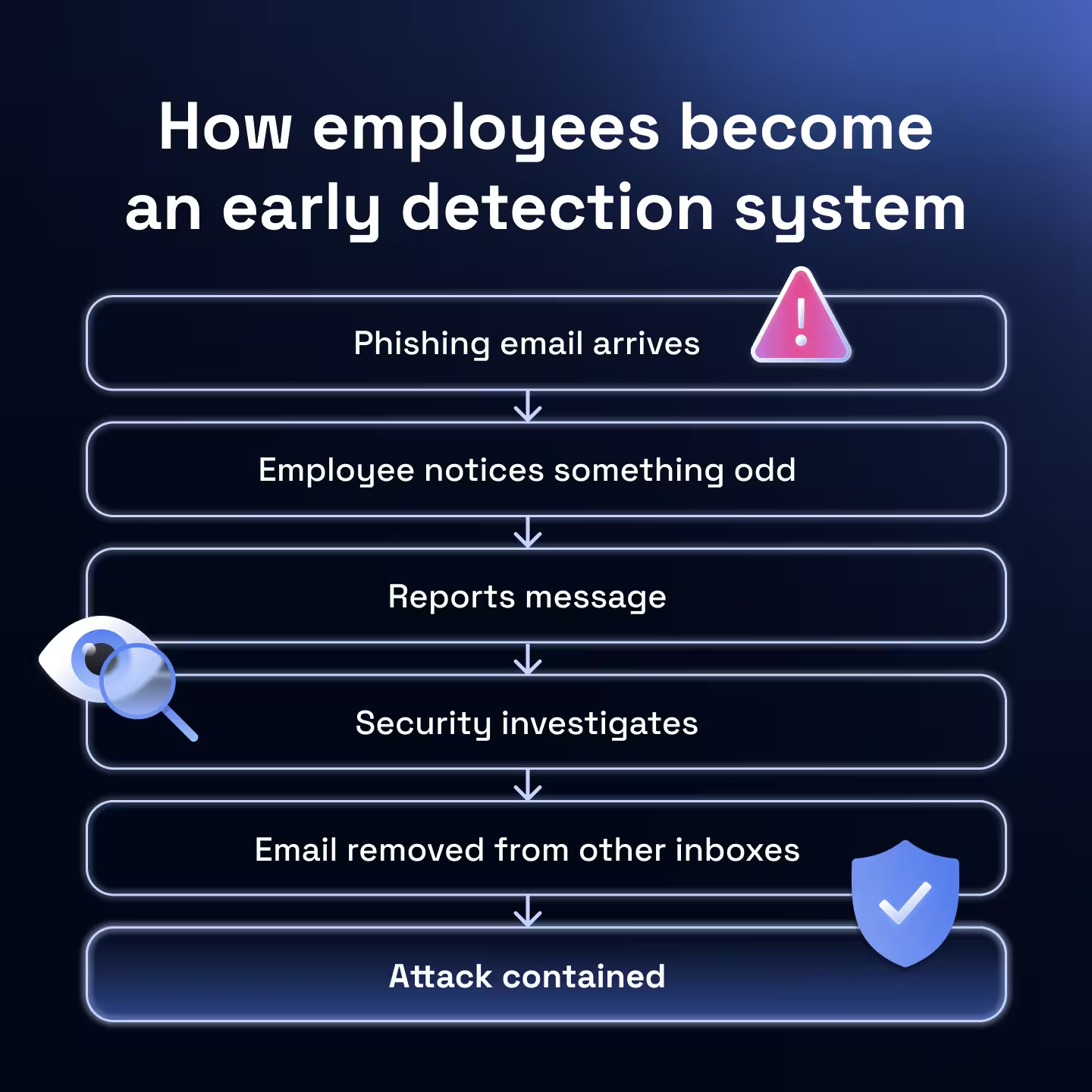
When one person reports quickly, you can often protect many:
- Security investigates faster
- You warn the business faster
- You pull similar messages faster
- You reduce the chance the next person clicks
This is also why “be vigilant” reminders don’t move the needle. People need a simple, repeatable action, and reporting is that action.
What can distort reporting rate (things to avoid)
- Too many reporting buttons → users don’t know where to click, so reporting stays low even if awareness is improving
- No feedback loop → users report, then hear nothing, so the behavior doesn’t stick (people want to know if they did the right thing)
- Punitive tone → users fear being wrong, so they stop reporting (or only report when they’re 100% sure)
If reporting is low, don’t assume “users don’t care.” Often the system is accidentally training them not to report.
Two practical ways to increase reporting rate without more training
- Make reporting a single reflex: One obvious button. One place. One consistent message: “If unsure, report.”
- Reward reporting, don’t just punish clicking: If the culture feels like “gotcha,” people hide. If the culture feels like “thanks,” people report.
Time-to-report: how quickly threats reach security
Reporting rate tells you whether employees report threats. Time-to-report tells you how fast those signals reach the security team.
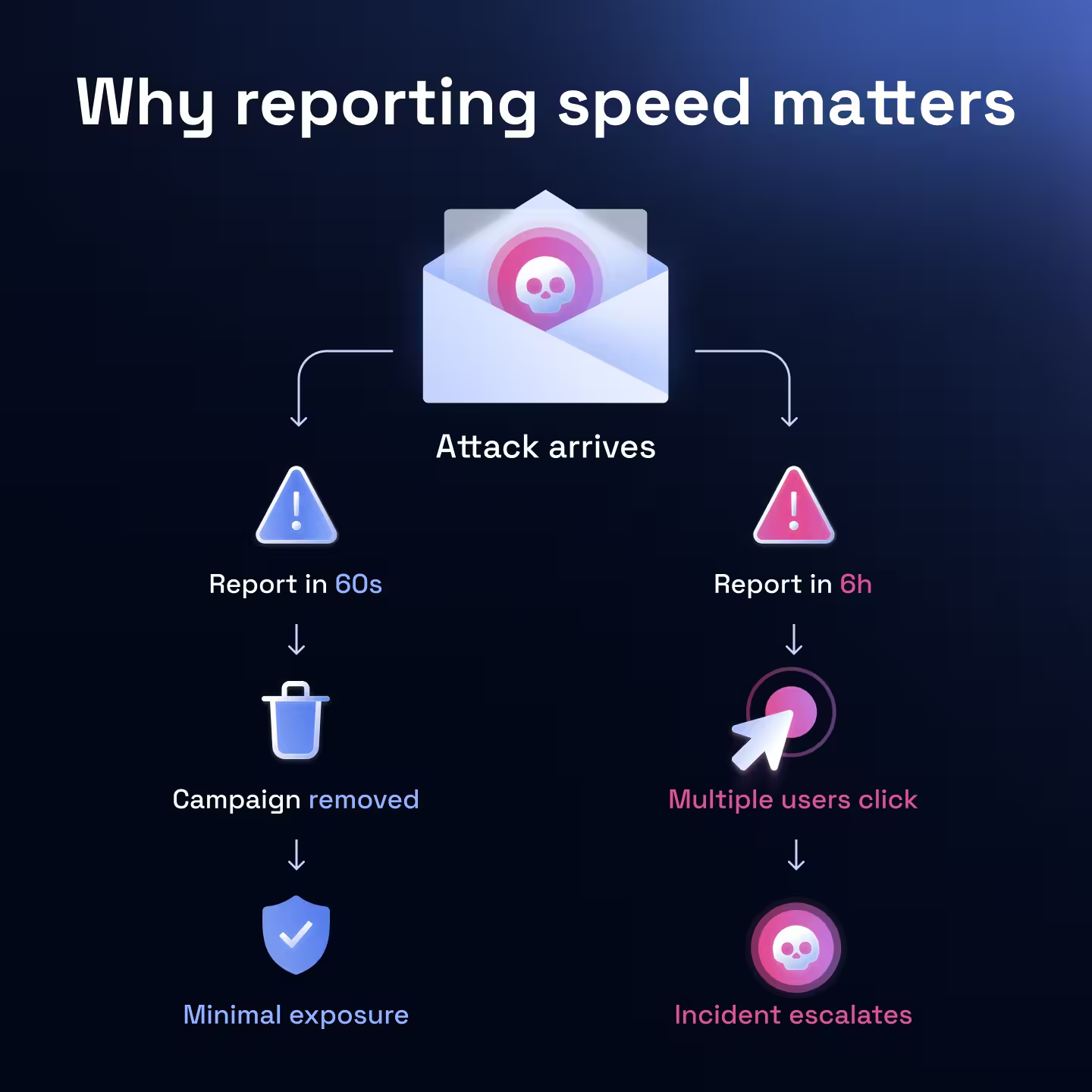
In real attacks, speed matters. The difference between a report in 60 seconds vs 6 hours can determine whether a phishing campaign becomes a contained incident or a widespread compromise.
Why speed matters in phishing detection
Phishing attacks typically target many employees at once.
If one person reports quickly, you can:
- Investigate the message
- Search for similar emails across mailboxes
- Remove malicious emails automatically
- Warn the rest of the organization
In effect, the first report can protect everyone else. That’s why fast reporting dramatically reduces the impact of phishing campaigns.
What good time-to-report looks like
Most organizations track median reporting time rather than averages to avoid outliers skewing the data.
A strong program usually shows a clear pattern:
- New users report slowly
- Trained users report faster over time
- Experienced users report almost immediately
Some organizations even track the fastest reporters, since those individuals effectively act as an early detection network.
In Hoxhunt platform data from 2026, the median reporting time for a real threat is 25 minutes and the fastest 10% of users report within 55 seconds. The fastest 5% report in as little as 39 seconds (Hoxhunt Phishing Trends Report 2026), effectively acting as an early detection network.
Why time-to-report improves with habit rather than knowledge
Training people to recognize phishing is useful. But reducing reporting time usually comes from habit formation.
Employees develop a simple reflex: something looks off → report it.
Frequent exposure to realistic simulations helps build that reflex over time, which is why continuous micro-training and regular simulations are far more effective than occasional awareness sessions.
How to improve time-to-report
Security teams typically see faster reporting when they:
- Make reporting frictionless (one button, one action)
- Give immediate feedback so employees know reporting helped
- Normalize false positives so people don’t hesitate to report
When employees feel confident reporting (even if they might be wrong) reporting speed improves dramatically.
Miss rate: the hidden risk most programs overlook
Miss rate tracks the proportion of phishing simulations that receive no interaction at all.
- The employee didn’t click
- The employee didn’t report
- The security team never saw the message
That creates invisible risk. If a real phishing attack followed the same path, your organization might never detect it early.
Why miss rate matters for awareness programs
If employees regularly ignore suspicious emails, it usually signals a deeper issue with the program.
Common causes include:
- Employees don’t know where or how to report
- Reporting feels unclear or inconvenient
- Users believe reporting creates extra work
- Employees assume someone else will report it
When reporting paths are confusing, people default to ignoring messages instead of engaging with them.
What miss rate tells you that other metrics don’t
Fail rate tells you who clicked. Reporting rate tells you who reported. Miss rate tells you whether employees are actively participating in threat detection at all.
When miss rate decreases over time, it usually means employees are starting to actually notice suspicious messages and take action by reporting. In other words, it’s often a signal that the security reflex is forming.
What is a good miss rate?
The Hoxhunt Phishing Trends Report 2026 has a number for how common the problem is: in a typical completion-based program, only about 10% of users report a simulation and 20% fail it, while the remaining 70% do nothing at all. A miss rate near 70% is not an edge case; it is the default most programs start from. “Good” is a miss rate that falls quarter over quarter as reporting absorbs it.
How mature programs reduce miss rate
Teams that reduce miss rate typically focus on making the response simple and habitual:
- One clear reporting button
- Fast feedback when users report
- Positive reinforcement for reporting
The goal is bigger than avoiding clicks: building a culture where suspicious messages trigger a consistent response.
Repeat clickers: where most human risk concentrates
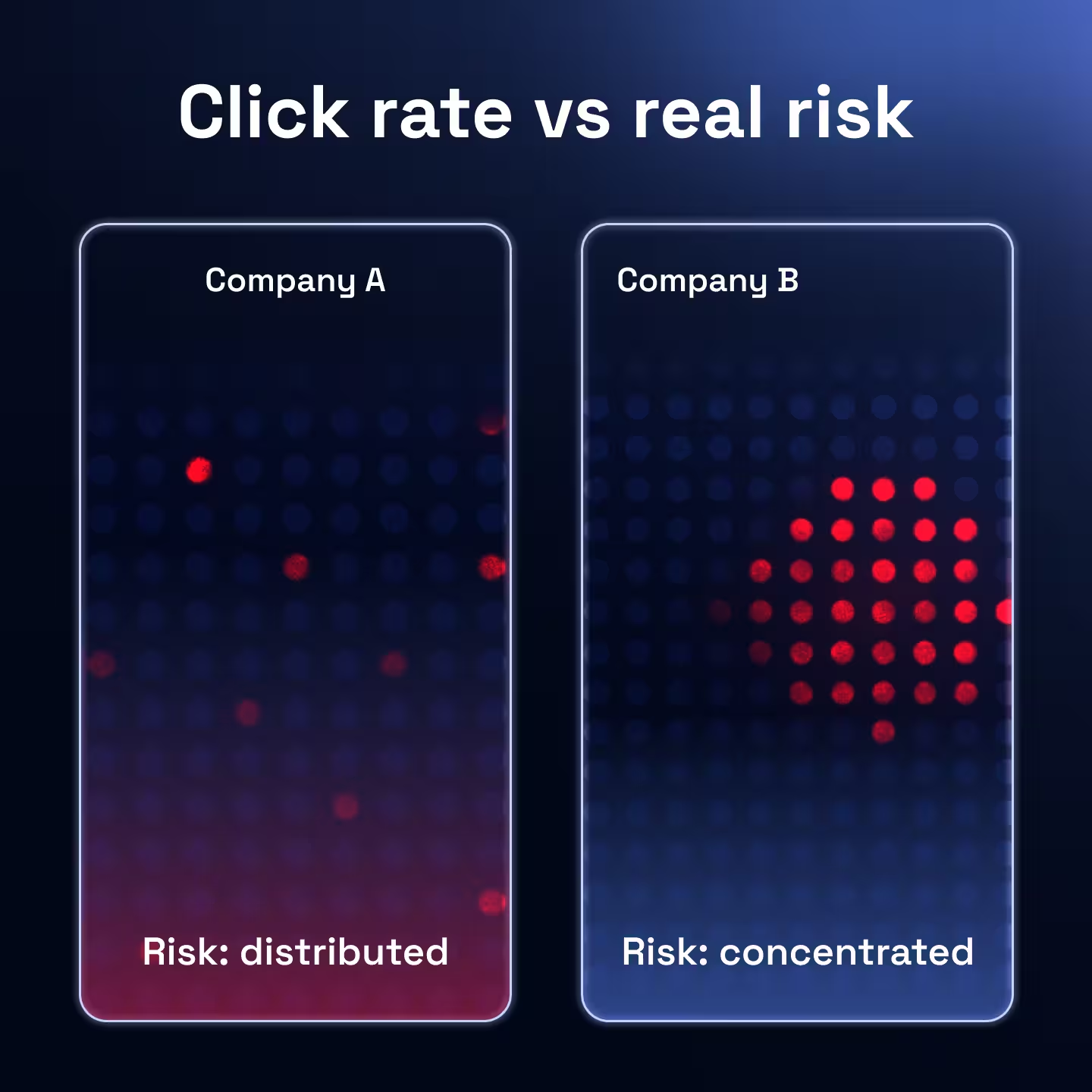
One of the most surprising patterns security teams discover is that phishing risk is not evenly distributed across employees.
Instead, it tends to concentrate.
In many organizations:
- A small group of users fails repeatedly
- The majority rarely click at all
- Overall averages hide this imbalance
This is why looking only at overall click rate can be misleading. Two organizations might both report a 5% click rate, but their risk profile could look completely different.
Why repeat clickers need addressing
Repeat clickers matter because they often represent persistent exposure to social engineering attacks.
If attackers send multiple phishing campaigns over time, these users are statistically more likely to interact with them.
From a security standpoint, that means:
- Attackers may repeatedly target the same individuals
- A single compromised account could become an entry point
- Overall program averages may look healthy while risk persists
This is why mature awareness programs track repeat clicker reduction over time in addition to overall failure rates.
LyondellBasell tracked exactly this: alongside reported phishing simulations jumping from 1,200 to over 8,000, a 6.5x rise, the chemical company saw an almost complete drop-off in repeat failures within two quarters, which is the shape repeat-clicker reduction takes when a program is genuinely working (LyondellBasell case study).
The goal isn’t to shame individuals but to understand whether the program is reducing concentrated human risk.
What does good repeat-clicker reduction look like?
“Good” here is a direction rather than a threshold: the repeat-clicker population should shrink every quarter, and the same names should stop appearing in the failure data. LyondellBasell’s almost-complete drop-off, above, is the pattern at full effect.
How to build a defensible security awareness metric narrative
At some point, every security leader gets the same question, whether it comes from the CISO, the board, or an ISO 27001 auditor: “Is this program actually making us safer?”
Answering that question with a single metric rarely works. What leadership actually needs is a narrative supported by multiple signals.
When the question arrives as ROI, translate it into risk terms: the return on security awareness is the incident cost you avoid (miss rate falling against your baseline, multiplied by what a breach costs) set against what the program costs to run. With IBM’s Cost of a Data Breach report putting the average breach at $4.88 million, even a modest drop in miss rate clears that bar.
Start with a simple behavioral framework
A clear way to explain awareness effectiveness is to show how employee behavior improves across four dimensions:
| Employee behavior | Metric to track | What the metric reveals |
|---|---|---|
| Detecting suspicious messages | Reporting rate | Shows how often employees surface potential threats to the security team. |
| Detecting threats quickly | Time-to-report | Indicates how fast employees escalate suspicious messages, reducing attacker dwell time. |
| Engaging with threats instead of ignoring them | Miss rate | Reveals whether employees are actively participating in threat detection or ignoring suspicious messages. |
| Reducing concentrated human risk | Repeat clicker reduction | Shows whether a small group of high-risk users is becoming more resilient over time. |
Each metric answers a different question about how employees respond to threats. Together, they show whether the human detection layer is improving.
Focus on trends rather than snapshots
One common mistake is presenting awareness metrics as a single number.
What leadership cares about is direction:
- Is reporting increasing over time?
- Are employees reporting faster?
- Are repeat failures decreasing?
Trends demonstrate that the program is changing behavior rather than just generating data.
The trend is also where the proof lives: in Hoxhunt Phishing Trends Report 2026 data, reporting rate climbs from roughly 47% at the start of adaptive training to about 67% after twelve months, against simulations that get harder over the same period. The defensible artifact is that curve; no single month’s number can carry it alone.
Density is what makes the narrative auditable: a completion-based program generates only about 4,000 behavioral data points a year in a 10,000-person company, while a behavior-change program produces closer to 180,000 (Hoxhunt Phishing Trends Report 2026). You can’t build a trend line out of four campaigns.
Connect the metrics to real security outcomes
The final step is translating awareness metrics into something leadership already understands: risk reduction.
For example:
- Higher reporting rate → more threats surfaced early
- Faster reporting → shorter attacker dwell time
- Lower miss rate → stronger employee engagement
- Fewer repeat clickers → less concentrated exposure
Taken together, these signals show that employees are becoming active participants in detection rather than passive training recipients.
That shift from awareness activity to measurable defensive behavior is what ultimately proves a program is working. Which of these metrics count as defensible, and where they sit in the wider risk-reduction stack, is where our guide to what actually reduces human cyber risk picks up.
How do you measure the effectiveness of a security awareness program?
You measure the effectiveness of a security awareness training program by tracking behavior over time and watching for one shift: employees stop being passive recipients of training and start acting as part of your detection layer.
You can usually see the shift in the metrics:
- More employees report suspicious messages
- Threats are reported faster
- Fewer emails are ignored
- The same users stop failing repeatedly
Individually, these signals are useful. Together, they tell a clear story that employees are helping detect attacks earlier.
The real objective of security awareness is not eliminating every click or achieving perfect simulation scores; it is creating an environment where suspicious activity is surfaced quickly and consistently.
In the real world, attacks don’t fail because no one clicks. They fail because someone notices and reports them before damage is done.
When that becomes the normal behavior inside an organization, security awareness isn’t just “working.” It’s actively reducing human risk.
Next questions security leaders ask about security awareness
- What Is a Good Phishing Failure Rate?
- We’re Running Security Awareness Training. Why Isn’t Risk Going Down?
- Why Security Awareness Plateaus After Year One (And What Most Teams Get Wrong)
Get more cybersecurity insights like this
- Subscribe to All Things Human Risk to get a monthly round up of our latest content
- Request a demo for a customized walkthrough of Hoxhunt
.avif)