The short answer
Human risk doesn’t spread evenly: it concentrates in the people and teams who keep repeating risky actions. Your security tools keep their findings in their own consoles, so nobody sees where the risk concentrates, or in whom. What you need is one view of every risky signal your tools catch, by person and by team, and targeted coaching only where it’s needed. Hoxhunt Secure Behavior Detection and Response gives you both, and works with the tools you already have.
Your email security, endpoint protection, web gateway, data loss prevention (DLP) and phishing training tools each flag risky actions every day. Each one sends its alerts to its own console, sorted by tool and usually tied to a device. The problem is that none of those tools tells you which people and teams keep triggering alerts, or which behaviors keep coming back.
Knowing where human risk concentrates matters because people are still part of most breaches. According to the Verizon Data Breach Investigations Report 2026, the human element was involved in 62% of breaches (full disclosure: Hoxhunt is one of the report’s data contributors).
For a CISO or an IT or security manager, two more questions come right behind “Where does human risk concentrate?”: 1) How can we know if human risk is actually going down? 2) What do we do about the people who repeat the same risky actions? Neither is easy to answer with the tools you have today.
Why can’t your security tools show you where human risk concentrates?
Your security tools can’t show you where human risk concentrates because each one is built to protect one place, and does it well. But none of them follows the same person across all five:
- Email security scans incoming mail and flags the messages that look like phishing, so it only sees what happens in the inbox.
- Endpoint protection runs on laptops and servers, and flags malware or a security setting someone switched off, so it only sees the device.
- Web gateway filters the sites employees visit and flags the risky ones, so it only sees browsing.
- Data loss prevention (DLP) flags sensitive files being shared or sent outside the company, so it only sees data leaving.
- Phishing training sees who clicks, who gives away their credentials in simulations, and who reports real attacks, but it sees nothing of their files, devices or browsing.
None of the above is a flaw: you want each tool doing exactly its job. The real problem is the gap between the consoles. When someone does something risky, the tool that caught them raises an alert in its own console, and out of the box nothing connects that alert with the alerts about the same person in the other consoles.
So let’s say the same person gives their credentials to a simulated phishing page on Monday, turns off a security setting on their laptop on Wednesday and shares a folder publicly on Friday. That’s three alerts in three consoles, each one filed away as a one-off. Multiply that across thousands of employees, and try to answer the million-dollar question (the one your board will ask): Where does our human risk concentrate?
Answering this question is next to impossible, because no single console has the answer: each one only holds its own tool’s alerts. You would need to cross-reference the alerts from every console yourself. The better approach is a tool that shows you the full picture and helps you act where it matters.
If each tool sees a slice of risky behavior, how do you get the full picture?
The full picture doesn’t live in any of your consoles. Someone has to build a view based on people’s actions across them: a view that ties each alert to the person behind it, names the behavior it shows, and counts how often that behavior comes back.
Hoxhunt Secure Behavior Detection and Response is the product that builds that view from the alerts your tools already raise.
That’s how you see where human risk concentrates: once the alerts sit together, the few teams and behaviors that drive most of your risk stand out, and you can put your effort there instead of everywhere.
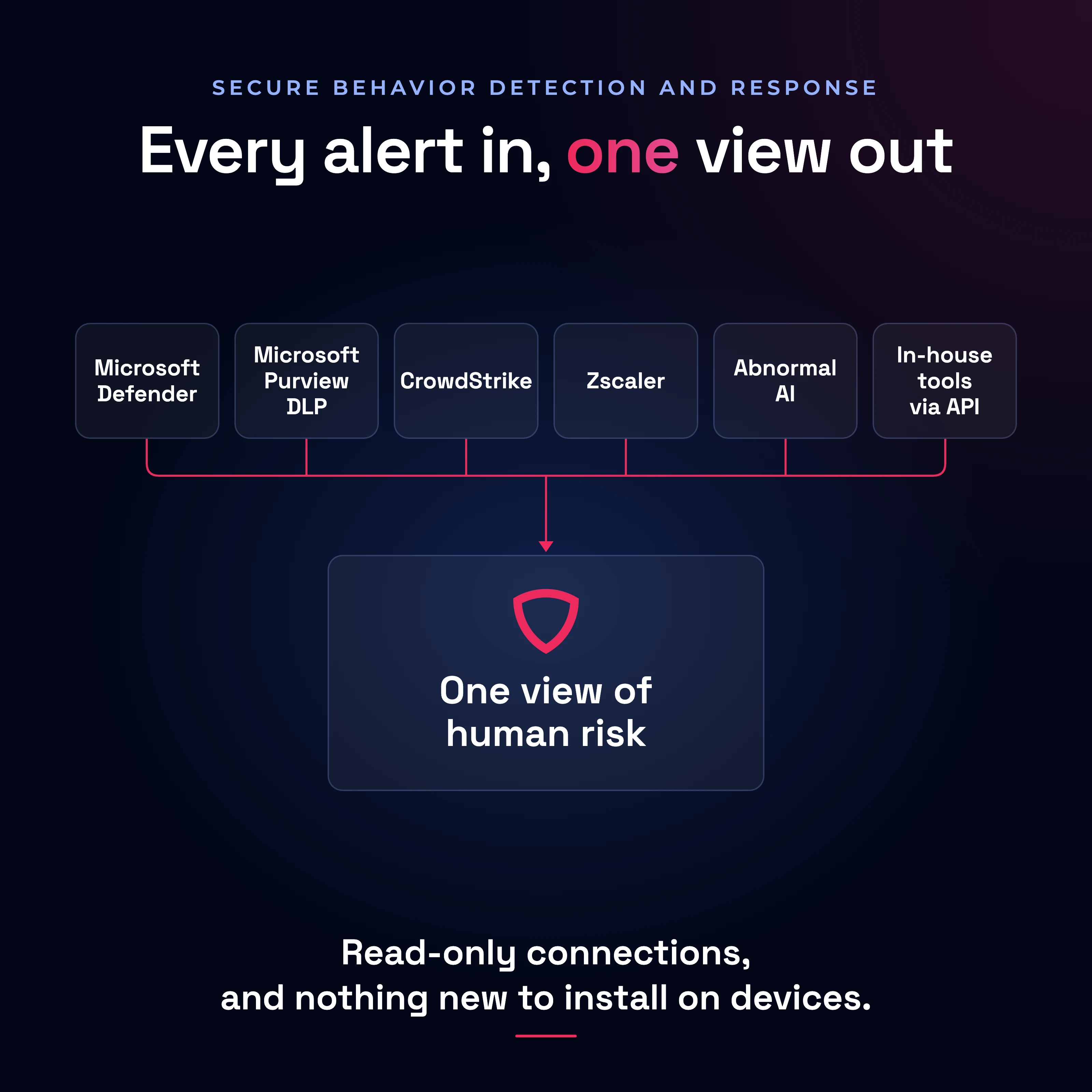
By the way, if you’re wondering what adding Hoxhunt means for the stack you run today, and worried about yet another deployment: Nothing gets replaced and nothing new gets collected. Each tool keeps its own detection logic and thresholds, and there’s no new agent to deploy on employee devices.
This is how an alert travels from one of your tools to the view Hoxhunt builds, in four steps:
- Read-only connections: Hoxhunt reads alerts from Microsoft Defender, Microsoft Purview DLP, CrowdStrike, Zscaler and Abnormal AI, and its own phishing training data is built in. And the list doesn’t end there: your internal systems and proprietary tools can send their alerts through an API too. Nothing new is installed on anyone’s laptop, and the tools you trust keep doing the detecting.
- Alerts become behaviors: Each alert becomes a named behavior with a severity level, such as “Shared a file or a folder publicly” or “Sensitive data shared with AI”. Each behavior falls into a risk area (like “social engineering” or “safe browsing”). This way, an alert from Purview and one from Zscaler, for example, now speak the same language, so you can compare them.
- Behaviors are tied to people: The same employee’s alerts are connected across tools, so alerts that look minor in each tool add up in one per-person view. When the same risky action keeps appearing in that view, that’s a habit. Access to the per-person view is limited to the admins you enable.
- A view by department, job function and country: The breakdown shows which teams carry the most risk and which behaviors drive it, so you can decide where to act first.
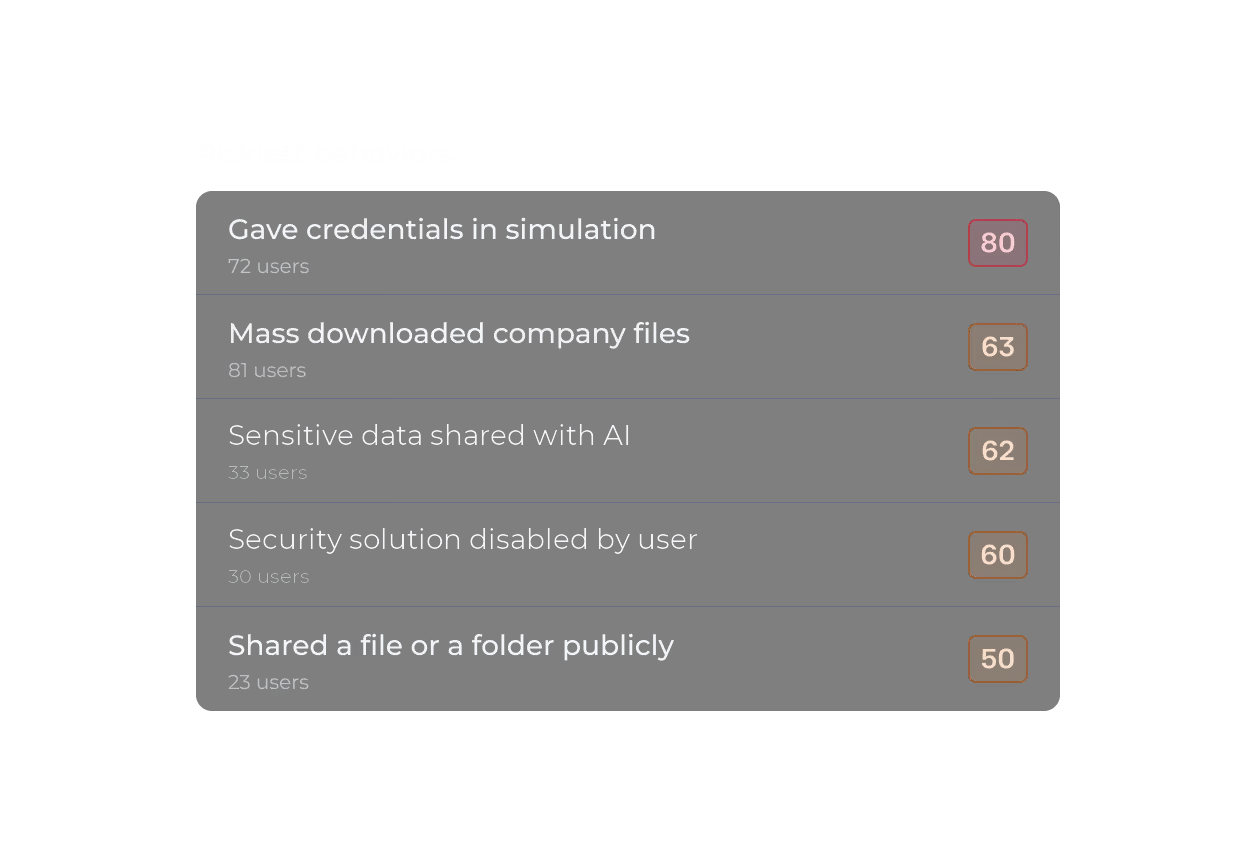
Hoxhunt then ranks the riskiest behaviors, the riskiest groups and the riskiest people across your environment, visible only to the admins you enable. What that ranking looks like in your organization depends on your tools, your people and your settings.
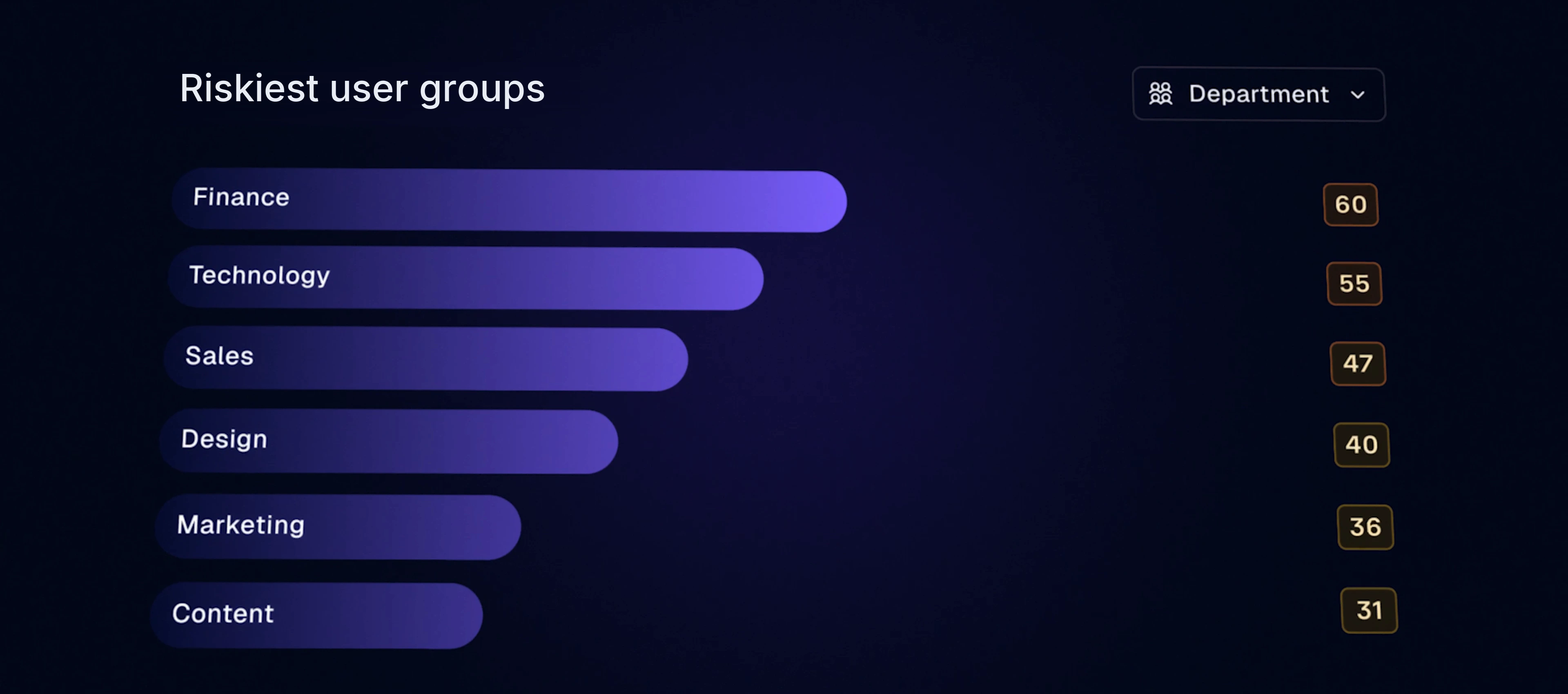
So, where does your human risk concentrate? Your consoles can’t tell you. Hoxhunt can.
See how Secure Behavior Detection and Response works →Your alerts usually name a device, not a person. How do you see the habits behind them?
Tools such as CrowdStrike and Zscaler are built to protect machines and accounts, so their alerts usually name a machine, an address or a session rather than a person. And that is totally fine, because those are the right units for containing a threat, which is exactly what those tools are for.
But if you’re trying to change what people do, machines, addresses and sessions are not the right unit. Behind many of those alerts is one person who clicked, downloaded, shared or switched something off.
To see that person’s habits, you need to line up their alerts over time. One alert rarely tells you much: it might be a false positive or a one-off mistake. A habit only shows up when the same behavior comes back again and again, sometimes across several tools.
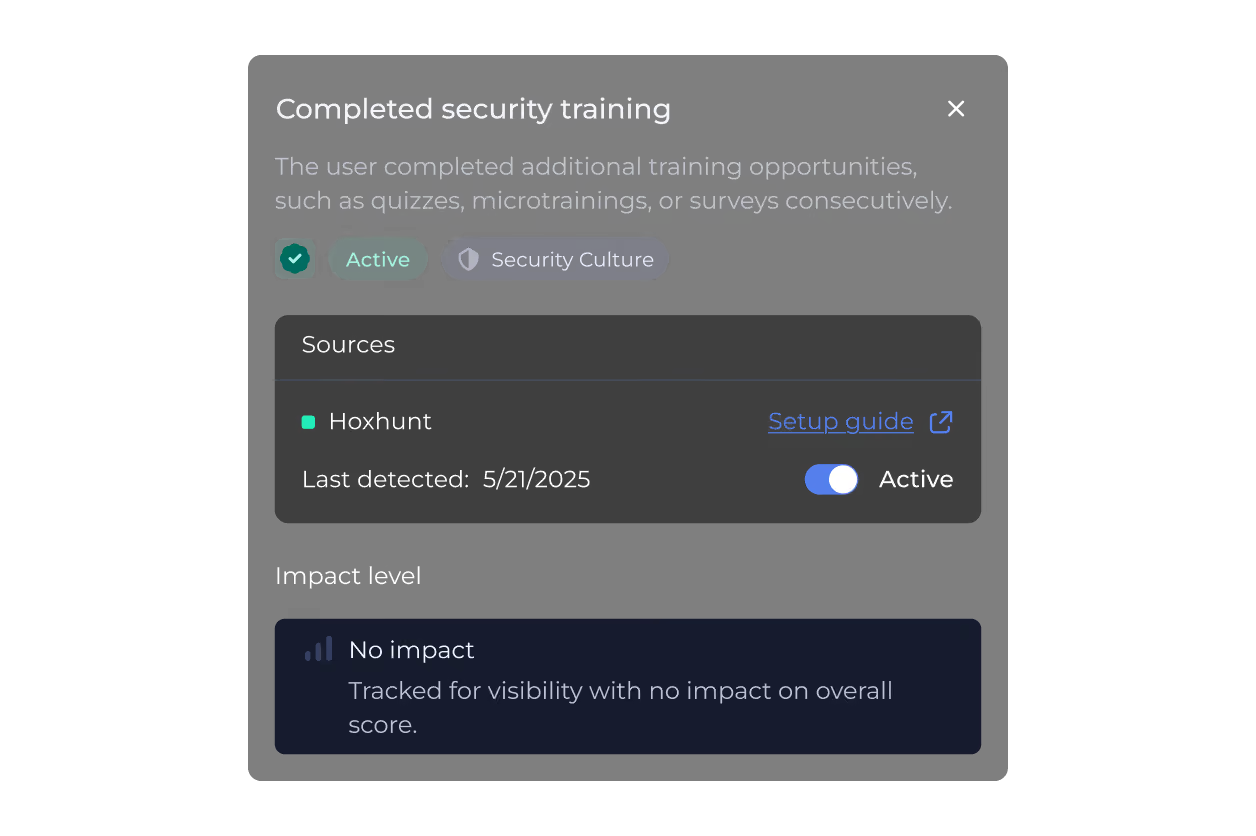
Hoxhunt Secure Behavior Detection and Response organizes the alerts it reads per employee and over time, and clusters related behaviors into named patterns, such as “risky credential handling” or “unsafe file sharing”, so you can see which habits are spreading and in which teams. It also counts positive behaviors, such as reporting a real phishing email or completing training, so you can see who is building safer habits too.
You find out the same people keep triggering the same alerts. What should happen next?
Without a per-person view, when the same people keep triggering the same alerts, what usually happens next is either a ticket or a lockout, and both land back on your security team: a ticket has to be handled by hand later, and a lockout creates a second task when the person asks for access back. Neither one changes the habit, and coaching every repeat by hand doesn’t scale. What should happen next is a response that grows with the behavior: it starts light and escalates only when the behavior repeats.
With Hoxhunt, you can do that with one automation (a rule you set up once) that can, for example, send a reminder in Microsoft Teams, Slack or email the first time, assign targeted training the second time and notify the person’s manager or your security team the third time. You set the number of repeats, the time window and a cooldown, so the same person isn’t messaged again right away.
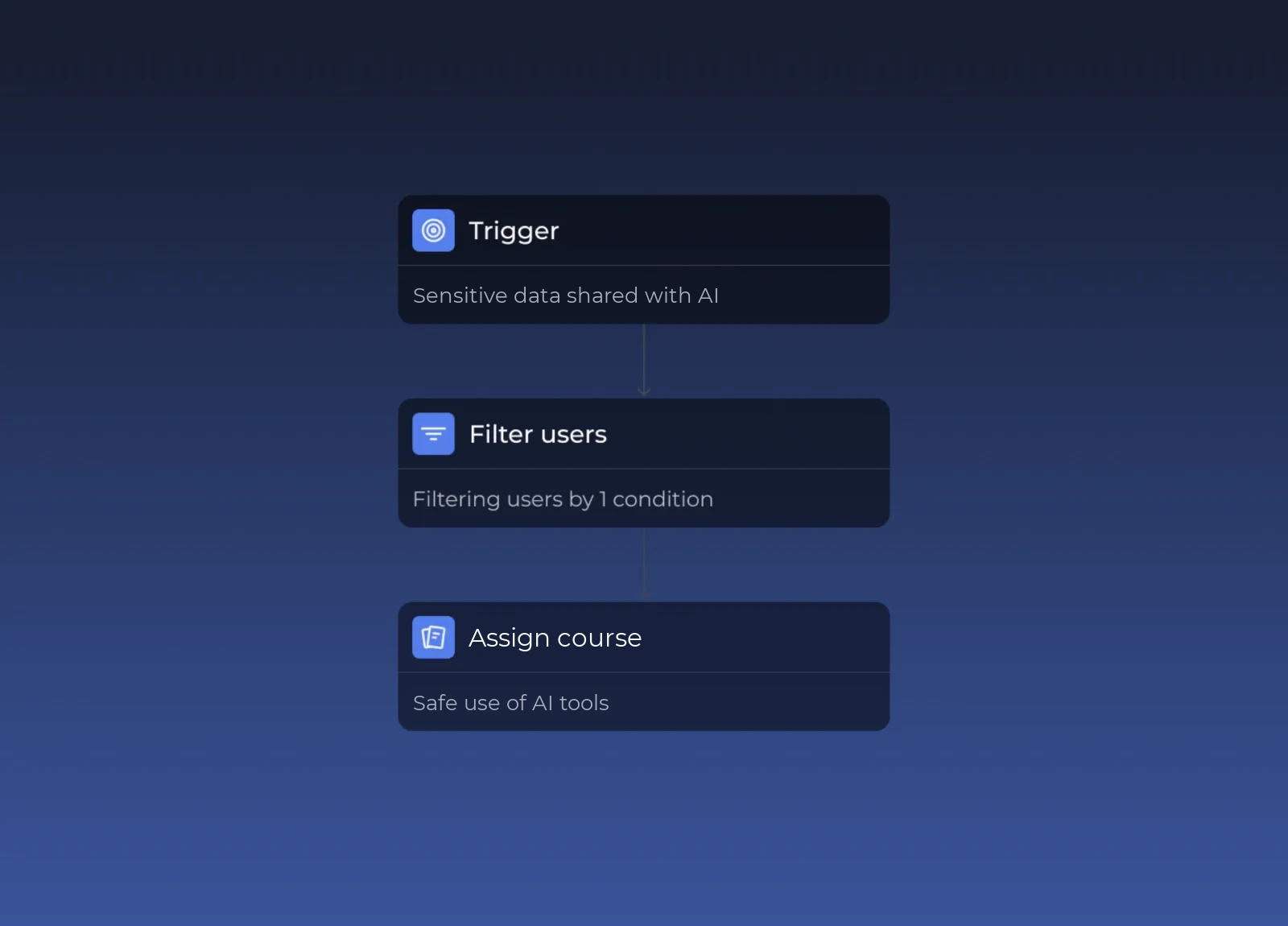
The same automation can call your own systems through a webhook, so your security team keeps its own playbooks and decides what happens next. Before any automation reaches an employee, you can run it in audit mode and see how often it would have fired.
Hoxhunt’s guidance for every message is to coach, never to shame: most risky behaviors are workflow shortcuts, misunderstandings or gaps in awareness rather than malice. It’s the same philosophy we use for our phishing simulations: we want to teach your people how to be your best defense against attackers, not to scare them or make them feel silly. For what to do with repeat clickers in phishing simulations specifically, see how to handle repeat clickers without creating a blame culture and our guide on repeat offenders in phishing training.
The board will ask if human risk is going down. Can you answer with more than “the click rate did”?
Showing the board that human risk is going down is hard for a reason: the numbers you have measure activity, not outcomes. A phishing click rate and a training completion rate tell you how the program ran, and nothing about whether people are safer; the alerts in your other security tools were never counted per person, so they could not be turned into a trend either.
Hoxhunt Secure Behavior Detection and Response counts risky behaviors per person and turns that count into a risk score, so you can see the trend and show it to the board. The score is built across every connected tool, for any group you choose: the whole company, a department, a country or a job function. Every behavior comes with a default severity, and you can adjust it to match your organization’s priorities. Here’s how the score is calculated, in three steps:
- The score counts risky behaviors per person, not in total. Ten risky behaviors from two people score higher than ten spread across ten people. What moves the score is concentration, not headcount: a small team can outscore a big one.
- Each person’s contribution to the score is capped, so one employee who keeps triggering alerts can’t dominate the group’s score.
- High and critical behaviors weigh far more than medium ones, so the severity you give each behavior shapes its weight in the score.
You can track the score over time and break it down by, for example, department or behavior, and you will also get a number with a direction and a breakdown that shows where the risk concentrates. Positive behaviors are counted separately, so good news never hides risk.
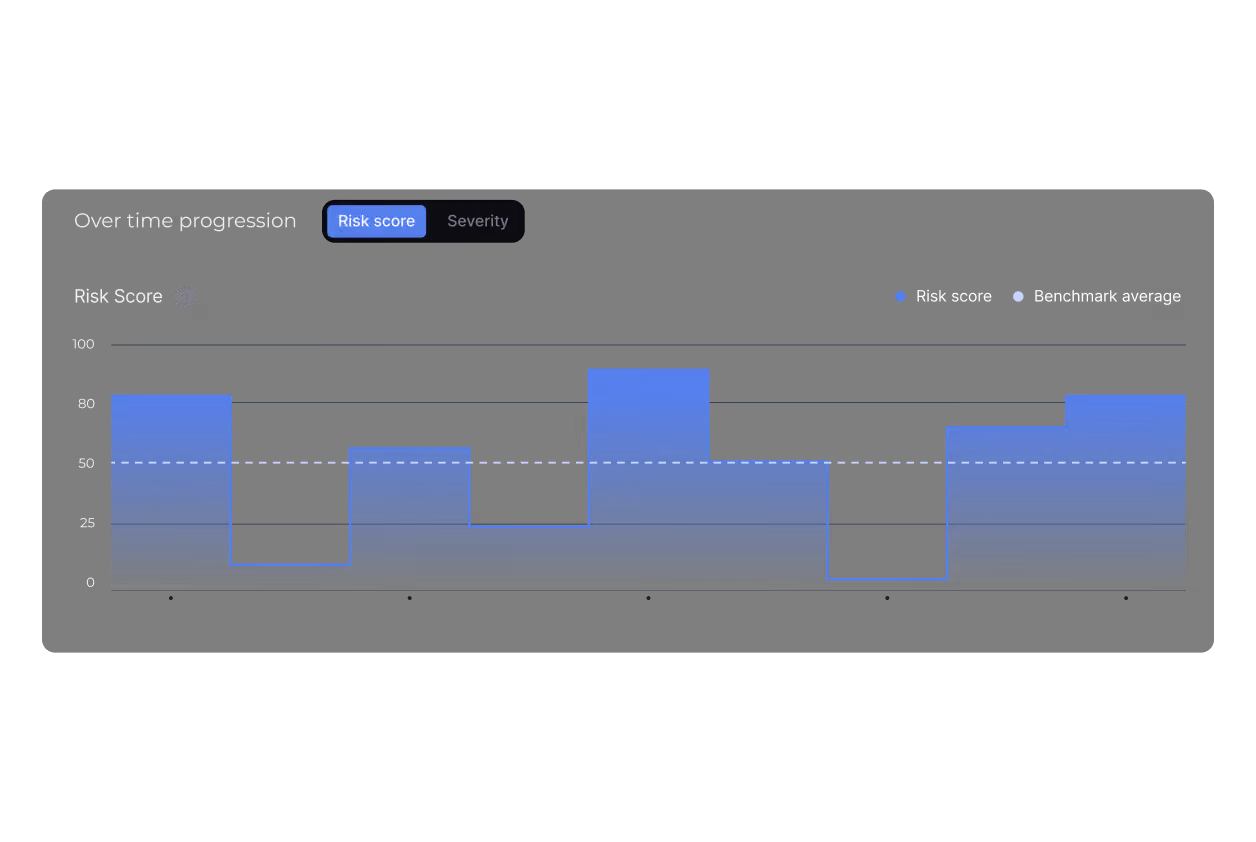
A risk score is only one line of your report to the board. What leadership and the board expect to see on human risk is its own question, and so is how to prove security awareness training is working.
How is Hoxhunt different from a SIEM, UEBA or DLP?
A security information and event management (SIEM) system centralizes logs and events from across your environment. User and entity behavior analytics (UEBA) builds a baseline of normal activity for users and devices and flags what departs from it. Data loss prevention (DLP) is the set of tools that detect and stop the unauthorized use or transfer of sensitive data.
Hoxhunt Secure Behavior Detection and Response is different from a SIEM, UEBA or DLP because those tools work on events (SIEM), users and devices (UEBA) and sensitive data (DLP), while Hoxhunt works on the human behavior behind the alerts they raise.
| Tool | The question it answers | What it works on |
|---|---|---|
| SIEM | Is something happening right now, and what happened? | Raw logs and events, one incident at a time |
| UEBA | Is this account or device acting unusually? | Deviations from a normal baseline |
| DLP | Is sensitive data being used or sent where it shouldn’t be? | Data in use, in motion and at rest |
| Hoxhunt | Which people and teams keep repeating risky behaviors, and how to help them change? | The alerts those tools already raise, per person, over time |
And if you’re wondering about policies and privacy: Hoxhunt doesn’t collect raw logs, search them or decide whether an event is a threat. It reads the alerts your existing tools already produce and keeps a record per person over time. Access to that record is limited to the admins you enable, and Hoxhunt responds with coaching. Your SIEM, UEBA and DLP keep their jobs, and your security team stays in charge of incidents.
See every human risk signal in one place.
See how Secure Behavior Detection and Response works →Frequently asked questions about human risk across security tools
How does Hoxhunt handle employee privacy?
Hoxhunt doesn’t collect anything new from employees or their devices: it reads the alerts your security tools already raise. What it adds is a per-person record built from those alerts, so it can offer timely coaching, and access to that record is limited to the admins you enable. You choose the severity of each behavior and who can see what, to match your own policies.
Which security tools does Hoxhunt work with?
Hoxhunt works with Microsoft Defender, Microsoft Purview DLP, CrowdStrike, Zscaler and Abnormal AI, plus its own phishing training data. And the list doesn’t end there: your internal systems and proprietary tools can send their alerts through an API too.
What do you need to get started with Hoxhunt?
You need read-only connections to the security tools you already run; if you use Hoxhunt’s phishing training, its data is already in. You can start with one tool or one use case, review what comes back and add more over time.
Does a cross-tool view of human risk replace security awareness training?
No. Security awareness training keeps running exactly as before: the cross-tool view doesn’t replace it. If the training you use is Hoxhunt’s, its results become one more signal in the view, next to the alerts from your other security tools.
Can you test a Hoxhunt automation before it reaches employees?
Yes. Set an automation to audit mode and it’ll run against real event data without sending anything, so you can see how often it would have fired and for whom, adjust the trigger and thresholds, and only then set it live.
Get more cybersecurity insights like this
- Subscribe to All Things Human Risk to get a monthly round up of our latest content
- Request a demo for a customized walkthrough of Hoxhunt
.webp)