


The short answer
Hoxhunt has written 24 phishing simulation templates for you, free to copy and adapt, across email, Microsoft Teams, text message, phone call, QR code and deepfake, from easy to expert. They draw on the Hoxhunt Phishing Trends Report 2026, based on more than 50 million simulations and millions of real malicious emails sent to over 4 million employees. Each one shows the clues that give the message away, what employees should do and a short lesson to send them after the simulation.
Good phishing simulation templates are hard to find. Each message has to fit the role and the level of the person who receives it, be new to them, and look like the attacks they get today.
Writing that by hand, employee by employee, is slow work for a security team. To help, Hoxhunt has put together these 24 phishing simulation ideas and examples: what to send on each channel, at four difficulty levels.
Every example shows the message as employees would receive it. Calls show what the caller says, and video calls show what happens on the call. Three notes follow: the lesson to send the employee after the simulation, the tells (the details that give the message away) and what employees should do when they spot those details.
If you are designing your whole simulation program, our guide to phishing simulation best practices is the place to start. If you are still choosing a phishing simulation platform, our guide to the best phishing simulation tools compares the leading platforms.
How difficulty levels work in these phishing simulation templates
Each template carries one of four levels (“Easy,” “Intermediate,” “Hard” or “Expert”), so you can match it to the person you send it to. Three things set the level: how many tells the message carries, how easy they are to spot and how closely its story (the situation the message claims to be about) fits the job of the person who receives it.
- Easy: a message with obvious tells, such as an unknown sender, a generic greeting or strong pressure to act now.
- Intermediate: a believable sender and an everyday request, with tells that need a second look.
- Hard: a message that fits the person’s work, with tells that are easy to miss.
- Expert: a targeted message with real-looking details about the person or the company, where the request itself is the main thing to question.
The tells in these examples, such as a look-alike domain or a tight deadline, show up in real attacks too. Our list of 14 phishing red flags explains how to spot many of them.
In most simulations, employees fail if they click the link or do what the message asks, and they succeed if they report it. In a phone call, they succeed if they hang up before they press a key or give the caller anything.
Why phishing simulations need different difficulty levels
A simulation that is too easy teaches little, and one that is too hard teaches people to give up. So the difficulty should rise for each person as they get better at spotting phishing. Done right, reporting keeps rising: across Hoxhunt customers, employees report 47% of their simulations when they start training and 67% after 12 months, even as the simulations keep getting harder (Hoxhunt Phishing Trends Report 2026).
Hoxhunt’s adaptive phishing training adjusts the difficulty for each person. When an employee keeps reporting simulations, the next ones get harder. When they keep clicking, the next ones get easier. Either way, employees get a micro-lesson the moment they report or click.
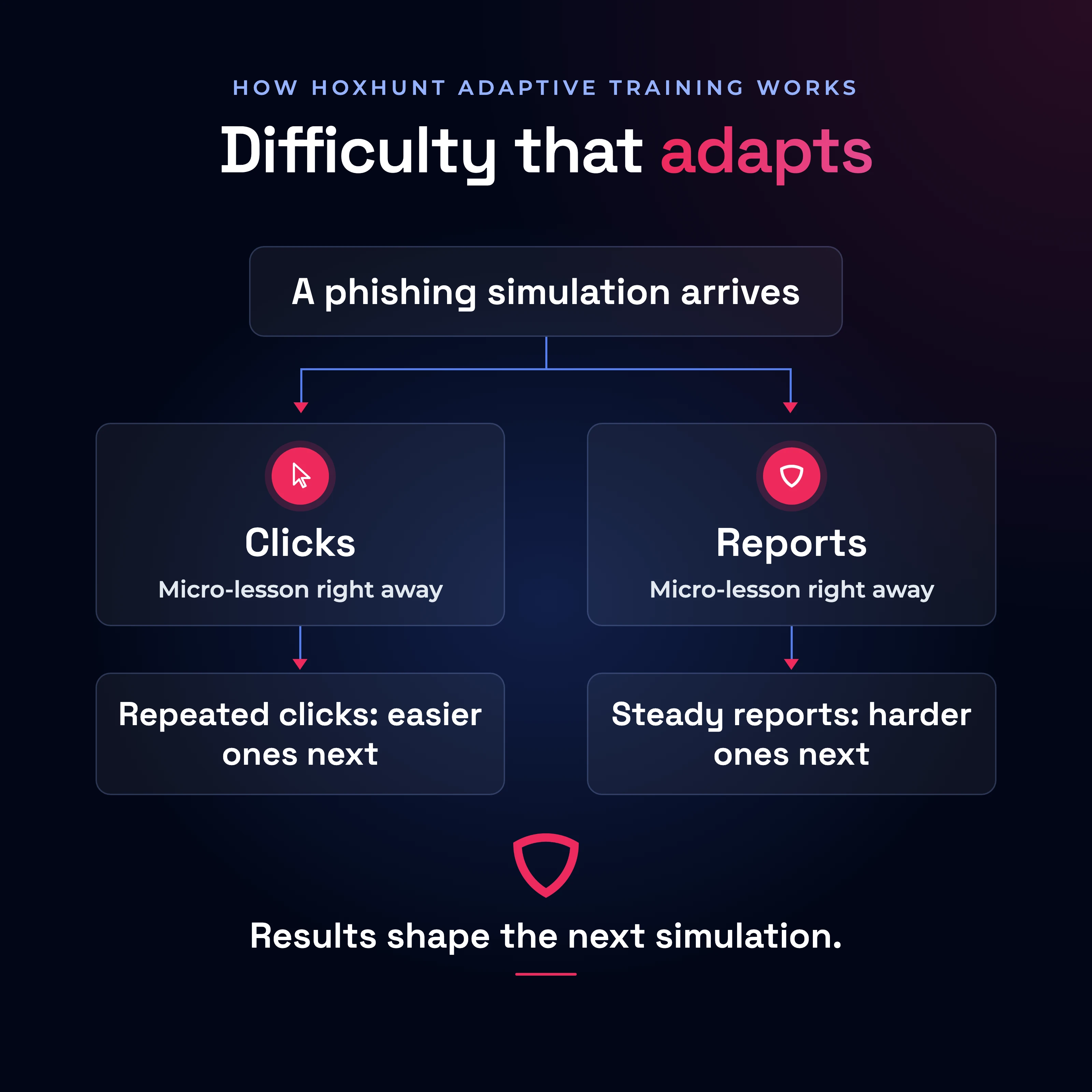
One simulation, two paths: what happens after a click and after a report.
How to use these phishing simulation templates
Each template is plain text you can copy. Text in braces, such as {first name}, marks a detail to fill in. Before you use one:
- Swap any made-up company, number or system for one your employees see every day.
- Keep the tells: they are what the lesson teaches.
- Choose the level that fits each person: “Easy” for people new to simulations, “Intermediate” as they get better at spotting phishing, and “Hard” and “Expert” as they keep improving. A card with a “Send to” line is written for the people it names, so send it only to them.
- Where a template names or impersonates a real person, such as a colleague, a manager or the CEO, use that person only with their consent.
With a phishing simulation platform:
- Create a custom template and paste in the subject and the message.
- Replace {first name} with the platform’s own placeholder for the employee’s first name, and fill in the other details in braces yourself.
- Use the platform’s tracked link in place of the link in the template.
- Show the lesson after the simulation, to the employees who click and to those who report.
- If the platform lets you mark the tells, mark them.
Without a platform:
- Use the templates as teaching material, for example in a team meeting or a security newsletter.
- Show a message, ask people to find the tells, then share what to do and the lesson.
- Don’t send the templates as real tests from an ordinary mailbox: without a platform, you have no reliable record of who clicked.
What “report” means: In every example, “report” means using the report button in the employee’s email client or chat app, which sends the message to the security team. For text messages, it means the reporting app the company uses. Where there is no button or app, and for calls and voicemails, it means telling the security team through the route the company uses for suspicious messages, such as a security inbox or the IT helpdesk.
Email phishing simulation examples, from easy to expert
Attackers keep coming back to everyday business lures. HR impersonation (8.2%) and invoice lures (8.3%) were two recurring themes in the AI-assisted phishing emails the Hoxhunt Phishing Trends Report 2026 analyzed. Calendar invites are risky too: in Hoxhunt’s simulations, employees fail them 24% of the time, about four times the usual failure rate.
Using these email templates: Load each one into your phishing simulation platform as a custom email template, following the steps above. Send calendar-invite templates as real calendar invitations, and attach the PDF to any template that has one, if your platform supports both.
In Hoxhunt, email simulations arrive as part of each employee’s adaptive training, and employees can report them with the Hoxhunt button in Outlook or Gmail.
Easy: a password expiry notice
EmailEasy
 Report this email
Your password expires in 2 hours
Dear {first name},
Your password will expire today. To keep your current password, confirm it within the next 2 hours:
Keep My Password
IT Support
The lesson
Two hours to save your password? Cute, but that rush is the trap. Before you touch anything about your account, check who sent the email and hover over the link. Need a new password? Change it in your account settings, never through a link in an email.
The tell
The sender’s address ends in account-notices.example. That isn’t the company’s domain, so the email doesn’t come from the company’s IT team. The two-hour deadline is there to rush the employee past a careful look. And the “Keep My Password” link asks them to confirm their password from an email, when passwords are changed in the account settings.
What employees should do
Employees should check the sender’s address and hover over the “Keep My Password” link, without clicking, to see where it goes. They should report the email. To find out whether their password is about to expire, they can check their account settings.
Intermediate: an HR policy update to acknowledge
EmailIntermediate
Action required: acknowledge the updated travel and expenses policy
Hi {first name},
The travel and expenses policy has been updated for 2027. Please sign in to the HR portal to read and acknowledge it.
Open HR portal
Thanks,
People Team
The lesson
Look-alike alert! yourcompany-hr.example borrows your company’s name, but it isn’t your company. Hover before you click: if the link doesn’t go to your usual HR system, don’t sign in. If the policy update is real, it should be waiting for you in the HR system too.
The tell
The sender’s domain is yourcompany-hr.example: the company’s name with “-hr” added. Anyone can register a domain like that, so the email only looks internal. The “Open HR portal” link leads to a sign-in page outside the company’s HR system. That page is where the employee’s password would be stolen.
What employees should do
Employees should compare the sender’s domain with the company’s real one, and hover over the “Open HR portal” link to see whether it goes to the company’s HR system. To read the updated travel and expenses policy, they should open the HR system themselves or ask HR through a channel they already use. They should also report the email.
Hard: a calendar invite with a link
EmailHard
Send to: people who join budget or planning meetings
Invitation: Q4 budget review, Thu 10:00 to 10:30 AM
Hi {first name},
You’ve been invited to the Q4 budget review. The agenda and the figures to review beforehand are in the shared drive.
Open agenda
Accept · Tentative · Decline
The lesson
Plot twist: meeting invites can phish too. A calendar feels safe, so it’s a great hiding place. Check who sent the invite and hover over the agenda link. An agenda that lives in your team’s shared drive should open there, so if the link goes anywhere else, find the agenda in the drive yourself.
The tell
The invite comes from yourcompany-team.example, a look-alike of the company’s domain, so the organizer isn’t a colleague. The email says the agenda is in the shared drive, yet the “Open agenda” link goes to an address outside it. A link like that usually leads to a fake sign-in page.
What employees should do
Employees should check the organizer’s address before accepting, and hover over the “Open agenda” link to see where it goes. They should look for the agenda in the shared drive or the team’s chat instead, and report the invite.
Expert: a supplier asking to change bank details
EmailExpert
Send to: people who pay supplier invoices
RE: Invoice INV-20431, updated remittance details
Hi {first name},
Thanks for confirming the October order. Our bank has changed, so please use the attached remittance details for invoice INV-20431. If anything is unclear, call us directly at +1 202 555 0142.
Best regards,
Accounts Receivable, Northwind Supplies
Remittance_details_INV-20431.pdf
The lesson
New bank details by email? Treat the request as an attack until the supplier proves otherwise. Attackers copy real orders and real suppliers, down to the invoice number. Call the number you already have on file, never the one in the email, before any money moves.
The tell
The email asks for an invoice to be paid into a new bank account, the core move of invoice fraud. It offers its own phone number for questions, so a call to check would reach the attacker. And it quotes a real-looking order and invoice number to make the request feel routine.
What employees should do
Employees shouldn’t open the attachment, pay into the new account or call +1 202 555 0142. They should call the supplier at the number already in the company’s records to check the change, report the email, and pay nothing until the change is verified.
Microsoft Teams phishing simulation examples
Microsoft Teams phishing simulations let employees practice spotting an attacker in the chat app they use with colleagues. There, a short request reads like everyday work. Teams marks messages from other organizations with an “External” label, and every example here carries it. What changes from one level to the next is how believable the sender and the request are.
Using these Teams templates: You need a simulation platform that can send messages inside Microsoft Teams. Ask your vendor whether it does. If you use a real colleague’s name, ask that person for consent first.
How does Hoxhunt do it? Teams simulations are part of Hoxhunt’s ready-made library, and employees can report them with the button built into Teams, just like a real attack.
Easy: a prize draw voucher
Microsoft TeamsEasy
PD
Prize Desk (External)2:12 PM
Congratulations {first name}! Your work email was picked in our partner prize draw for a $100 voucher. Claim it before midnight: Claim voucher
The lesson
Free money with a countdown? Classic bait. The “External” label means the message comes from outside your company, and a real prize doesn’t need you to click a stranger’s link before midnight. Leave the link alone.
The tell
The account is marked “External,” so the message comes from outside the company. The $100 voucher is a prize from a draw the employee never entered, a common way to get a click. The midnight deadline is there to stop them from thinking it over.
What employees should do
Employees should look for the “External” label next to the name, and hover over the “Claim voucher” link without clicking to see where it goes. They should then report the message with the report button in Teams, if the company has one, or through any other channel agreed internally.
Intermediate: an IT service desk chat
Microsoft TeamsIntermediate
IT
IT Service Desk (External)2:12 PM
Hi {first name}, we’re moving mailboxes to the new server this month. Please confirm your sign-in here so your email moves with you: Confirm account
The lesson
A sign-in request through a chat link deserves a pause, especially from an account marked “External.” When in doubt, ask IT directly through its usual channel, never by replying to the message itself. Your mailbox will survive the wait.
The tell
The IT Service Desk account is marked “External,” so it comes from outside the company, whatever its name says. It asks the employee to sign in through a link in the chat. That link is how a password would be stolen.
What employees should do
Employees shouldn’t sign in through the link. They should check for the “External” label, look for news of the mailbox move where the IT team usually posts updates, or ask IT through its usual channel. Then they should report the message.
Hard: a shared file from a colleague
Microsoft TeamsHard
Send to: people who work with headcount or planning files
DO
Daniel Ortega (External)2:12 PM
Hey {first name}, can you check the headcount numbers for the planning meeting? Q4_headcount_plan.xlsx
The lesson
Right name, outside account: someone borrowed your colleague’s name. Ask the person directly, in your usual chat with them, before you open anything.
The tell
A colleague’s name sits on an account marked “External,” so someone outside the company is using that name. The file arrives as a link in the chat instead of in the shared drive. A link like that can hide a fake sign-in page or malware.
What employees should do
Employees should check the “External” label next to the name, and ask “Daniel” about the file in their usual chat with him, or by phone, before opening it. Then they should report the message.
Expert: a new contact at a supplier
Microsoft TeamsExpert
Send to: people who manage supplier relationships or purchasing
NS
Alex Moreno, Northwind Supplies (External)2:12 PM
Hi {first name}, I’m your new account manager at Northwind Supplies. Ahead of the 2027 renewal, the revised pricing is in our portal. You’ll need to sign in with your company account to view it. View revised pricing
The lesson
A supplier you work with and a renewal that’s coming up: that’s what makes this one convincing. Before you sign in from a chat link, check that the address bar shows your company’s usual sign-in address. Not sure? Call the contact you already know.
The tell
The message comes from a contact the employee has never dealt with, so nothing about the sender can be checked against past contact. It sends them to a supplier portal that asks for their company sign-in. If that page isn’t the company’s usual sign-in page, it is built to steal the password.
What employees should do
Employees shouldn’t sign in through the link. They should call their usual contact at Northwind Supplies, at the number on file, to ask about the pricing, and report the message.
SMS phishing (smishing) simulation examples
SMS phishing simulations, or smishing simulations, let employees practice spotting the attacks that reach them by text message. Text messages arrive on a phone, and that matters: in Hoxhunt’s data, employees fail phishing simulations far more often when they open them on a phone than on a desktop:
6%
of phishing simulations are failed when opened on a desktop
19%
of phishing simulations are failed when opened on a phone
On a phone, employees are also 13 percentage points less likely to report a phish than on a desktop. And a text shows only a number or a short sender name, so the tells sit in that number and in what the text asks for: money, card details or a click on a link to an address the employee doesn’t know.
Using these text message templates: You need a simulation platform or service that can send text messages, and the employees’ mobile numbers. Ask your vendor whether it sends text message simulations and how employees report them. If a text names a real person, such as the CEO, ask that person for consent first.
At Hoxhunt, text message simulations are a managed service: Hoxhunt’s own team writes and sends the texts, within local telecom rules, and employees can report them in the Hoxhunt iOS app.
Our guide on how to prevent smishing explains how these scams work and how to stop them.
Easy: a package redelivery fee
Text messageEasy
?+1 202 555 0111
Today 2:12 PM
Your package could not be delivered. Pay the $1.99 redelivery fee by today: parcel-redelivery.example/pay
Text Message
The lesson
$1.99 sounds harmless, and that’s the point: the fee is how scammers get your card details. Before you pay any delivery fee, check it in the delivery company’s own app or website. Your package can wait.
The tell
The text comes from an unknown number. It asks for a fee small enough that the employee won’t think twice, to be paid by today. And the link goes to parcel-redelivery.example, which isn’t a delivery company’s website, so the employee would be typing their card number on a scammer’s page.
What employees should do
Employees shouldn’t tap the link or pay. They should check any delivery they’re expecting in the delivery company’s own app or website, and report the text.
Intermediate: the CEO’s new number
Text messageIntermediate
Send to: people who buy things on behalf of executives
?+1 202 555 0171
Today 2:12 PM
Hi {first name}, it’s {CEO’s name}, this is my new number. Could you get four gift cards for the client visit? You can buy them here with the company card: giftcards-corporate.example
Text Message
The lesson
New number, same boss? Not so fast. Gift card codes work like cash and are hard to trace, which is why attackers love them. Check with the CEO’s office at the number in your directory before you buy anything or enter the company card details.
The tell
The text comes from a number that isn’t the CEO’s, and the “new number” story is there to explain that away. It asks for gift cards through a link, and gift cards are a favorite of attackers because the money is hard to trace and hard to get back.
What employees should do
Employees shouldn’t reply, tap the link or buy anything. They should check with the CEO’s office or assistant, using the number in the company directory, and report the text.
Hard: a declined corporate card payment
Text messageHard
Send to: people who hold a corporate card
?+1 202 555 0148
Today 2:12 PM
{company} corporate card: a payment of $879 to ELECTRO MARKET was declined. If this was not you, confirm your card details here: secure-card-check.example
Text Message
The lesson
A payment you don’t recognize is worrying, and a link to fix it right away feels like help. That combination is exactly what attackers use. Check the payment where you usually see your card’s transactions, and keep your card details out of links that arrive by text.
The tell
The text reports a declined payment the employee doesn’t recognize. The aim is to worry them into acting fast. It then asks for card details through a link to secure-card-check.example. That isn’t the card provider’s website, so the card number would go straight to the scammer behind the link.
What employees should do
Employees shouldn’t tap the link. They should check the payment where they usually see the card’s transactions, or call the number on the card, and report the text.
Expert: a payroll approval by text
Text messageExpert
Send to: people who approve payroll
?+1 202 555 0139
Today 2:12 PM
{company} Finance Systems: Hi {first name}, the {month} payroll run is ready for your approval before it goes to the bank. Approve it here: payroll-approve.example
Text Message
The lesson
This text knows your name, your company and that you sign off on payroll. That’s why it feels routine. Open the payroll system yourself and check, instead of approving anything through a link in a text.
The tell
The text asks for the payroll run to be approved through a link to payroll-approve.example, an address outside the company. The approval page is where the approver’s password would be stolen. The text also comes from an unknown number, not the payroll system’s usual sender.
What employees should do
Employees shouldn’t tap the link. They should open the payroll system themselves to check the run, and report the text.
Voice phishing and callback simulation examples
Voice phishing simulations let employees practice handling the attacks that move them onto a phone call, where there is no email address or link to inspect. There are two types. In a vishing simulation (vishing is voice phishing), the employee gets a phone call. In a callback simulation, an email asks the employee to call a number. Attackers use callbacks too: in the Hoxhunt Phishing Trends Report 2026, 5% of AI-assisted phishing emails carried a phone number meant to move the employee onto a call.
Using these voice templates: The callback example is an ordinary email template with a phone number in it, but to see who calls, the number has to connect to a service that tracks the calls. The call examples need a platform that places phone calls. Ask your vendor whether it supports either, and how it records the outcome. In a robocall template, pressing a key counts as a failure. In a callback template, calling the number does.
How does Hoxhunt run them? The caller in a Hoxhunt vishing simulation is a highly convincing AI voice, and the call goes to the number on the employee’s profile. Answering is not a failure: the employee fails only by giving information during the call. In callback simulations, the number connects to the same kind of AI voice agent.
Our guide to vishing attacks explains how these calls work.
Easy: a refund robocall
Phone callEasy
?+1 202 555 0160Mobile
“This is the refunds department. You are owed a refund of 340 dollars. Press one to speak to an agent and confirm your bank details to receive the payment.”
The lesson
A real refund doesn’t start with a recorded voice asking for your bank details. That request is the scam, whoever the voice claims to be. Hang up, and your money stays where it is.
The tell
A recorded voice offers a refund the employee wasn’t expecting, as bait. Pressing a key to reach an agent would put them on the line with a scammer. And the call asks for bank details, something no real refunds team asks for on a call it placed.
What employees should do
Employees should hang up without pressing anything, since pressing a key is what connects them to the scammer. Then they should report the call.
Intermediate: a callback about a subscription renewal
Email to phoneIntermediate
Your annual subscription has been renewed: $399.00
Hi {first name},
Thank you for your payment. Your plan renews automatically today. If you did not authorize this charge, call our billing team at +1 202 555 0187 to cancel and get a refund.
Billing Team
The lesson
No link to hover over? Then the trap is the phone number. Callback scams want you to dial, so a person on the line can talk you into paying or handing over access. Not sure about a charge? Check it in your account on the service’s real website, or ask finance.
The tell
The email comes from cloudsuite-renewals.example and shows a $399 renewal charge the employee doesn’t recognize. The point here is to worry them. Also, the only way it offers to cancel is a phone number, and calling it puts the employee on the line with the attacker.
What employees should do
Employees shouldn’t call +1 202 555 0187. They should check the charge in their account on the service’s own website, or with the finance team, and report the email.
Hard: a call from the IT helpdesk
Phone callHard
?+1 202 555 0133Mobile
“Hi, this is the IT helpdesk. We’ve seen unusual sign-ins on your account and I need to check your setup before anything else happens. Can you tell me the guest Wi-Fi password at your office and the name of your manager?”
The lesson
A calm voice, a real-sounding problem and a couple of small questions. That’s the whole attack: small details help an attacker sound like an insider on the next call. Hang up and call IT back at the number you know.
The tell
The caller asks for two internal details (the guest Wi-Fi password and the manager’s name) that IT already has. A real helpdesk would have no reason to ask. The caller also pushes the employee to act before anything else happens, so there’s no time to check who is calling.
What employees should do
Employees shouldn’t share anything. They should hang up and call the helpdesk at the number in the company directory, to check whether the problem is real. Then they should report the call.
Expert: a call from the company bank’s fraud team
Phone callExpert
Send to: people in finance who handle payments
?+1 202 555 0199Mobile
“Hi {first name}, this is the business fraud team at {company’s bank}. We’re reviewing a payment from {company}’s account that doesn’t match your usual payees. To check it, can you confirm who approves payments this week and the name of the supplier it was meant for?”
The lesson
A caller who knows your company and your bank sounds legit. Knowing who approves payments lets a fraudster send a fake payment request to exactly the right person. Hang up and call the bank at the number in your company’s records.
The tell
The caller asks who approves payments and which supplier a payment was for. A bank already holds the account details it needs, so these questions only help someone plan a fake payment request to the right person.
What employees should do
Employees shouldn’t share anything. They should hang up, call the bank at the number in the company’s banking records and report the call.
QR code (quishing) simulation examples
QR code simulations let employees practice spotting a phishing link in a QR code. QR code phishing, also known as quishing, hides the link inside an image, so employees can’t see where it leads until they scan the code. QR codes fell to under 2% of attacks in the body of emails, but they have come back hidden inside attachments such as PDFs, according to the Hoxhunt Phishing Trends Report 2026. PDFs are also the most common malicious attachment, about a quarter of them.
Using these QR code templates: Make the QR code from the link your platform tracks, so a scan opens the lesson. Check whether your platform can create one code per employee, so you know who scanned. The site the code opens must never keep what people type. If you want to go deeper, our guide to QR code phishing walks through how these attacks work.
Easy: a free coffee voucher
Email with QR codeEasy
Your free coffee voucher: scan to claim
Hi there,
You’ve won a free coffee at Brew & Co this week. Scan the attached QR code with your phone to claim it before Friday.
Brew & Co Rewards team
coffee-voucher-qr.png
The lesson
A QR code is a link you can’t read by looking at it. When a free coffee is only one scan away, stop and check who sent the email. A café you never signed up with doesn’t owe you a latte.
The tell
The sender, brewco-offers.example, claims to be a café the employee never signed up with. The greeting is generic, so the email went to many people. And the prize can only be claimed by scanning a QR code, which hides where the link goes.
What employees should do
Employees shouldn’t scan the code. They should check the sender’s address to see whether it’s a company they deal with, and report the email.
Intermediate: a QR code inside a PDF attachment
Email with PDFIntermediate
Updated parking permit form
Hi {first name},
Parking permits are being renewed for 2027. Please scan the QR code in the attached form to sign in and confirm your permit.
Thanks,
Facilities
Parking_permit_2027.pdf (contains a QR code)
The lesson
Sneaky one: the QR code is hiding inside a PDF, where it’s easy to miss. A parking form that wants your password through a code deserves a check: ask Facilities directly. Your parking spot isn’t going anywhere.
The tell
The sender’s domain is yourcompany-office.example, a look-alike of the company’s, so the email isn’t from the Facilities team. The QR code inside the PDF leads to a sign-in page, and a parking permit has no reason to need the employee’s password.
What employees should do
Employees shouldn’t scan the code. They should compare the sender’s domain with the company’s, ask Facilities about the permit through a channel they already use, and report the email.
Hard: a multi-factor authentication re-enrollment
Email with QR codeHard
Action required: re-enroll your authenticator app
Hi {first name},
Our multi-factor authentication provider has released a new version of its app. Scan the attached QR code with your phone to re-enroll your device.
IT Security
mfa-re-enrollment-qr.png
The lesson
Your sign-in is the key to everything, so attackers love asking you to “update” it. Real changes come from IT through channels you know. A QR code in an email can take you straight to a fake sign-in page on your phone. Ask IT before you scan.
The tell
The sender’s domain is yourcompany-secure.example, a look-alike of the company’s, so it isn’t the company’s IT. The email asks the employee to re-enroll their authenticator through a QR code that leads to a fake sign-in page, where the password and the sign-in code would be captured to take over the account.
What employees should do
Employees shouldn’t scan the code. They should ask IT through its usual channel whether re-enrollment is really needed, and report the email.
Expert: a contract to sign by phone
Email with QR codeExpert
Send to: people who sign supplier contracts
Northwind Supplies has sent you a contract to sign
Hi {first name},
Northwind Supplies has sent you the 2027 supply agreement for signature. To review and sign on your phone, scan the attached QR code.
e-Signature Service
sign-on-your-phone-qr.png
The lesson
Why a QR code? Because it moves you from your laptop to your phone, and people fall for phishing far more often on a phone. A familiar supplier and a believable agreement make the email feel safe. Ask your contact at the supplier before you scan.
The tell
The email asks the employee to scan a QR code with their phone to review and sign the contract, which moves them away from the computer where they would normally review a document, to a phone where the link’s address is harder to check. It also comes from esign-delivery.example, which isn’t the signing service the company uses.
What employees should do
Employees shouldn’t scan the code. They should ask their contact at Northwind Supplies about the contract, using the details already on file, and report the email.
Deepfake simulation examples: a cloned voice or face
Deepfake simulations let employees practice spotting an attack where AI copies the face or voice of someone they trust. The goal of the practice is a habit: employees should verify any urgent request through a channel they already know, however real the face or the voice seems.
Using these deepfake templates: You need a platform that can produce the cloned voice or video and run the call. Ask your vendor whether it does, and whose likeness it can use. Only use a real person’s face or voice with their consent.
How does Hoxhunt run them? In Hoxhunt’s deepfake simulations, the employee most often gets an email with an urgent request to join a video call, opens a page that looks like Teams, Zoom or Google Meet, and meets the deepfake there. Reporting the email still counts as a success even after joining the call, as long as the employee hasn’t clicked the link in the call’s chat. The ready-made deepfakes impersonate a role such as IT support or HR. Hoxhunt can also build a deepfake of your own executives, with their consent, so employees practice against the faces and voices they would actually trust.
Our guide to deepfake attacks explains how they are built and how to train against them.
Easy: a voicemail from IT support
VoicemailEasy
?+1 202 555 0122Mobile
“Hi, this is IT support. Your account has been flagged and we need to sort it out with you today. Call us back at this number as soon as you get this.”
The lesson
A voice on a voicemail proves nothing, and AI can make it sound like anyone. Call back at the number in your company directory, never the one the message gives you. Real IT will still be there.
The tell
The voice claims to be IT support, and AI can now fake a voice like that. The voicemail comes from a number that isn’t in the company directory. It’s urgent but gives no details, so there’s nothing to check. And it asks for a call back at that same number, which in a real attack would reach the scammer.
What employees should do
Employees shouldn’t call back the number in the voicemail. They should call IT at the number in the company directory and report the voicemail.
Intermediate: an urgent call from IT support
Email to video callIntermediate
Urgent: join a quick call about a security issue on your laptop
Hi {first name},
We’ve found a security issue on your laptop that we need to fix with you today. Please join this short video call now so a support specialist can walk you through it.
Join video call
IT Support
The lesson
Urgent call, look-alike sender: that’s how deepfake attacks often start. The person on the call can look and sound exactly like real support. Check the sender before you join, and contact IT through the helpdesk or the directory number.
The tell
The email comes from yourcompany-it.example, a look-alike of the company’s domain, so it isn’t the company’s IT. It pushes the employee to join a video call now, before they have time to check.
What employees should do
Employees should check the sender’s domain against the company’s real one. They shouldn’t join the call through the link. They should contact IT through its usual channel and report the email.
Hard: a video call from the IT director
Video callHard
 IT Director
Someone who looks and sounds like the IT director joins the call and says the company is being hit by ransomware right now. He asks the employee to install a protection tool from the link he has just posted in the call’s chat, before the attack spreads.
The lesson
Ransomware is malware that locks a company’s files until a ransom is paid, which makes it the perfect panic button. Real fixes come through IT’s usual tools, whoever is on the screen. Leave the call and phone IT at the number you know.
The tell
The caller asks the employee to install a tool from a link in the call’s chat. Installing software from a chat link is a common way for malware to get in. The live emergency is there so the employee acts before checking who is really on the call.
What employees should do
Employees shouldn’t open the link in the chat. They should leave the call, phone IT at the number in the company directory and report the call.
Expert: an urgent payment request on a video call
Video callExpert
Send to: people who can approve payments
 Chief Financial Officer
Someone who looks and sounds like the chief financial officer (CFO) joins the call, apologizes for the short notice and posts a payment form in the call’s chat: a payment to a new account, to approve today and keep quiet until the deal is announced.
The lesson
Seeing is no longer believing. When urgency, secrecy and a new account show up in one request, check it through a channel you already use, however senior the face on the screen.
The tell
The caller posing as the CFO asks for a payment to a new account, approved through a form in the call’s chat, today and in secret. Each part is a trap: the new account is where the money would go, the same-day deadline leaves no time to check, a form in the chat sits outside the usual approval process, and the secrecy stops anyone else from hearing about it.
What employees should do
Employees shouldn’t open the form in the chat. They should leave the call politely, check with the CFO through a number or chat they already use, and report the call. No payment should go out until the CFO confirms.
How to write phishing simulation templates that are realistic and responsible
A responsible phishing simulation template copies real attacks closely enough to teach employees what to look for, and it keeps their trust in the security team. That trust matters, because a simulation program only works if employees choose to report suspicious messages, and people who feel humiliated or picked on are less likely to keep reporting. These are the rules every template should follow:
- The lure must copy what employees actually receive. Your templates should mirror the senders, tools and requests your people see every day, and the lures hitting your industry now. If every template is an obvious fake, employees learn to spot the fakes rather than the attacks. Our guide on why generic phishing simulations miss real attacks explains that gap.
- Some topics must stay off limits. A simulation should never promise a bonus or raise that isn’t real, announce layoffs or restructuring, invent a health scare, use a real tragedy or impersonate a government agency such as a tax office. Lures like these hurt the people who believe them. The damage to trust also lasts longer than anything the simulation teaches.
- A real person may be named or impersonated only with their consent. If a template uses a named colleague or an executive, including a deepfake of their face or voice, that person should agree to it first.
- The web page the link opens must never keep what people type. The simulation only needs to record what the employee did, such as a click or a report. Storing a real password, even by accident, turns a training exercise into a security problem.
Templates are one part of a simulation program. Our guide to phishing simulation best practices covers the rest: feedback after a click, recognition for the people who report, how fast the difficulty should rise, how often to send simulations and how to brief employees. Our guide on how to run a phishing simulation test walks through sending a single round, step by step.
Why manual phishing simulations don’t keep up, and how Hoxhunt automates them
As the examples show, one good simulation takes real work: a story that fits the person’s job, the right number of tells for their level, a lesson written for them, and a fresh version as soon as people learn to spot the old one. Now multiply that by every employee, six kinds of attack and every month. Reusing the same old templates doesn’t work either: once people learn to spot a template, it stops teaching them anything.
Hoxhunt’s adaptive training automates that work across email, Microsoft Teams, callback and phone-call simulations:
- Each employee gets simulations matched to their role, language and skill level.
- The difficulty rises after consistent success and eases after repeated failures.
- Employees get a micro-lesson the moment they report or click.
- Dashboards show how employees and the company handle simulations over time.
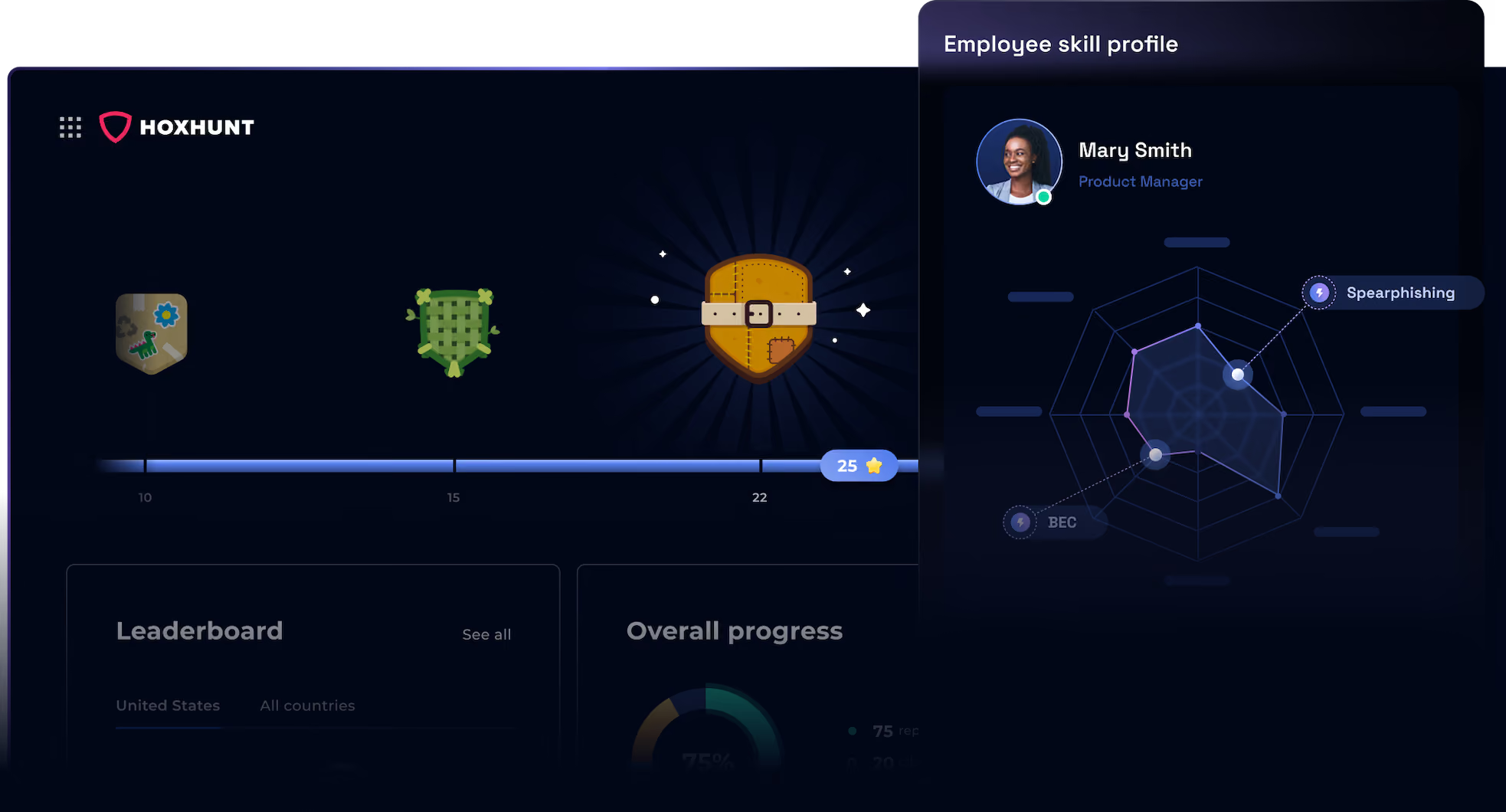
The Hoxhunt dashboard: badges, progress, a leaderboard and each employee’s skill profile by type of attack.
And that’s not all. Beyond email and Teams, Hoxhunt also runs text message and deepfake simulations. Its experts write and send the text message campaigns for you. The deepfakes range from ready-made ones that impersonate a role to custom deepfakes of your own executives, built with their consent. Simulations are drawn from a library that is constantly updated with real attacks, and two more tools go beyond it:
- Simulation Editor (in limited early access): a no-code editor in the Hoxhunt admin app for turning email templates like these into Hoxhunt simulations. You can duplicate an existing template, add placeholders that fill in details such as the employee’s first name, set up the link that counts as the fail and choose a difficulty from “Easy” to “Expert.” Our post on the Simulation Editor explains what it’s for: recreating the look and tone of the messages your employees actually receive.
- Spear Phishing Agent: an AI agent inside Hoxhunt’s adaptive phishing training that adds new simulations written from scratch for each person, just as a real spear phishing attack is written for one chosen target.
See how Hoxhunt’s adaptive phishing training picks and sends simulations for each employee, or book a demo.
Frequently asked questions about phishing simulation examples and templates
What is a phishing simulation template?
A phishing simulation template is a ready-made practice attack that a security team sends to its own employees. It includes the message, its tells and the lesson that follows. Nothing is stolen: falling for it leads to the lesson, and reporting it is recorded as a success.
What phishing simulation ideas should you send?
Send lures that copy what employees actually receive at work, matched to each person’s role and level. Use more than one channel, because attacks come by email, chat, text message, phone and video. Raise the difficulty as people get better at spotting phishing.
What are some common phishing simulation examples?
Common phishing simulation examples copy everyday business messages: a password or account notice, an HR policy update, a supplier invoice, a shared file, a meeting invite, a package delivery text and a call from the IT helpdesk. Real attacks use similar themes: Hoxhunt’s Phishing Trends Report 2026 found HR impersonation and invoice lures among the themes of the AI-assisted phishing emails it analyzed.
What should a phishing simulation template never include?
A phishing simulation template should never use a lure that could cause real distress, such as a fake bonus, layoffs, a health scare or a real tragedy. It should never impersonate a government agency either, or name or impersonate a real person without that person’s consent, and the web page its link opens should never store anything employees type.
How do you make a phishing simulation harder?
You make a phishing simulation harder by removing the clues that give it away and by fitting the message more closely to the person’s job. A hard simulation fits the person’s work and leaves clues that are easy to miss, such as a link to an address the person didn’t expect.
Are there phishing simulation templates for Microsoft Teams, text messages and phone calls?
Yes. Attacks reach employees through chat apps, text messages, phone calls, QR codes and video calls, so simulation templates should reach them through the same channels. The 24 examples here cover email, Microsoft Teams, text messages, phone calls, QR codes and deepfake voice and video, and each one comes with a lesson to send employees, its tells and what employees should do.
Sources
- Hoxhunt, Phishing Trends Report 2026: more than 50 million phishing simulations and millions of real malicious emails, sent to over 4 million users in 125 countries. Figures cited from pages 7, 9, 10, 17, 35 and 39 to 41.
Get more cybersecurity insights like this
- Subscribe to All Things Human Risk to get a monthly round up of our latest content
- Request a demo for a customized walkthrough of Hoxhunt
.webp)
.avif)