The Short Answer
Shadow AI is the unapproved use of AI tools, accounts or features by employees. Verizon's 2026 Data Breach Investigations Report (full disclosure: Hoxhunt is one of the report's data contributors) found that 45% of employees use AI regularly on work devices, approved or not, up from 15% a year earlier. Bans rarely remove the behaviour. Security leaders can lower Shadow AI risk by making the secure path easier than the unsafe one.
We are living through a transformation of work on a scale we have not seen since the Industrial Revolution, but compressed into years rather than generations.
The way we experience work is changing faster than we have time to stop and make sense of.
Three years ago, most people had never used generative AI at work. In the past year alone, we have moved from asking whether people will use AI to debating how much agency we should give it. New capabilities appear almost weekly. Some tools become obsolete almost as quickly as we learn them. Even those of us who spend a significant part of our working lives thinking about AI would struggle to claim we are fully up to date on everything that’s going on.
This is not simply another technology shift. It is changing our relationship with our own capability.
Skills that took years to develop can suddenly be augmented, accelerated or replicated in seconds. Someone with very little technical knowledge can analyse thousands of rows of company data, write working code, build an application, connect services or automate a workflow through an interface as simple as a browser tab and a conversation.
The distance between “I wonder if I could do this” and “I have done it” has collapsed into nothingness.
That can be incredibly empowering. It can also be deeply destabilising. In almost every organisation, there are people building sophisticated AI workflows alongside colleagues who are still figuring out where AI belongs in their work. Some are experimenting every day. Others are anxious about using it at all. And underneath all of this sits a deeply human question: if this technology can do more of what I do, what do I need to become next?
Using AI is about so much more than productivity. It is increasingly bound up with competence, relevance and professional identity. When the message everywhere is that AI will transform, if not steal, your job, choosing not to engage can feel like an existential risk in itself.
This is the human context in which Shadow AI is exploding.
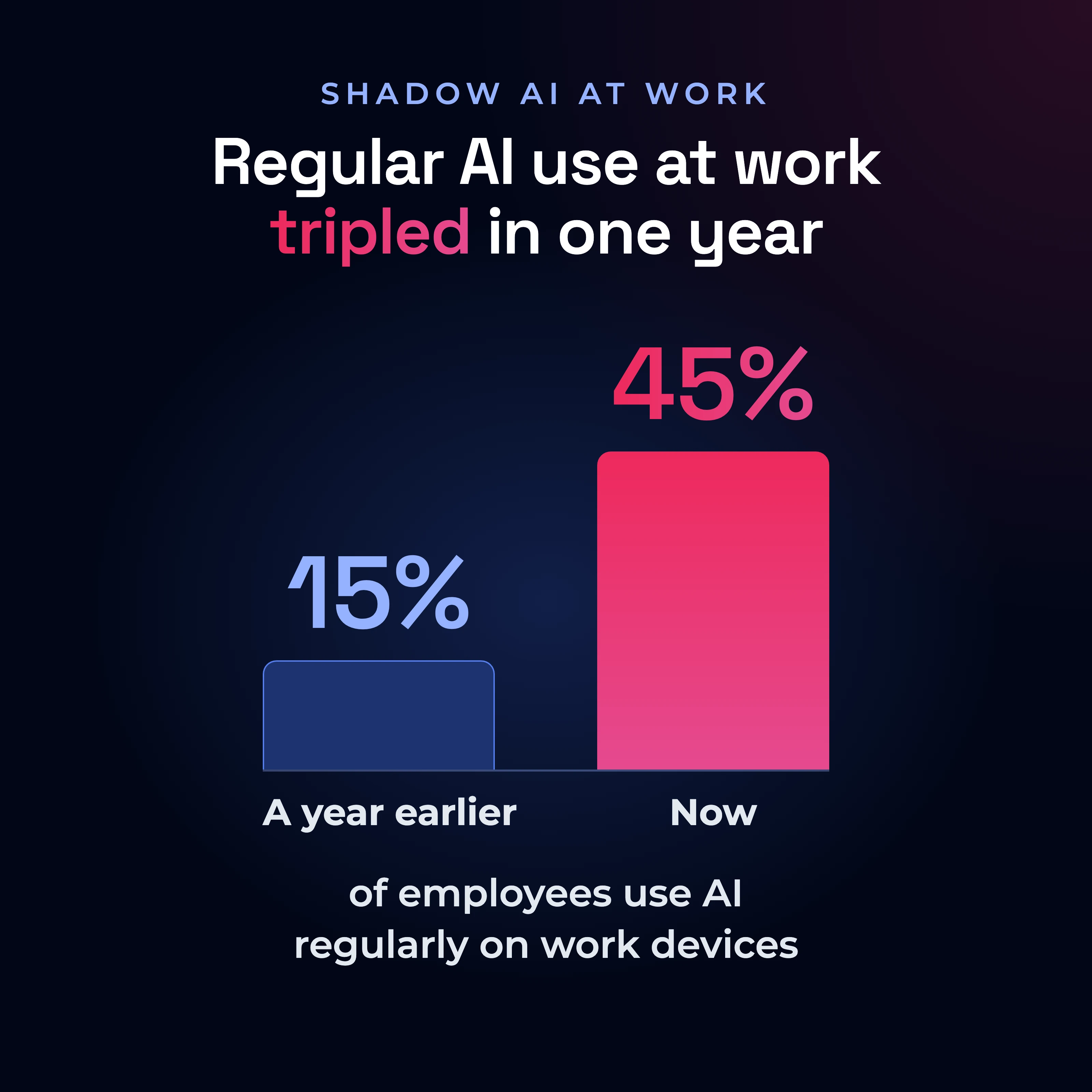
The numbers give us some sense of the scale. Verizon's 2026 Data Breach Investigations Report found that regular AI use on corporate devices jumped from 15% to 45% in a single year. In the UK, Deloitte's 2026 GenAI Workforce Survey found that 63% of workers had already used generative AI for work, and nearly a third of those users were doing so without their employer's knowledge.
63%
of UK workers have used generative AI for work
31%
of GenAI users use it without their employer's knowledge
And people are not necessarily waiting for their organisations to provide the tools. They are finding a way. Some use free tools, some bring in unapproved ones and some are willing to put their own money behind the workaround. In Britain alone, workers are spending an estimated £958 million of their own money each year on GenAI tools for work. One in six GenAI users pays for at least one work tool themselves.
That tells us something important. When people believe a technology materially changes their ability to do their job, they will find ways to access it.
Shadow IT, the use of software, devices or services at work that the IT team has not approved, is not new. People have always found ways around technology that is too slow, too restrictive or simply not good enough for what they are trying to do. What is different now is the speed, scale and power available on the other side of that decision. Discovering a tool, accessing it and using it on real company work can happen in minutes, while the technical knowledge required to do something potentially consequential has fallen dramatically.
And this is already creating very real security exposure. Verizon found that 67% of employees accessing AI services were using non-corporate accounts on their work devices. Shadow AI had become the third most common non-malicious insider action in its data loss prevention data, increasing fourfold as a share in a year. Source code was the most common type of information being submitted to external GenAI models.
The risk is no longer just what AI can see. It is what AI can do.
This is where Shadow AI is becoming much messier than the Shadow IT we are used to. The obvious risk is still data leakage: someone pastes source code, customer information or confidential documents into a tool the organisation does not control. But increasingly, people are not just giving AI information. They are giving it access and authority.
An employee can connect an AI tool to their email, calendar, cloud storage, CRM or other workplace systems with a few clicks. They may grant OAuth permissions (the “Allow access” screens that let one app act inside another) without fully understanding what those permissions allow, or connect an agent capable not only of reading information but of sending messages, updating records, executing code or taking actions on their behalf.
That fundamentally changes the potential blast radius. A compromised or manipulated AI tool may not simply expose the information one employee gave it. It could potentially act through the legitimate permissions that employee has already granted. And with indirect prompt injection, the malicious instruction may not even come directly from an attacker interacting with the employee. It could be hidden in an email, webpage or document that an AI agent has been asked to process.
We spent years teaching people not to give attackers their credentials. Now we also need people to think about what authority they are delegating to AI.
That makes the attack surface extraordinarily distributed. The risk can sit in the tool someone chose, the account they used, the data they shared, the permissions they granted, the systems they connected, the content the AI later consumes and the actions an agent is allowed to take. And much of this can happen outside the security team's visibility.
The Shadow AI question is therefore rapidly becoming bigger than “What data did you give it?”
We also need to ask: What did you connect it to, and what did you give it permission to do?
So the instinctive response is understandable.
Why don't we just ban AI tools?
We should absolutely ban clearly high-risk tools and sites. Organisations need visibility into AI use, governance around what is acceptable, protection for sensitive data and identities, and hard blocks where the risk warrants them. The problem is not blocking. The problem is believing that blocking removes the underlying behaviour.
Because you also need to be realistic about what happens next.
I recently spoke to a CISO whose organisation had restricted ChatGPT. Not long afterwards, they discovered employees using a German website with ChatGPT embedded inside it. The block had worked technically. The behaviour had barely paused.
Another security leader told me about an employee who wanted to use an unsanctioned AI tool to get a presentation finished over the weekend. They couldn't access it from their work environment, so they copied hundreds of pages of company information into a personal email, sent it to themselves and uploaded it from their home computer.
Oh, the irony. A control intended to prevent company information entering an unsanctioned AI tool resulted in someone creating an entirely new route for hundreds of pages of company information to leave the corporate environment.
People optimise for the path of least resistance.
And AI is the perfect shortcut machine.
Welcome to AI panic: how mixed messages push employees towards Shadow AI
There is a contradiction at the heart of how we are talking to employees about AI right now.
We are telling people to experiment, become more productive, learn new ways of working and not get left behind. At the same time, we are telling them not to use the wrong tool, share the wrong information, connect AI to the wrong system, trust its outputs too readily or accidentally create a security, privacy or compliance problem while figuring all of this out.
Both messages are reasonable. Together, they create what I think of as AI panic: urgency, uncertainty, information overload and a very real pressure to keep up.
Now add a control that simply says no.
If you have ever tried to manage a teenager's screen time, you will recognise at least part of what happens next. Tell someone they cannot do something they already value, without resolving why they want to do it, and the restriction itself can become something to navigate around.
There is a behavioural explanation for this. Psychological reactance theory describes what happens when people perceive that a freedom is being taken away: we become motivated to restore it. Research into teenagers and technology restrictions has even found that controlling approaches can increase reactance and concealment, while approaches that preserve more autonomy can reduce it.
Employees are not teenagers craving Snapchat access, obviously. But the underlying human tendency matters.
If I believe AI helps me do my job, if everyone around me is telling me that learning AI is important to my future, and if the approved route is slower or less capable, a blanket restriction does not remove my motivation to use it.
It creates friction between my goal and the route available to me.
And humans are remarkably good at removing friction.
Why do employees use AI tools their employer has not approved?
Most Shadow AI does not start with someone deciding to break a security policy. It starts with someone trying to get something done.
A deadline is approaching. The approved tool cannot do what they need. Access takes too long. They have already used another model at home, or saw a snazzy presentation by a friend, or heard about a productivity shortcut from a neighbour, and know it will solve the problem in minutes. So they take the shortcut.
This is why I think we need to stop looking at Shadow AI only as a collection of prohibited tools and start looking at the behaviour underneath it.
Deloitte's research makes that behaviour visible. Among people paying for their own AI tools or potentially using unapproved ones, 21% said those tools outperform their company's tools. Fourteen per cent said they were essential to doing their job but their employer would not fund them. Sixteen per cent even believed using them could improve their promotion prospects.
That is not a population waiting patiently for your updated acceptable-use policy.
It is demand.
And when demand meets friction, people create workarounds.
This does not mean we remove the controls. It means we need to understand what behaviour the control is likely to create around it.
How should security leaders manage Shadow AI instead of banning it?
Shadow AI is feedback.
If people repeatedly find ways around the approved path, we should probably listen to what that behaviour is telling us.
Start with the work itself.
- What are people actually trying to get done?
- Which tools are they reaching for, and why?
- Where is the approved technology falling short?
- Where are people losing time?
- Which processes are they trying to automate?
- What is sufficiently painful that someone is prepared to use their own account, device or money to solve it?
This is where visibility becomes much more interesting than simply knowing that an unsanctioned application exists. The behaviour around it tells you something about how work is actually happening inside your organisation.
Security teams need to get closer to that reality.
If dozens of employees start using the same unapproved AI tool, the answer might be to block it because it presents an unacceptable risk. But the next question should be why dozens of people wanted it in the first place. Perhaps there is a capability they genuinely need. Perhaps the approved alternative is worse. Perhaps nobody knows what is approved. Perhaps getting access takes three weeks and the work needs to be done today.
You cannot eliminate every workaround. But you can remove many of the reasons people need one.
That means listening to employees, understanding how they actually work and giving them tools that genuinely help them do it. Make approved AI useful. Make it obvious what people can and cannot do. Make access proportionate to risk. Give people somewhere safe to experiment. And when you see the same workaround appearing repeatedly, treat it as a signal rather than simply another rule to enforce.
The UK’s National Cyber Security Centre makes the same point:
“Organisations that understand why people are using shadow AI are better placed to identify risks, provide secure alternatives and support innovation safely.”
At Uber, employees ask an AI-powered Security Policy Advisor in Slack about security requirements and get immediate guidance; it shortened resolution times for security and policy questions from days to seconds.
The secure path has a much better chance of becoming the default when it is also the path that helps people get their work done.
How do you stop employees pasting sensitive data into AI tools?
Meet people at the point of decision.
Even then, there will be moments your policy cannot anticipate.
AI is changing too quickly. New tools appear constantly. AI capabilities are being embedded into software people already use. The boundary between an application, an AI feature and an agent capable of taking actions is becoming increasingly blurred.
So somebody still has to make a judgement.
Should I use this tool? Should I connect it? Should I put this information into it? Is this account safe to use for work? Can I trust this output? Am I about to cross a boundary I do not fully understand?
Those decisions are happening in real time, often in a browser, in the middle of someone trying to get something done.
That is where security needs to meet people.
Sometimes the right intervention is a hard stop. Sometimes it is a warning that gives someone a chance to reconsider. Sometimes it is simply making the risk visible at the exact moment a decision is being made. And sometimes the most useful thing security can do is observe the pattern and learn from it.
The important thing is that the response matches the risk and the context.
A person about to paste sensitive company information into an unapproved AI service needs something different from someone experimenting with a low-risk tool. Treating both situations identically creates friction where it is unnecessary and makes the genuinely important boundaries harder to see.
This is where technology and behaviour should reinforce each other.
- See the behaviour.
- Understand the context.
- Intervene where necessary.
- Help the person make a better decision.
- Learn from what happens next.
“We want to meet people where they are and help them make better security choices in the context of their actual jobs,”
says Jason Harper, who leads the Human Risk Management programme at Uber.
Build judgement, not just knowledge
Because ultimately, we cannot write a rule for every AI decision.
Traditional security awareness has often relied on transferring knowledge and hoping people recall it later. AI makes the limitations of that model increasingly obvious. The environment is moving too quickly and the decisions are too contextual.
Knowing a rule is not the same as following it under pressure.
People build judgement through practice, feedback and reinforcement. They need to encounter realistic decisions, make choices, understand the consequences and strengthen the right response over time. And guidance is much more powerful when it appears close to the behaviour itself, not buried in an annual training module six months earlier.
For AI, the behaviours we need are relatively intuitive even when the technology is not. Pause before connecting an unfamiliar service. Think before sharing company information. Question an AI-generated output before using it in a consequential decision. Recognise when something falls outside the normal boundaries. Ask when you are unsure. Report quickly when something does not feel right.
The objective is not to turn every employee into an AI security expert.
Because under pressure, people rarely stop to retrieve everything they once learned about a policy. They fall back on habits.
That is where security culture becomes real.
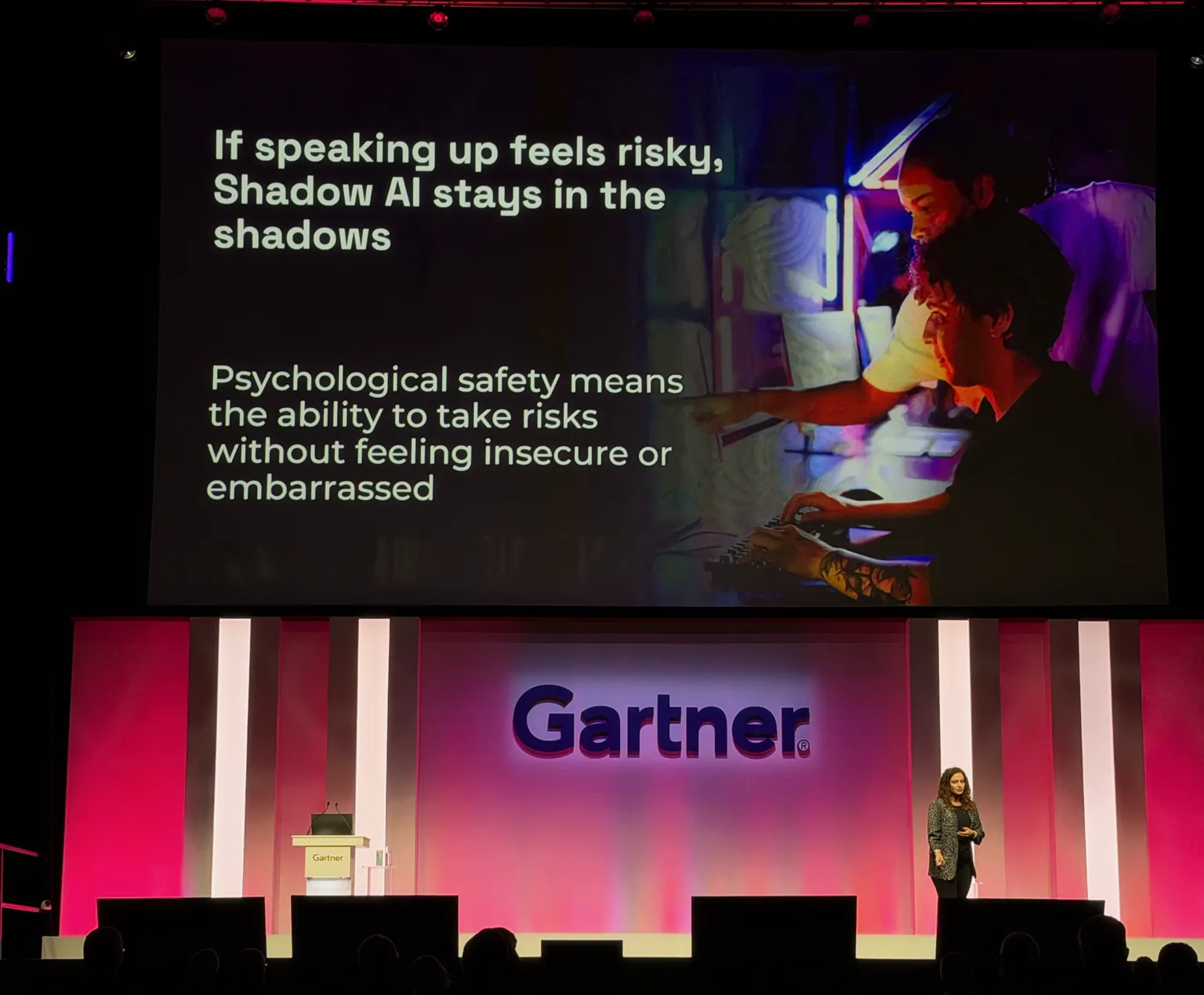
If speaking up feels risky, Shadow AI stays in the shadows
And there is one final behaviour we need to design for: telling us when something has gone wrong.
Imagine someone has experimented with an AI service they were not supposed to use. Perhaps they connected it to something they should not have, or they are no longer certain what information they shared.
Your security team needs to hear about that early.
But if admitting the mistake feels more dangerous than staying quiet, silence becomes the easier option.
That matters particularly in an environment where AI is already entangled with professional identity. Deloitte found that almost a quarter of UK workers believe there is stigma attached to using GenAI at work. People can simultaneously feel pressure to use AI and pressure not to reveal how they are using it.
So listen here too.
When someone asks whether a tool is safe, that is useful information. When they report a mistake quickly, reinforce it. When something goes wrong, ask not only who did it, but what they were trying to accomplish and what made the risky route seem like the best one available.
Psychological safety is not softness. It is visibility.
If speaking up feels risky, Shadow AI stays in the shadows.
Design security for how people actually work
AI has compressed the distance between intention and capability. People can now do things they could not do before, using technology they may barely understand, in organisations that are themselves still working out the rules.
We are not going to anticipate every tool they will discover or every decision they will make.
So security has to get closer to the reality of work.
See which tools people are actually using. Understand what they are trying to achieve. Give them secure options that genuinely help. Make the important boundaries visible at the moment they matter. Stop what genuinely needs to be stopped. Use everything else as an opportunity to guide, learn and improve.
Most importantly, design security around the human being on the other side of the control.
Because people will continue to optimise. They will continue to look for faster ways to work. And as AI becomes more capable, the incentive to do so will only get stronger.
The question is whether the secure path can keep up.
You can't ban your way out of Shadow AI. You have to make the secure path easier than the unsafe one.
At Hoxhunt, that is the secure path we build: turning security signals from across the environment into a clear view of risky behaviour, and helping people build safer habits.
| ✕Instead of | ✓Do this |
|---|---|
| ✕A control that simply says no | ✓Make the secure path easier than the unsafe one |
| ✕A blanket restriction | ✓Make access proportionate to risk |
| ✕Treating every workaround as another rule to enforce | ✓Treat it as a signal |
| ✕Guidance buried in an annual training module | ✓Guidance close to the behaviour itself |
| ✕Silence after a mistake | ✓Reinforce people who report quickly |
Frequently asked questions
What is Shadow AI?
Shadow AI is the use of AI tools, accounts or features at work that the organisation has not approved, such as a personal ChatGPT account on a work laptop. Most of it does not start with someone deciding to break a security policy. It starts with someone trying to get something done.
How is Shadow AI different from Shadow IT?
Shadow IT is not new: your people have always found ways around technology that is too slow, too restrictive or simply not good enough for what they are trying to do. What is different with AI is the speed, scale and power available on the other side of that decision. Discovering a tool and using it on real company work can happen in minutes.
Can banning AI tools stop Shadow AI?
Banning AI tools does not stop Shadow AI on its own. Organisations should absolutely block clearly high-risk tools and sites, but blocking does not remove the underlying behaviour. One CISO's organisation restricted ChatGPT and then found employees using a German website with ChatGPT embedded inside it: the block worked technically, and the behaviour barely paused.
What are the risks of Shadow AI?
The main risk is company data leaving your organisation's control. Verizon's 2026 Data Breach Investigations Report found that 67% of users accessing AI services from corporate devices used non-corporate accounts, and that source code was the most common type of data submitted to external GenAI models. Workarounds can open new routes too: one employee blocked from an AI tool emailed hundreds of pages of company information to a personal account to upload it from home.
Why do AI agents make Shadow AI riskier?
AI agents add an access risk to the data risk: people are no longer just giving AI information, they are giving it access and authority. An employee can connect an AI tool to their email, calendar, cloud storage or CRM with a few clicks and grant it permission to send messages, update records or run code on their behalf. A compromised or manipulated tool could then act through those legitimate permissions. With indirect prompt injection, the malicious instruction can even be hidden in an email, webpage or document the agent has been asked to process.
What percentage of employees use unapproved AI tools?
In the UK, 31% of GenAI users say they use it without their employer's knowledge, according to Deloitte's 2026 GenAI Workforce Survey of 25,000 workers. Verizon's 2026 Data Breach Investigations Report found that 45% of employees now use AI regularly on corporate devices, up from 15% a year earlier.
How should security leaders manage Shadow AI instead of banning it?
Make the secure path easier than the unsafe one. See which tools your people are actually using and understand what they are trying to achieve. Make approved AI useful, make it obvious what people can and cannot do, and make access proportionate to risk. Stop what genuinely needs to be stopped, and use everything else to guide, learn and improve.
Why does psychological safety matter for Shadow AI?
Psychological safety decides whether your security team hears about AI mistakes early. If admitting a mistake feels more dangerous than staying quiet, people stay quiet, and Deloitte found that 23% of UK workers think there is a stigma attached to using GenAI at work. When someone reports a mistake quickly, reinforce it, and ask what made the risky route seem like the best one available.
What should employees do before putting company information into an AI tool?
Pause before connecting an unfamiliar service and think before sharing company information. Question an AI-generated output before using it in a consequential decision, ask when unsure, and report quickly when something does not feel right.
What should an AI acceptable use policy include?
It should make it obvious what people can and cannot do with AI at work: which tools are approved, what information must stay out of unapproved services, where hard blocks apply because the risk warrants them, how to get access, where people can experiment safely, and how to ask a question or report a mistake.
Get more cybersecurity insights like this
- Subscribe to All Things Human Risk to get a monthly round up of our latest content
- Request a demo for a customized walkthrough of Hoxhunt
.avif)