


The short answer
Cybersecurity training for employees only works if it changes how people act when a real attack lands. It is an ongoing practice: short lessons, realistic simulations and nudges at the moment risky behavior shows up, across email, calls, chat, the web and the data people handle, measured by whether those risky actions drop.
If you own security awareness at your company, you probably already run a course and people complete it. The hardest part is showing whether anyone behaves differently when a real attack lands.
You may call it security awareness training for business, cyber security training for employees and staff, or information security training for employees. Either way, running it comes down to three questions: (1) which threats to train for, (2) how often to train, and (3) how to show leadership that behavior changed.
This guide answers all three with data from Hoxhunt’s Phishing Trends Report 2026, which covers more than 50 million phishing simulations sent to over 4 million users in 125 countries. Where official guidance helps, it also points to the framework the US National Institute of Standards and Technology (NIST) publishes for building a cybersecurity training program, NIST SP 800-50 Rev. 1.
Cybersecurity training for employees should cover the attacks your people actually face, with more depth for roles that can move money, share data or grant access. Every program should start with five core topics, and each one must be trained the way its risk shows up:
- Phishing (including AI-written): It is still where most programs start, and AI has removed the old giveaways, so employees need practice on attacks that look like the real ones. Realistic simulations give them that.
- Deepfakes and voice phishing: Attackers move victims onto calls and video, where there is nothing to inspect but a voice or a face. Practice calls build the habit of confirming any urgent request through a channel employees already trust, such as a call back to the number in the company directory.
- Passwords and MFA: A stolen password and one careless approval of a multi-factor authentication (MFA) prompt are all an attacker needs. Short lessons should teach employees to deny any prompt they didn’t start. A nudge right after a risky sign-in should keep that habit in place.
- Data handling (including AI tools): Most of it now happens in the browser, where a shared file or a copied paragraph can leave the company in seconds. You should build lessons from your own data policy. A nudge at the moment of a risky share should then make the policy stick.
- Remote and mobile work: A lot of work now happens on a phone, where people click more and report less. That’s why practice should include text-message (SMS) and mobile scenarios.
The sections below take each topic in turn. For the full year-round topic list, see our guide to security awareness training topics for employees.
How to train employees to spot phishing, including AI-written phishing
Phishing training teaches employees to spot and report fraudulent emails, texts and chats designed to make them click, pay or share a password. It is where most programs start. What has changed is who writes the messages. Hoxhunt’s Phishing Trends Report 2026 shows AI-written emails at 1% to 4% of reported threats through November 2025 and 40% by January 2026.
56%
of the threats employees reported in December 2025 were written by AI
7.5%
of phishing simulations get clicked after one month of simulation-led training, down from 20% at the start
So a new program starts from a high click rate. The attacks also no longer come with typos, so training people to hunt for bad grammar won’t bring that rate down. Training should teach them four checks for every message: who sent it, where the link really goes, whether they expected the attachment, and what the message asks them to do. That last check needs the most practice, because the pressure is in the request: an urgent deadline, a changed payment detail, a login page they didn’t expect. Here’s how to make those checks a habit:
- Simulations should mirror what your people actually receive. Lures that are hitting your industry and region right now, AI-written ones included, teach people what a real attack looks like. Obvious fakes only teach them to look for mistakes attackers stopped making.
- The difficulty must match each person and their role. Real attackers target a finance clerk and a developer differently, so the two should practice on different lures. A simulation that is too easy teaches nothing. One that is too hard teaches people to give up. That’s why the difficulty should rise as each employee improves.
- Feedback must arrive in the moment. The lesson should come right after a click or a report and be about that exact email, so it lands while the person still remembers what they saw. A results email a week later should never be the only feedback they get.
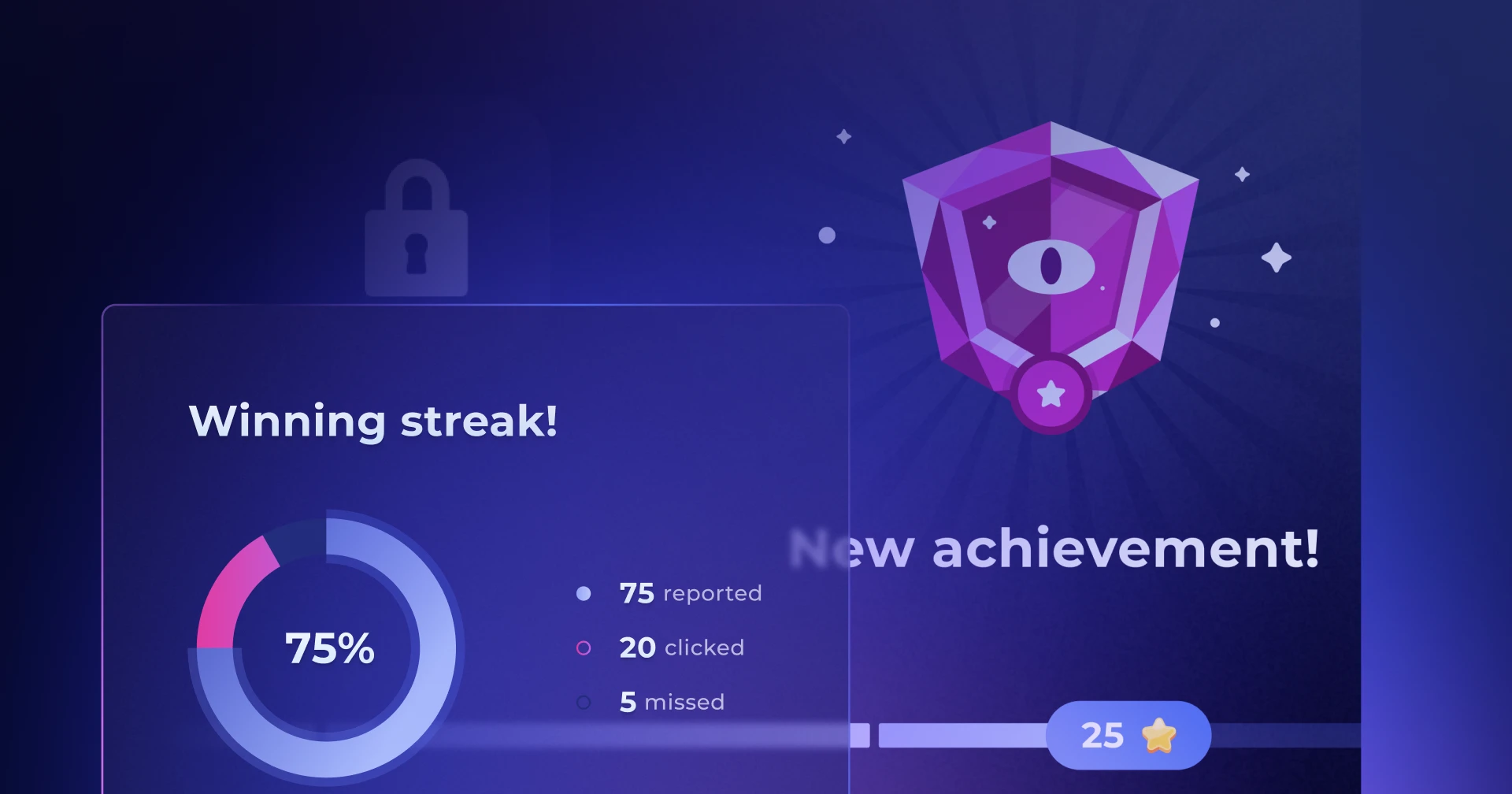
- Reporting must take one click and feel like a win. People should get recognition for every attack they catch, because recognition is what turns reporting into a habit. Our guide to gamified cyber security training explains why positive reinforcement works better than punishment.
- Every report must get an answer. Employees who flag a suspicious email and never see anything happen will stop flagging, so each of them should hear back on what they found. Also, the better the training works, the more reports your security team will have to review: if many people flag the same email, the team should only have to review it once and, if it is malicious, they should remove it from everyone’s mailbox.
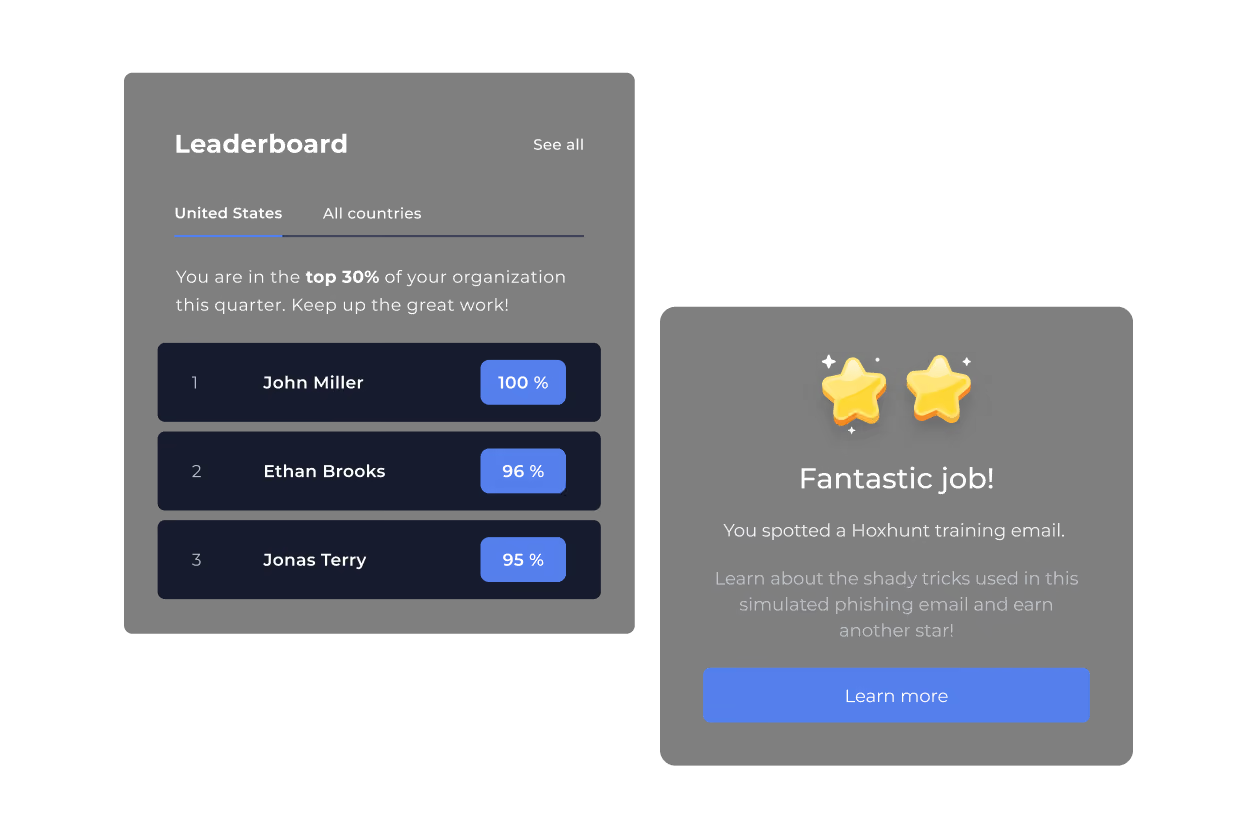
Hoxhunt runs phishing training this way: simulations matched to each employee’s skill level and role; a report button with instant feedback that works in Outlook and Gmail on desktop, web and mobile; and a short lesson at the moment someone clicks or reports. Our phishing training guide for employees covers the topic in depth. For what happens after an employee reports an email, see our guide to automating user-reported phishing response.
How to prepare employees for deepfakes and voice phishing
In deepfake and voice phishing (vishing) attacks, someone impersonates a person your employees trust, by phone, video call or voicemail. Hoxhunt’s Phishing Trends Report 2026 found that 5% of AI-generated phishing emails carried a malicious phone number. That points to attackers moving employees onto calls, where there is no sender address or suspicious link to check, only a voice.
Phishing training teaches people to spot a fake message. On a phone or video call, AI can now make a real colleague’s voice and face convincing enough that there is nothing left to spot. So the training has to teach employees to verify the request, whoever seems to be asking. Here’s what that training should include:
- Every employee must follow one verification rule. Employees must confirm any urgent request to move money, change bank details, share data or grant access through a channel they already trust. That can be a call back to the number in the company directory, a message in an existing chat thread, or a check with the requester’s manager. A rule this simple is the one people remember under pressure.
- Practice must be realistic and repeated. Everyone should get a practice call. People who can approve payments, password resets or access, such as finance, helpdesk and executive assistants, should get practice calls more often, because their approval is what attackers are after. One call teaches the verification rule; repetition builds the reflex to pause.
- Every practice call must end with a debrief. A short lesson should follow right after the call and show what gave the scam away, so a stressful call turns into something people learn from.
- Lessons must tell people where to flag a suspicious call. Your program should name one place, such as a security chat channel or the IT helpdesk, so flagging a call is as easy as reporting an email.
The video shows a Hoxhunt vishing simulation, in which an AI voice agent plays the attacker. Hoxhunt runs voice simulations like this one, and callback simulations, where an email asks the employee to phone a number. It also runs deepfake video-call simulations that can use the likeness and voice of one of your own executives. Our guide to vishing attacks training goes deeper on voice scams.
How to build password and MFA habits that survive MFA fatigue
Password and multi-factor authentication (MFA) training is what stops a stolen password from turning into a breach. MFA fatigue is the attack this training has to beat, and here’s how it works: an attacker who already has an employee’s password sends sign-in requests again and again, until the employee, tired or confused, taps approve to make the requests stop.

Telling employees to pick strong passwords protects very little on its own. What truly protects the account is a handful of habits that employees keep even when they are under pressure. These are the habits worth building:
- An unexpected MFA prompt must be treated as an attack. If employees didn’t start the sign-in themselves, they must deny the request and report it. MFA fatigue only works on people who don’t know this rule.
- A one-time code must never be shared. Your lessons should make clear that IT will never ask employees for a one-time code, so any call or text asking for one is a scam, whoever it claims to come from.
- Practice must include the pressure moment. That’s why simulations should recreate it: a fake IT contact calls or texts and asks for a one-time code or an MFA approval. Once employees have been through it in practice, they will spot the trick when a real attacker tries the same thing.
- Password managers should be the default. With a unique password for every work account, one leaked password opens one door instead of every door.
- A risky action must trigger a nudge right when it happens. Someone might type their work password into a page that isn’t the real sign-in page, or switch off a security tool on their device. That person should get a short nudge about that exact action at that moment, while they still remember doing it.
Hoxhunt’s library includes more than 300 ready-made training modules in video and text, plus training tracks built for specific regulations. You can tailor any of them to your own policies. For a closer look at the attack itself, see our guide to MFA fatigue attacks.
How to teach safe data handling, including AI tools
Data handling training teaches employees where sensitive information is allowed to go. The risk usually looks like a shortcut rather than an attack: a file sent to a personal address, a folder shared with the wrong people, a document pasted into an AI assistant the company hasn’t approved. Because these rules differ from company to company, generic content rarely helps.
Company-specific rules are also where the work piles up for you: every policy, every type of data and every approved tool needs its own lesson. Here’s how to keep that work manageable:
- Lessons should come from your own policy, and you shouldn’t have to write each one by hand. The labels your company puts on data, your sharing rules and your list of approved AI tools give you examples your people will recognize. A training platform that turns a policy document into a draft lesson for you to review takes most of the writing off your plate.
- The rules must be concrete. Your lessons should name the approved AI assistants and the approved ways to share files. They should also give examples of data that must never leave the company, such as customer records, payroll files or source code.
- A nudge works best just before the mistake. When someone is about to paste confidential data into an unapproved AI assistant, or share a file with a personal account, a short message in the browser should teach the rule at that moment.
- The next best nudge arrives right after the mistake. Most file-sharing platforms and security tools can record when someone shares a file with a personal email address, with people outside the company or through a public link. A nudge about the rule that share broke should go out right then, while the person can still undo the share.
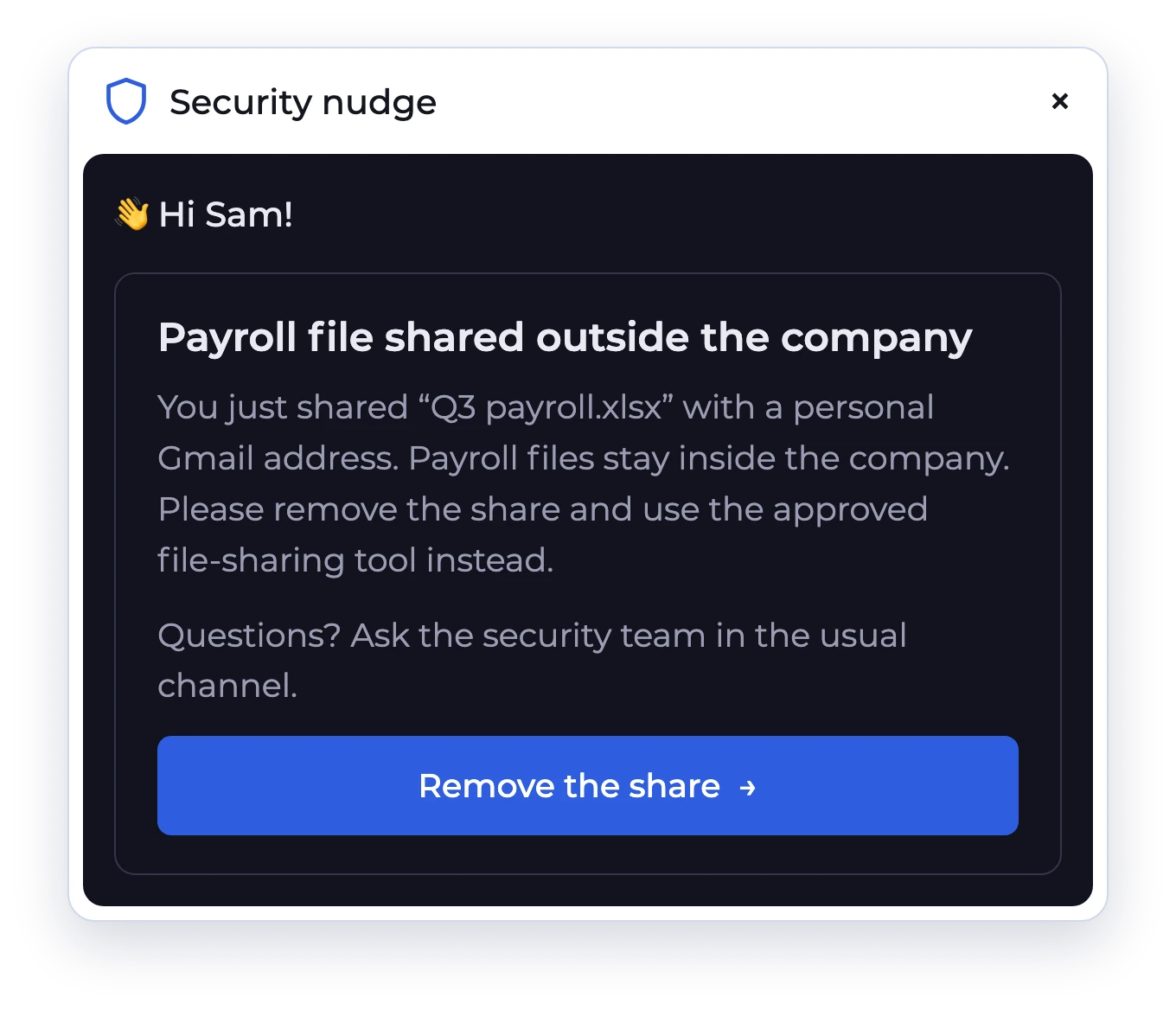
Hoxhunt turns your policies, procedures and existing materials into short draft lessons. You review and edit each draft, and nothing reaches employees until you publish it. You can also start from a ready module and adapt it, so a new policy doesn’t turn into a writing project. Hoxhunt also connects to the security tools you already use, such as Microsoft Defender, CrowdStrike and Zscaler. When one of them flags a risky action, Hoxhunt can send that person coaching or a policy reminder, and step up to training or escalation if the action repeats.
How to keep remote and mobile work secure
Remote and mobile work training matters because people behave differently on a phone: they check messages between tasks, see less of who sent each message on a small screen, and are often more tired and distracted. Hoxhunt’s Phishing Trends Report shows the reporting rate is 13 points lower on mobile than on desktop, and the gap widens after hours.
6%
of phishing simulations fail when opened on desktop
19%
of phishing simulations fail when opened on mobile
For many employees the phone is now a work device, and for frontline staff it is often the only one. If your training only happens at a desk, it misses much of the risk. Here’s what that means for your training:
- Practice must reach the phone. SMS and mobile scenarios should be part of the program, so employees learn what a lure looks like on a small screen. Lessons should also cover the moments Hoxhunt’s data flags, such as checking email on the phone in the evening, when people are tired and mobile reporting falls furthest behind desktop.
- Reporting must work on mobile too. Employees should know how to report from their phone, so the habit doesn’t stop at the laptop.
- Lessons must cover the remote basics, and why each one matters. On home and public Wi-Fi, employees should know which networks are safe for work and when to use the company virtual private network (VPN), because an untrusted network can expose what they send. Employees must report a lost or stolen device right away, so IT can lock or wipe it.
- Your policy should cover USB drives too. Employees should never plug in a drive when they don’t know where it came from. Copying company files to a drive should follow your policy, because a lost drive is a data leak nobody notices.
- Sensitive work should stay out of public view. In trains, cafés and airports, employees should keep confidential documents and calls away from anyone who can see or hear them. People who often work while traveling should have a privacy filter on their laptop, which makes the screen look black to anyone sitting beside them.
With Hoxhunt, lessons like these arrive in small, regular bursts, so the rules stay top of mind all year. Each lesson can mix video, text, interactive exercises and quizzes, and you can target it by role, department and location, so a sales team that travels gets the rules for trains and airports. The same lessons reach frontline staff, contractors and board members with no account required, in more than 40 languages.
How often should employees receive cybersecurity training?
Employees should receive cybersecurity training continuously, in three layers that work as one program: lessons at onboarding and whenever a topic or policy is new, regular realistic practice, and a nudge when their real behavior shows a risk. One long course a year gives people one chance a year to learn, while attacks change from month to month.
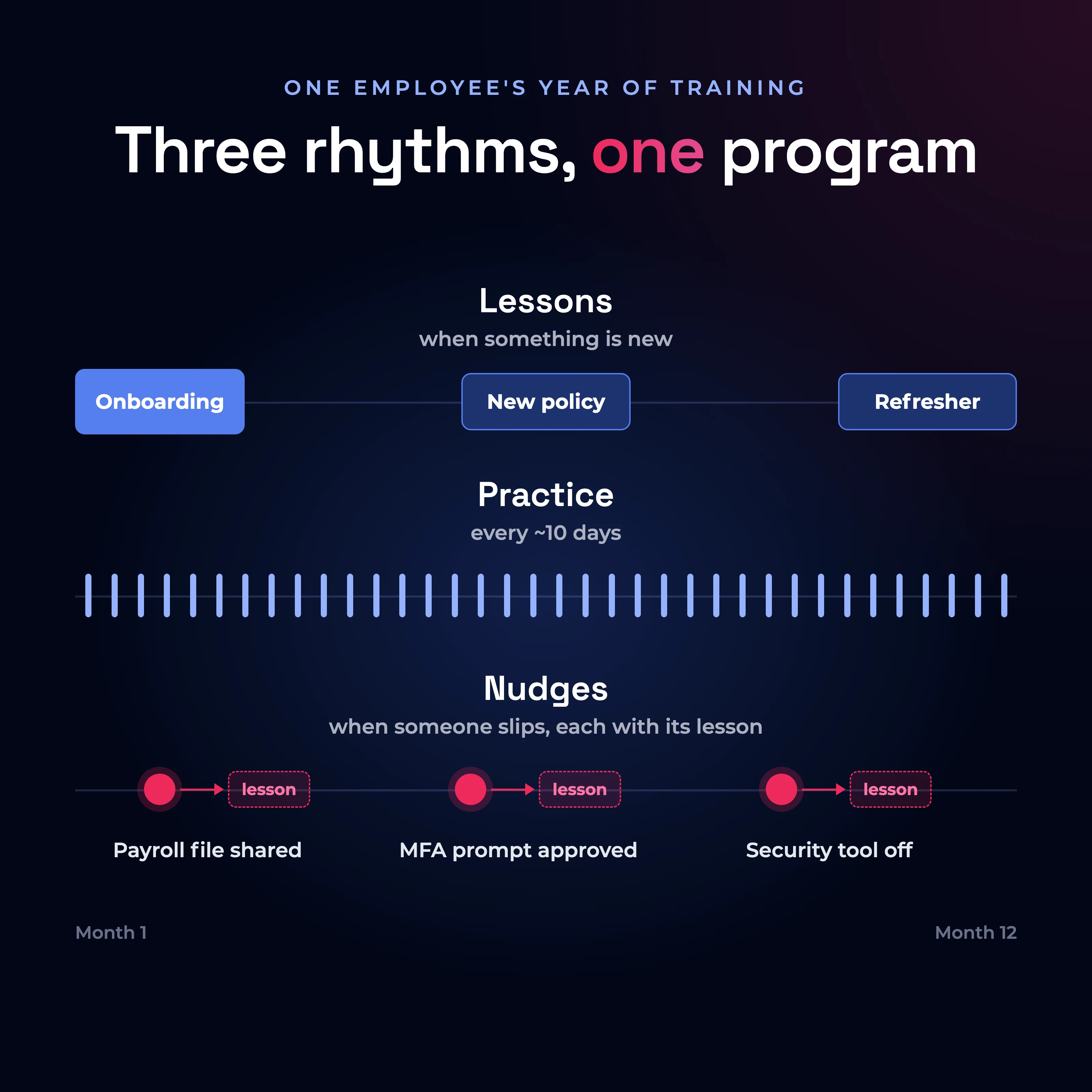
Safe reactions only become a reflex through repetition, so how often people practice matters. Hoxhunt sends each employee a simulation about every 10 days by default. That adds up to about 36 rounds of practice a year, against 4 in a quarterly program.
NIST SP 800-50 Rev. 1 also treats training as continuous: a program you run through a life cycle and keep improving.
What do lessons, practice and nudges each do?
Each layer does a different job, and none of them works alone. Lessons explain the rules, practice turns them into reflexes, and nudges step in when a rule is about to be broken or just was. When the three run as one program, each layer feeds the next: a nudge points to the relevant lesson, and practice shows whether that lesson stuck.
| Lessons | Practice | Nudges on real behavior | |
|---|---|---|---|
| What it is | Short lessons or courses on a topic or policy | Realistic phishing, SMS, voice and deepfake simulations with instant feedback | A nudge or short lesson sent to a person right after a risky action your security tools flagged |
| What it builds | Knowledge of the rules and the reasons behind them | The reflex to spot and report an attack | Correction where the risk actually happens |
| How often | At onboarding, when a policy changes, short refreshers | Regular and adapted to each person | When a risky action happens, escalating if it repeats |
| What to measure | Completion, as a record | Reporting rate, failure rate, time to report | Whether the same risky action repeats |
What should security training for new employees look like?
A new hire’s first month is the best chance you will get to build the reporting habit. Hoxhunt’s data shows how much reporting jumps in that month:
10%
of phishing simulations are reported before regular practice starts
51.5%
of phishing simulations are reported after the first month of practice
That jump only happens once, so you should plan for it.
New hires should start in their first week with a short onboarding course on your policies and their first simulation, so good habits form before bad ones do. With ready-made courses and modules, you don’t have to write the onboarding program from scratch.
After onboarding, practice should stay steady and adapt to each person. Hoxhunt’s adaptive phishing training keeps that steady rhythm for each employee and raises the difficulty as their skills improve. Practice has to feel safe to work, so the program should reward the report rather than punish the click. Our guide to positive vs punitive security awareness training explains why.
The annual policy course still has a job: it keeps the compliance record. For small organizations starting from zero, the free Cyber Essentials guide from the US Cybersecurity and Infrastructure Security Agency (CISA) includes a chapter on staff training that works as a first checklist.
Who needs more training, and how much more?
Two groups need more training than everyone else, for different reasons.
The first group is people who keep making the same mistake. Repeat clickers, who fail simulation after simulation, should get simulations more often until they improve. When your security tools keep flagging the same risky action from one person, that person should get a response that steps up: a nudge first, then a training course, then a note to their manager. You should also look at these repeats by team, role and country. That shows where risk is concentrating, so the next lessons go where they are needed.
The second group is the people attackers want most, because of what they can approve. They should get deeper scenarios on top of the basics, and practice them more often:
| Role | Extra focus | Why this role |
|---|---|---|
| Finance and accounts payable | Fake invoices, requests to change a supplier’s bank details, urgent payment requests that seem to come from an executive | They can approve payments |
| HR and recruiting | Fake job applicants, requests to change an employee’s payroll account, requests for employee tax forms | They can change pay details and share employee records |
| IT and helpdesk | Calls asking to reset a password or MFA, fake vendor support | They can grant access |
| Executives and their assistants | Messages built from what they post publicly, deepfake voice and video calls | They can approve the biggest decisions, and their assistants can act in their name |
How do you know employee cybersecurity training is working?
Employee cybersecurity training is working when risky behavior goes down where it actually happens: more people report attacks, they report them faster, and the risky actions your security tools record repeat less often.
Vanity metric alert
Completion rates are the easiest numbers to show and the least useful. They prove that people finished the course and say nothing about what they do when a real attack arrives.
NIST SP 800-50 Rev. 1 includes suggested metrics and evaluation methods. Reporting is the place to start, because it has the best benchmarks. Instead of completion rates, these are the metrics you should measure, with the definitions Hoxhunt’s Phishing Trends Report 2026 uses:
- Reporting rate: The share of phishing simulations employees report. Across Hoxhunt customers, it is 47% at onboarding, measured from each employee’s first simulation. It rises to 63% at 6 months and 67% at 12 months, even as the simulations get harder.
- Time to report: The time between a phishing email arriving and an employee reporting it, also called dwell time. Hoxhunt’s data shows employees report one third faster with adaptive training.
- Real-threat reporting: The share of employees who report a real malicious email. Across Hoxhunt customers, half of employees report a real threat within 6 months of starting training.
- Failure and miss rate: Failure is clicking a simulation; a miss is neither clicking nor reporting it. You should read them together with the reporting rate, because a low failure rate next to a high miss rate means many people are ignoring the simulations rather than spotting them.
- Risky behavior beyond email: Human risk management is the practice of measuring behavior across all your security tools and training the people whose risky actions repeat. You should count the risky actions your tools log, per person and per team. Examples are a file shared with a personal email address, a data loss prevention (DLP) warning or an unapproved app. Training works when the same actions stop repeating. Our human risk management playbook shows how to build that program.
You should read each metric as a trend against your own starting point, and keep simulations realistic so the numbers mean something. For a deeper look at which metrics predict fewer breaches, see our guide to security awareness metrics that matter. To design the whole program around these metrics, see our guide on how to build a security awareness training program.
How do you prove to leadership that training works?
To prove to leadership that cybersecurity training works, you need to answer the three questions they actually ask: Is our risk going down? Where is it concentrated? How do we compare with similar organizations? A list of completed courses answers none of them.
A monthly summary for leadership that answers all three should show:
- One headline number that moves: A single score built from the reporting rate, the failure rate and real-threat reporting. Tracked over time, it shows leadership at a glance whether risk is going down.
- Where the risk sits: The same measures broken down by department, country and manager. That breakdown turns the leadership conversation to the teams that need help.
- How you compare: A benchmark against similar organizations. Without one, every number invites the question “is that good?”
- What you changed: Each movement in the trend, shown next to the program change behind it. That way, leadership sees cause and effect rather than a wall of percentages.
Building this summary by hand means a lost day in a spreadsheet every month. It also arrives late, and a late summary gets read late. Your training platform should produce these numbers for you and update them as the program runs, so the monthly conversation with leadership is about decisions instead of data collection.
What does a complete employee cybersecurity training plan look like?
A complete employee cybersecurity training plan gives each topic a way to train it, a frequency and a measure. It also runs lessons, practice and nudges as one program instead of three separate tools. The table that follows works as a one-page summary. You should adjust the depth of each topic by role.
| What to train | How to train it | How often | How to measure it |
|---|---|---|---|
| Phishing, including AI-written phishing | Simulations matched to each person’s level and role, a lesson the moment someone clicks or reports, one-click reporting with feedback | Regular practice, more often for repeat clickers | Reporting rate, failure rate, time to report, real-threat reporting |
| Deepfakes and voice phishing | Lessons on verifying urgent requests, practice calls and deepfake scenarios, a debrief after each call | Part of regular practice, more often for people who can approve payments, password resets or access | How often people verify the request through a channel they already trust during practice calls |
| Passwords and MFA | Lessons on MFA prompts, one-time codes and password managers, simulations of fake IT requests, a nudge when a tool flags a risk | Lessons at onboarding and when the policy changes, simulations as part of regular practice, a nudge whenever a risky action happens | Risky sign-ins and device alerts your tools flag, and whether they repeat |
| Data handling, including AI tools | Lessons written from your own policy, a nudge before a risky paste or upload, and another after a risky share | Lessons when a policy is new or changes, a nudge whenever a risky action happens | Data loss prevention warnings and risky shares, and whether they repeat |
| Remote and mobile work | Mobile and SMS scenarios, reporting from the phone, lessons on Wi-Fi, lost devices, USB drives and working in public | Mobile scenarios as part of regular practice, lessons at onboarding and when the policy changes | Failure and reporting rates on mobile compared with desktop |
The point of the plan is that the layers work together: practice shows where lessons didn’t stick, nudges catch what practice can’t reach, and measurement tells you which layer to strengthen next. If you are choosing a platform to run a plan like this, our guide to the best security awareness training platforms compares the options.
Frequently asked questions about cybersecurity training for employees
What topics should cybersecurity training for employees cover?
Cybersecurity training for employees should cover at least five core topics: phishing, including AI-written phishing; deepfakes and voice phishing; passwords and MFA; safe data handling, including AI tools; and remote and mobile work. Every employee needs the basics of each, and roles that can move money, share data or grant access need deeper scenarios on top.
Is annual cybersecurity training enough for employees?
No. An annual course keeps your policies and compliance record in order, but behavior changes through repetition. With one course a year, employees go most of the year without practice. You should keep the annual course for the record and, between courses, add short, frequent practice and nudges after risky actions.
What should new-hire cybersecurity training include?
New-hire cybersecurity training should include a short course on your key policies, such as passwords and MFA, data handling and approved AI tools, plus how to report a suspicious email. New hires should also have a report button set up on day one and get a first phishing simulation in week one. After that, new hires should join the same program as everyone else: regular practice, and a nudge when their real actions show a risk.
What is a good phishing reporting rate for employees?
A good phishing reporting rate is one that keeps rising against your own starting point, even as simulations get harder. Hoxhunt’s Phishing Trends Report 2026 publishes benchmarks for that climb over an employee’s first year in training.
How do you train employees who don’t have a company email address?
You should send training as a link they can open on their own phone or a shared device, and identify each learner with an employee number or similar. That means your training platform has to deliver courses by link to people with no account. The training should also cover SMS and QR-code lures, which reach people outside email.
How do you measure security behavior beyond phishing?
You measure security behavior beyond phishing with the risky actions your security tools can record, such as files shared with a personal email address, files copied to a USB drive, the use of an app the company hasn’t approved or a security tool switched off. You should count them per person and per team, follow up with the people involved, and check whether the same actions repeat.
Does employee cybersecurity training help with NIS2 and ISO 27001?
Yes. NIS2, the EU cybersecurity directive, requires the management bodies of the companies it covers, such as their boards, to follow cybersecurity training, and asks EU countries to encourage regular training for employees (Article 20). It also lists cybersecurity training among the required risk-management measures (Article 21). ISO/IEC 27001:2022 control 6.3 covers staff awareness, education and training, with regular updates on the policies for each job. Completion records cover the audit, and behavior metrics show that the training works.
Should cybersecurity training be different for each role?
Every role needs the same basics: phishing, voice and deepfake scams, passwords and MFA, data handling and mobile work. Roles that attackers target for what they can approve need more depth: finance on payment fraud, HR on payroll changes, IT helpdesk on reset calls, and executives on deepfakes and messages built from what they post publicly.
Sources
You can check every figure and requirement on this page against these sources.
- Hoxhunt, Phishing Trends Report 2026: more than 50 million phishing simulations sent to over 4 million users in 125 countries. Figures cited from pages 7, 9, 33, 34, 35, 37 to 39 and 41.
- NIST, SP 800-50 Rev. 1, Building a Cybersecurity and Privacy Learning Program, September 2024.
- CISA, Cyber Essentials.
- European Union, Directive (EU) 2022/2555 (NIS2), Articles 20 and 21.
- ISO, ISO/IEC 27001:2022, Annex A control 6.3.
Get more cybersecurity insights like this
- Subscribe to All Things Human Risk to get a monthly round up of our latest content
- Request a demo for a customized walkthrough of Hoxhunt
.webp)