THE SHORT ANSWER
Proofpoint ZenGuide is a security awareness training tool sold with Proofpoint’s email security products. Hoxhunt is the ZenGuide alternative built to change employee behavior: security awareness training plus adaptive phishing simulations on email, SMS and Teams, rated #1 on G2 by enterprises (October 2026). The other alternatives are KnowBe4, Mimecast Engage, Cofense PhishMe, SoSafe, MetaCompliance, Infosec IQ, NINJIO, Ironscales and Adaptive Security. Whichever you shortlist, run a pilot to see how many of your employees report phishing, and compare what each quote includes.
People are involved in 62% of breaches, according to the Verizon DBIR 2026 (full disclosure: Hoxhunt is one of the report’s data contributors). If you are a security leader, you probably already know this, and you are likely choosing an employee security training tool, either for a first purchase or at renewal. What you should be looking for is a platform that changes what your employees do when a real phishing email, call or Teams message arrives. Below, we compare Proofpoint ZenGuide with ten alternatives to help you find that platform.
Here is how users rate the most reviewed of those alternatives on G2 (October 2026), next to Proofpoint ZenGuide:
- Hoxhunt: 4.8/5 across 3,775 reviews
- KnowBe4: 4.6/5 across 2,410 reviews
- MetaCompliance: 4.6/5 across 1,125 reviews
- Proofpoint ZenGuide: 4.5/5 across 337 reviews
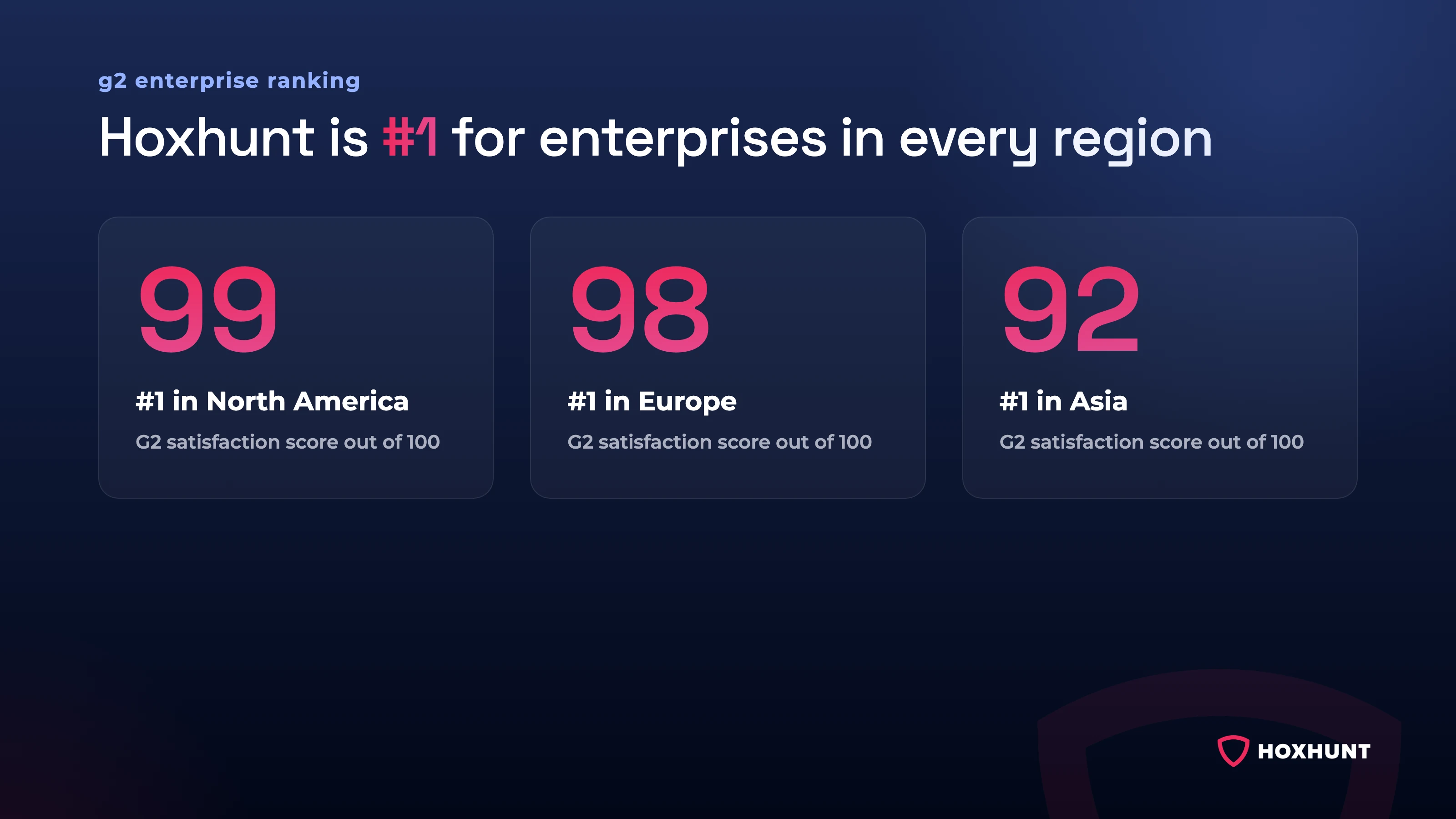
Hoxhunt also ranks #1 on G2’s list of the highest-rated security awareness training for enterprises, meaning organizations with more than 1,000 employees, both overall and in North America, Europe and Asia.
For ratings of every major security awareness training platform, not only the Proofpoint alternatives, see our guide to the best security awareness training platforms.
Proofpoint alternatives compared (2026): at a glance
Here are ZenGuide and the ten alternatives side by side, so you can see quickly which ones are worth a closer look. For each platform, “What it is” says what the vendor sells, and “What to validate” lists what to check in a demo or pilot before you buy. The ratings come from G2’s security awareness training category, read in October 2026. Hoxhunt’s 4.8 comes from 3,775 reviews, more than any other platform here.
| Platform | What it is | What to validate* | G2 (October 2026) |
|---|---|---|---|
| Proofpoint ZenGuide | Proofpoint’s security awareness training tool, part of Collaboration Security Prime, a Proofpoint bundle for email, collaboration tools and cloud apps | Whether training stays varied after the first year, and how much of the content you can adapt yourself | 4.5/5 · 337 reviews |
| Hoxhunt | Security awareness training and adaptive phishing simulations, measured by how many employees report real threats | As more employees report phishing, your security team gets more emails to check. Hoxhunt can check them automatically with Incident Response Automation, sold separately. | 4.8/5 · 3,775 reviews, the most in this table |
| KnowBe4 | Security awareness training and phishing simulation | Whether content suits your more technical users, and whether simulations stay unpredictable after a few cycles | 4.6/5 · 2,410 reviews |
| Mimecast Engage | Mimecast’s security awareness training, sold alongside its email security | How much detail reports give for each employee, and how much you can customize simulations | 4.1/5 · 44 reviews |
| Cofense PhishMe | Security awareness training sold by Cofense | Few public reviews: ask Cofense which simulation types your license includes | 4.4/5 · 5 reviews |
| SoSafe | Security awareness training and phishing simulation | Whether training stays varied over a long program, and what you can change yourself | 4.5/5 · 804 reviews |
| MetaCompliance | Security awareness training plus policy management software | How easy your admins find the interface to navigate | 4.6/5 · 1,125 reviews |
| Infosec IQ | Infosec Institute’s security awareness training and phishing simulation platform | How easy your admins find the admin interface to use | 4.5/5 · 654 reviews |
| NINJIO | Security awareness training built on animated video episodes, plus PHISH3D, its phishing simulation product | Phishing simulation is a separate product, PHISH3D: check how much of each simulation you can change yourself | 4.8/5 · 389 reviews |
| Ironscales | Email security, with security awareness training sold alongside it | Whether the simulations and training run without manual work, and which training videos the base price includes | 4.7/5 · 71 reviews |
| Adaptive Security | Security awareness training, phishing simulation and email security | Ask for reference customers your size | 4.9/5 · 141 reviews |
*Based on user reviews on G2, Gartner Peer Insights, TrustRadius and Capterra (October 2026), quoted with links in each vendor’s section.
How to choose a Proofpoint ZenGuide alternative
Every security awareness training vendor will tell you its training works. The way to find out is to ask each one the same questions and have them prove the answers in a demo or a pilot with your own employees. The questions below show whether a tool changes what employees do, which attacks it can simulate, how it fits your systems and your team, and what you will really pay. Ask them about ZenGuide too, so you compare every option on the same terms.
- Does it change behavior, or only track completion? Ask the vendor for three numbers from a customer that has used the tool for two or three years: how many employees report phishing, how fast they report it, and how many keep failing simulations.
- Does difficulty adapt to each person? If everyone gets the same template on the same schedule, your strongest people will tune out and your weakest will never catch up.
- Which channels can you simulate today? Ask which of these channels the vendor can simulate: email, SMS, voice calls, callback phishing (an email that pushes you to call a fake number), messages on Microsoft Teams and deepfake video (an AI fake of a real person, such as an executive). Then ask for one live example per channel, and check which channels are included in the quote.
- Where does an employee’s report go? A report only helps if it reaches your security team quickly, and if the employee hears back, so they know reporting was worth it. In the demo, have the vendor report a test email the way your employees would, then show you where it lands for your security team and what message the employee gets back.
- Can you tailor the content? Ask whether you can build modules from your own policies, and how ready courses for onboarding, annual refreshers and specific regulations are set up. Check too that training and simulations come in the languages your workforce speaks.
- Does it work with the systems you already use? Check that it works with your email platform, such as Microsoft 365 or Google Workspace, and with the system your employees log in with, so their accounts are created automatically. If you load courses into a learning management system, check that the tool supports SCORM, the file standard those systems use.
- How much admin time does it take once it is running? Ask the vendor what your admin will have to do each month and how long it takes, and ask to see the report you would show your board. In the pilot, check that the answer holds.
- What is in the price? Ask for a written quote that lists everything it covers: how many users, how long the contract runs, the training content, the simulations, any response automation and the support. Ask for the renewal price in writing too, so you know what the second term will cost.
Top Proofpoint alternatives for security awareness training
Here is our verdict on each platform and what it rests on: what users report after living with the tool, what each vendor sells and how its quote works. We start with Proofpoint ZenGuide, then the ten alternatives.
Proofpoint ZenGuide: training inside the Proofpoint platform
Proofpoint ZenGuide is Proofpoint’s security awareness training tool: lessons and simulated phishing attacks that teach employees to spot and report phishing. Proofpoint sells it as part of Collaboration Security Prime, a Proofpoint bundle for email, collaboration tools and cloud apps.
What users report: ZenGuide holds 4.5/5 across 337 reviews on G2 (October 2026).
“Some training modules feel repetitive over time, and customising content or reporting can be a bit cumbersome.”
Reviewer on G2, retail
“…limited flexibility in user awareness training.”
Reviewer on Gartner Peer Insights
Both are worth testing in any alternative too: ask each vendor how the content changes for an employee in their second year, and check in the pilot how much of the content you can adapt yourself.
Pricing: quote on request. Because ZenGuide comes inside a bundle, ask what it costs on its own.
Proofpoint ZenGuide verdict
Over time, ZenGuide’s modules start to feel repetitive to its reviewers, and its content is hard to adapt. If changing what employees do is the goal, ask Proofpoint to put you in touch with a customer your size, and ask that customer whether more of its employees report phishing now than in its first year. For ZenGuide against KnowBe4, see our KnowBe4 vs Proofpoint comparison.
Hoxhunt: adaptive, behavior-based training
Hoxhunt combines security awareness training with adaptive phishing simulations: each employee gets a simulation roughly every 10 days, and the difficulty rises as their skills improve. As more employees report phishing, your security team gets more emails to check, so Hoxhunt also sells Incident Response Automation, which checks them automatically.

What users report: Hoxhunt holds 4.8/5 across 3,775 reviews on G2 and ranks #1 on G2’s list of the highest-rated security awareness training for enterprises, organizations with more than 1,000 employees (October 2026). It is also first on that list in North America, Europe and Asia, and its G2 profile shows G2’s Fall 2026 Best Results badge for enterprise.
“Learning through this training platform is impactful because we are learning practically with hands-on experience.”
Reviewer on G2
Pricing: per employee. Your quote depends on your headcount and the capabilities you need, after a scoping call of 30 minutes (Hoxhunt pricing).
Hoxhunt verdict
Hoxhunt is the security awareness training that enterprises rate #1 on G2, overall and in every region. It is the choice if you want more of your employees to report real threats, on email, SMS, Teams and more, and a clear way to show your board that their behavior is changing. Its simulations adapt to each employee as their skills grow.
KnowBe4: security awareness training with published prices
KnowBe4 sells security awareness training and phishing simulation.
What users report: KnowBe4 holds 4.6/5 across 2,410 reviews on G2 (October 2026).
“Some of the training modules can feel generic or overly scripted, especially for more technical users. After a few cycles, the phishing simulations can become somewhat predictable unless they’re rotated carefully.”
Reviewer on G2, IT services
“There were repeated mentions of limited customization.”
G2’s review roundup
“Some of the admin panel features are not intuitive…”
Reviewer on Capterra
In the pilot, check whether the content suits your more technical users, whether simulations stay unpredictable after a few cycles, and how easily your admins find their way around the admin panel.
Pricing: published for 25 to 1,000 seats, from $1.63 to $3.75 per seat per month on a three-year contract (KnowBe4’s pricing page, checked in October 2026, dates these prices May 2026). Above 1,000 seats, KnowBe4 gives a quote on request.
KnowBe4 verdict
The main doubt about KnowBe4 is how long it stays fresh: its reviewers find the content generic for technical users and the simulations predictable after a few cycles. Ask KnowBe4 to put you in touch with a customer in its second year, and ask that customer whether more of its employees report phishing now than in year one. If you are weighing KnowBe4 against others too, see our Hoxhunt vs KnowBe4 comparison and our KnowBe4 competitors and alternatives guide.
Mimecast Engage: training from Mimecast, an email security vendor
Mimecast Engage is Mimecast’s security awareness training, sold alongside its email security.
What users report: On G2, where it is listed as Mimecast Security Awareness Training, it holds 4.1/5 across 44 reviews (October 2026).
“Reporting features lack granularity for tracking progress and individual completion.”
Reviewer on TrustRadius
“Limited customization for phishing simulations and training templates.”
Reviewer on TrustRadius
If you shortlist Mimecast Engage, check in the pilot how much detail its reports give for each employee, and how much of the content you can adapt yourself.
Pricing: two plans, Engage Core and Engage Pro, both quoted on request.
Mimecast Engage verdict
Mimecast Engage has fewer G2 reviews than most platforms here, and its TrustRadius reviewers find its reports and customization limited, so ask Mimecast to put you in touch with a customer your size before you decide.
Cofense PhishMe: training from Cofense, an email threat defense vendor
Cofense PhishMe is Cofense’s security awareness training platform. Cofense also sells email threat defense products.
What users report: PhishMe has few public reviews. It holds 4.4/5 across only 5 reviews on G2 (October 2026), and the written reviews on TrustRadius date from 2021 to 2023.
Ask Cofense to put you in touch with customers your size, and to show you which simulation types your license includes.
Pricing: quote on request.
Cofense PhishMe verdict
PhishMe’s rating rests on too few reviews to tell you much, so the customers Cofense puts you in touch with are your best evidence.
SoSafe: security awareness training with a published starting price
SoSafe sells security awareness training and phishing simulation.
What users report: SoSafe holds 4.5/5 across 804 reviews on G2 (October 2026).
“Some reviewers felt the training would benefit from more variety as users progressed.”
G2’s review roundup
“Low flexibility to make changes or add new elements, e.g. user specific phishing mails”
Reviewer on Gartner Peer Insights
The second reviewer would like phishing emails tailored to each employee. If you shortlist SoSafe, ask SoSafe how the training changes for an employee in their second year, and check in the pilot which content you can change yourself.
Pricing: the Advanced plan starts from €625 per month, billed annually, with 50 seats included. The Core plan is quoted on request.
SoSafe verdict
SoSafe’s reviewers ask for two things: more variety as employees progress, and phishing emails tailored to each one.
MetaCompliance: training paired with policy management
MetaCompliance sells security awareness training plus policy management software, which distributes company policies and keeps a record of who has read them.
What users report: MetaCompliance holds 4.6/5 across 1,125 reviews on G2 (October 2026).
“Overly Complicated Interface: Navigation can feel cumbersome, and some users report the UI [user interface] as outdated compared to competitors.”
Reviewer on G2, construction
If you shortlist MetaCompliance, have your admins set up and send a full round of training and simulations in the pilot, so they test the interface they would work in.
Pricing: quote on request.
MetaCompliance verdict
MetaCompliance’s weak point, according to its reviewers, is an interface they find complicated and dated.
Infosec IQ: training from Infosec Institute
Infosec IQ is Infosec Institute’s security awareness training and phishing simulation platform. Infosec Institute also sells skills and certification training for security, IT and development teams.
What users report: Infosec IQ holds 4.5/5 across 654 reviews on G2 (October 2026).
“The web UI [user interface] needs a lot of work. Basic concepts are not in place such as pages remembering filter settings when you go back to it in the same session, etc.”
Reviewer on Gartner Peer Insights
“…admin UI still needs some work”
Reviewer on TrustRadius
If you shortlist Infosec IQ, ask your admins to run the pilot themselves, from setting up a round of training and simulations to reading the results, so they judge the admin screens before you sign.
Pricing: quoted on request, for three plans: Standard, Enterprise, and Infosec IQ + Skills, which adds Infosec Institute’s skills training.
Infosec IQ verdict
Infosec IQ falls short on its admin interface, which reviewers on Gartner Peer Insights and TrustRadius say still needs work.
NINJIO: training built on animated video episodes
NINJIO sells security awareness training built on animated video episodes of 3 to 4 minutes. Phishing simulation is a separate product, PHISH3D.
What users report: NINJIO holds 4.8/5 across 389 reviews on G2 (October 2026).
“The phishing simulator could be easier to customize.”
Reviewer on TrustRadius
“The portal can be more user friendly.”
Reviewer on TrustRadius
If NINJIO is on your shortlist, ask the vendor which simulation types PHISH3D includes. In the pilot, check how much of each simulation you can change yourself, and how easy the portal is for your admins and employees to use.
Pricing: quote on request. Because PHISH3D is a separate product, ask whether your quote includes it.
NINJIO verdict
NINJIO’s gap is ease of use: its reviewers would like a phishing simulator that is easier to customize and a portal that is easier to use.
Ironscales: an email security vendor that also sells training
Ironscales sells email security for Microsoft 365 and Google Workspace: software that scans incoming email for phishing. It also sells security awareness training and phishing simulation, included in its Complete Protect plan or as a separate training package.
What users report: Ironscales holds 4.7/5 across 71 reviews on G2 (October 2026), on one listing that covers both its email security and its training.
“I wish the phishing simulation and training features were a bit more automated and that all training videos were included in the base price.”
Reviewer on G2
If you shortlist Ironscales, ask Ironscales to put you in touch with customers your size that use the training, and to show you which simulation types and training content your plan includes.
Pricing: quote on request. If you are not buying Complete Protect, ask how much the training package adds to your quote.
Ironscales verdict
Ironscales’ G2 rating covers its email security and its training together, so it tells you little about the training on its own. A reviewer would also like more automation and every training video in the base price.
Adaptive Security: training, phishing simulation and email security
Adaptive Security sells security awareness training, phishing simulation and email security.
What users report: Adaptive Security holds 4.9/5 across 141 reviews on G2 (October 2026). Outside G2 it has few public reviews: Gartner Peer Insights shows a single review.
Ask Adaptive Security to put you in touch with customers your size, and ask those customers whether more of their employees report phishing now than before they started using it.
Pricing: per seat, quoted on your employee count and the products you choose.
Adaptive Security verdict
Adaptive Security has only 141 G2 reviews and almost none elsewhere, so weigh what its reference customers tell you above the rating. For the two side by side, see our Hoxhunt vs Adaptive Security comparison.
Which Proofpoint alternative fits your situation?
The right Proofpoint alternative depends on your situation: what you need from your training and how you want to buy it. Here is each situation next to the platforms to look at, and why.
| Your situation | Platform | Why |
|---|---|---|
| You want more employees to report real threats, and to show your board that the change is real | Hoxhunt | Training adapts to each employee, and progress is measured by how many employees report real threats, not by how many finish a course |
| You run a large organization (more than 1,000 employees) | Hoxhunt | #1 on G2’s list of the highest-rated security awareness training for enterprises (October 2026), overall and in North America, Europe and Asia |
| You need simulations beyond email | Hoxhunt | One program covers email, SMS, callback phishing (an email that pushes you to call a fake number), messages on Microsoft Teams and deepfake video (an AI fake of a real person, such as an executive) |
| You want training built from your own policies | Hoxhunt | Content Studio turns your policies and procedures into training modules, employees confirm on an acknowledgement page that they have read each policy, and Hoxhunt tracks who has |
| Your email security comes from Proofpoint, Mimecast, Cofense, Ironscales or Adaptive Security, and you are weighing its training | That vendor’s training | Ask for its price on its own, and pilot it against the alternatives on how many employees report phishing |
| You want a published price | KnowBe4, SoSafe | KnowBe4 lists seat prices for up to 1,000 seats, and SoSafe’s Advanced plan starts from €625 per month with 50 seats |
| You also want certification training for your security, IT and development teams | Infosec IQ | Infosec Institute sells skills and certification training alongside its awareness training |
How much do Proofpoint alternatives cost?
Only KnowBe4 and SoSafe publish prices. With every other vendor, Hoxhunt included, you get a price by asking for a quote, and what you pay depends on how many employees you have, how long the contract runs and which plan or products you choose.
| Platform | Pricing model | Published price |
|---|---|---|
| Hoxhunt | Per employee, based on how many employees you have and the capabilities you need | Quote after a 30-minute scoping call |
| Proofpoint ZenGuide | Part of the Collaboration Security Prime bundle | Quote on request; ask what ZenGuide costs on its own |
| KnowBe4 | Per seat (one employee’s license) per month on a three-year contract; Foundation and Advanced plans | $1.63 to $3.75 per seat per month for 25 to 1,000 seats (dated May 2026 by KnowBe4, checked October 2026); above 1,000 seats, quote on request |
| SoSafe | Core and Advanced plans, billed annually | Advanced from €625 per month with 50 seats; Core, quote on request |
| Mimecast Engage | Two plans, Engage Core and Engage Pro | Quote on request |
| Cofense PhishMe | Not published | Quote on request |
| MetaCompliance | Not published | Quote on request |
| Infosec IQ | Three plans: Standard, Enterprise, and Infosec IQ + Skills | Quote on request |
| NINJIO | Not published; PHISH3D, its phishing simulation, is a separate product | Quote on request |
| Ironscales | Training included in its Complete Protect plan, or sold as a separate package | Quote on request |
| Adaptive Security | Per seat, based on how many employees you have and the products you choose | Quote on request |
Hoxhunt does not publish a price because your quote depends on two things: how many employees you have and which capabilities you need. On a 30-minute scoping call, you will go through both and see the employee experience and the admin dashboard live, so you will end the call with a full quote and a demo (Hoxhunt pricing).
To compare the quotes on the same basis:
- Ask for the same scope. Ask every vendor for a quote covering the same number of employees and the same contract length. ZenGuide comes inside a Proofpoint bundle, so ask Proofpoint what it costs on its own.
- Add the cost of admin time. Put a cost on the hours your admins will spend running the program, and add it to the quote. Ask the vendor how many hours that is, and check it in the pilot.
- Add the cost of checking reports. Put a cost on the hours your security team will spend checking the emails employees report, and add it too. That time grows as more employees report.
- Compare each total with its pilot results. Set each total next to the percentage of employees who reported phishing in that vendor’s pilot. A cheaper offer with far fewer employees reporting is not the better deal.
Replacing Proofpoint email security or Proofpoint ZenGuide? Two different decisions
Proofpoint is a cybersecurity company that sells several separate products. Three matter when you decide what to replace:
- Email security: software that scans incoming email for phishing and malware. Products like this are also called email gateways.
- Proofpoint ZenGuide: its security awareness training tool, with lessons and simulated phishing attacks that teach employees to spot and report phishing.
- Report Suspicious and CLEAR: Report Suspicious, formerly called PhishAlarm, is the ZenGuide button employees click to report a suspicious email. CLEAR is the Proofpoint product that processes those reports for your security team.
Because these are separate products, you can replace ZenGuide and keep Proofpoint’s email security. Replacing the email security itself is a bigger decision, with its own comparison: Gartner Peer Insights publishes user reviews of email security products.
To keep Proofpoint’s email security and move to another security awareness training tool, whoever runs your email system, usually IT or the security team, has to plan for two changes:
- Proofpoint has to let the simulations through. Proofpoint’s email security checks every incoming message, so it has to be told that the new tool’s simulated phishing emails are safe. This setting is called an allowlist rule. Without it, Proofpoint will block the simulations as if they were real phishing, and your employees will never see them.
- Employees can end up with two ways to report. When you replace ZenGuide, its Report Suspicious button may stay installed in your employees’ email, next to the new tool’s way of reporting. Two ways to report confuse people and split the reports between two systems, and an employee who reports a simulation the wrong way can be counted as failing it. Before the switch, agree which button stays and which team receives its reports. If CLEAR processes your reports today, decide what does that job afterwards.
Check your contract as well: ask Proofpoint what your agreement includes and how the price changes if you drop ZenGuide, so you know how switching affects your bill.
Switching from Proofpoint ZenGuide: renewal timing and a parallel run
Time the switch to your renewal, and test the new platform on a small group of employees before everyone moves. Run it in this order:
- Read your contract first. Find the notice period and any automatic renewal, and start the evaluation early enough to finish a pilot before that date.
- Agree the numbers and the date. With your team, pick two or three numbers to compare, such as how many employees report phishing, how many click a simulation and how fast they report. Record today’s figures from ZenGuide, and set the date when you will compare them.
- Pilot with a small group of real employees. Ask whoever runs your email system to allowlist the new platform’s simulations in Proofpoint, so they reach inboxes. Then enroll a few hundred employees in the new platform and keep everyone else on ZenGuide.
- Settle how employees report. Choose one way to report and one team to receive the reports, then check that a reported email reaches that team before you remove ZenGuide’s Report Suspicious button.
- Move your own content. List the custom modules and policies you assign today and rebuild them in the new platform before the old contract ends.
- Compare the results on the date you set. Compare the pilot group with the figures you recorded at the start, then roll out to everyone at renewal.
How Hoxhunt differs
We built Hoxhunt to reduce human risk, the chance that an employee falls for a phishing email, a fake call or a deepfake, by changing what your people do when a real attack arrives and proving that change to your board. Here is what that means in practice.
Success is measured by who reports real threats
In Hoxhunt data, when employees get security awareness training four times a year, roughly 10% of them report phishing. Reporting above 20% typically comes from a program built to change behavior, with frequent practice and instant feedback (Hoxhunt Phishing Trends Report 2026, p.33). Hoxhunt’s dashboards show who reports a phishing email, who clicks it and who never responds, so the number you take to your board shows how employee cyber behavior is changing.
~10%
of employees report phishing with security awareness training four times a year
Source: Hoxhunt Phishing Trends Report 2026, p.33
20%+
reporting typically reached with a program built to change behavior
Source: Hoxhunt Phishing Trends Report 2026, p.33
Difficulty adapts to each person
Every employee gets a simulation roughly every 10 days, and its difficulty, timing and scenario type adjust to that person. Hoxhunt’s agentic reasoning engine, the AI behind the simulations, picks each one to match the person and the threats they face. An AI agent also writes new spear phishing, messages aimed at one specific person, because attackers now write those with AI too. Strong performers get harder scenarios as their skills improve, so the program stays challenging for the people who would otherwise tune out.
Simulations beyond the inbox
Simulations cover email, SMS, callback phishing, messages on Microsoft Teams and deepfake video. Simulated voice phishing calls to employees’ phones are also available, in English, in the countries where Hoxhunt holds local numbers, at extra cost.
These channels matter because an email gateway only sees email. In Hoxhunt’s simulations, mobile has a 19% failure rate, over three times the 6% on desktop (Phishing Trends Report 2026, p.9).
Content you build from your own policies
Content Studio turns your policies, procedures and existing materials into training in under 60 seconds. It sits on top of a library of 300+ ready modules, translatable into 40+ languages, with compliance training tracks for PCI DSS (payment card data), HIPAA (US health data), DORA (EU rules for financial firms) and GDPR (EU data protection). Ready courses for annual refreshers, new hire onboarding, executives, specific job functions and specific regulations launch in a few clicks and stay editable.
The program runs itself
Enrollment, reminders, manager escalations and completion tracking run automatically, and Hoxhunt puts the time this saves at 13 hours a week of training operations. Setup is quick as well: reviewers rate Hoxhunt 9.7 out of 10 for ease of setup, against 8.7 for Proofpoint (Hoxhunt security awareness training).
At Uber, a two-person team has run 100,000+ phishing simulations across 500+ scenarios, and the time to resolve everyday security and policy questions fell from days to seconds.
Reported emails get checked and cleaned up
Employees report with one click in Outlook or Gmail and get feedback straight away. With Incident Response Automation, sold separately, each reported email gets a verdict on whether it is safe or malicious, and on Microsoft 365 a confirmed malicious campaign can be removed from every inbox, so the extra reports do not bury your security team. For teams that use Proofpoint’s Report Suspicious button and CLEAR today, this is the part of Hoxhunt that does the same job. Our guide to automating the response to phishing your employees report covers that workflow.
Results after switching from older training
These customers replaced an older security awareness training program with Hoxhunt.
United States
Monster Energy
Beverage company
- 4% simulation failure rate with Hoxhunt, down from between 16% and 18% with their previous training
Europe
LyondellBasell
Chemicals company
- 6.5x jump in reported phishing simulations, from 1,200 to over 8,000
Proofpoint alternatives FAQ
What is the best Proofpoint alternative for security awareness training?
The best Proofpoint alternative depends on what you need the training to do. If you want more employees to report real threats, and to show your board that the change is real, choose Hoxhunt, which ranks #1 on G2’s list of the highest-rated security awareness training for enterprises, including in North America, Europe and Asia (October 2026). KnowBe4 and SoSafe publish some prices.
Is Microsoft’s Attack simulation training an alternative to Proofpoint ZenGuide?
It covers part of the job. Microsoft’s Attack simulation training comes with Microsoft 365 E5 and Defender for Office 365 Plan 2, and runs email simulations and training inside Microsoft’s security portal. A dedicated platform adds difficulty that adapts to each person, simulations on SMS, voice calls, Teams and deepfake video, and reports that show your board how behavior is changing.
Do I need to replace Proofpoint email security to switch awareness training?
No. Proofpoint’s email security and Proofpoint ZenGuide are separate products, so you can replace ZenGuide and keep Proofpoint’s email security. Hoxhunt works alongside it.
What happens to the Proofpoint report button if we switch training vendors?
Proofpoint’s report button, now called Report Suspicious (formerly PhishAlarm), is part of ZenGuide, so plan what replaces it when you move away from ZenGuide. Choose one way for employees to report, so every report, real or simulated, lands in one place. Then test in the pilot that a reported email reaches your security team before you remove the old button, so no report is lost during the switch.
How do Proofpoint’s competitors compare on G2?
As of October 2026, by number of reviews: Hoxhunt 4.8/5 (3,775 reviews), KnowBe4 4.6/5 (2,410), MetaCompliance 4.6/5 (1,125), SoSafe 4.5/5 (804), Infosec IQ 4.5/5 (654), NINJIO 4.8/5 (389), Proofpoint ZenGuide 4.5/5 (337), Adaptive Security 4.9/5 (141), Ironscales 4.7/5 (71), Mimecast Security Awareness Training 4.1/5 (44) and Cofense PhishMe 4.4/5 (5). Weigh review counts as well as stars: a rating built on thousands of reviews tells you more than one built on five.
What should you evaluate when comparing Proofpoint competitors?
Compare measured behavior first: how many employees report phishing, how fast they report it and how many keep failing simulations. Then compare how each platform adapts to each person, the channels it can simulate today, where a reported email goes, how much admin time the program takes, and named customer results you can check.
How we evaluated
We started from the platforms Gartner Peer Insights lists as Proofpoint ZenGuide alternatives, KnowBe4, Cofense, Mimecast Engage and Infosec IQ among them, and added six vendors that also sell security awareness training: Hoxhunt, SoSafe, MetaCompliance, NINJIO, Ironscales and Adaptive Security. G2 ratings and review counts were read in October 2026. User quotes come word for word from G2, Gartner Peer Insights, TrustRadius and Capterra, each with a link to its source. Vendor facts, plans and prices come from each vendor’s own product and pricing pages, read in October 2026, so you can check every figure yourself. Hoxhunt wrote this guide; where we describe Hoxhunt, we use our own product pages and published customer cases.
Sources
Reviews: Proofpoint ZenGuide alternatives on Gartner Peer Insights, Proofpoint ZenGuide on Gartner Peer Insights, SoSafe on Gartner Peer Insights, Infosec Institute on Gartner Peer Insights, Ironscales on Gartner Peer Insights, Adaptive Security on Gartner Peer Insights, Email security market on Gartner Peer Insights, Security awareness training category on G2, Enterprise ranking on G2, Security awareness training software guide on G2 Learn, Ironscales on G2, KnowBe4 on Capterra, Mimecast on TrustRadius, Cofense PhishMe on TrustRadius, Infosec IQ on TrustRadius, NINJIO on TrustRadius.
Vendors: Proofpoint ZenGuide, Proofpoint ZenGuide Report Suspicious, KnowBe4 pricing, Mimecast Engage Core and Engage Pro, Cofense PhishMe, SoSafe pricing, MetaCompliance policy management, Infosec IQ pricing, NINJIO AWARE, NINJIO PHISH3D, Ironscales pricing, Adaptive Security pricing, Attack simulation training on Microsoft Learn.
Hoxhunt: Phishing Trends Report 2026, security awareness training, phishing training, pricing.
Get more cybersecurity insights like this
- Subscribe to All Things Human Risk to get a monthly round up of our latest content
- Request a demo for a customized walkthrough of Hoxhunt
.avif)